Android 颜色选择器(ColorPicker)
因为画图板中需要使用颜色选择器. 去查了下api demo, 发现有现成的ColorPickerDialog, 但是功能比较简单, 主要是无法选择黑色和白色. 之后也去网上找了下, 倒是发现了几个, 但是用着感觉不太好.就想着自己重写个好了.
?
先上图
1.测试界面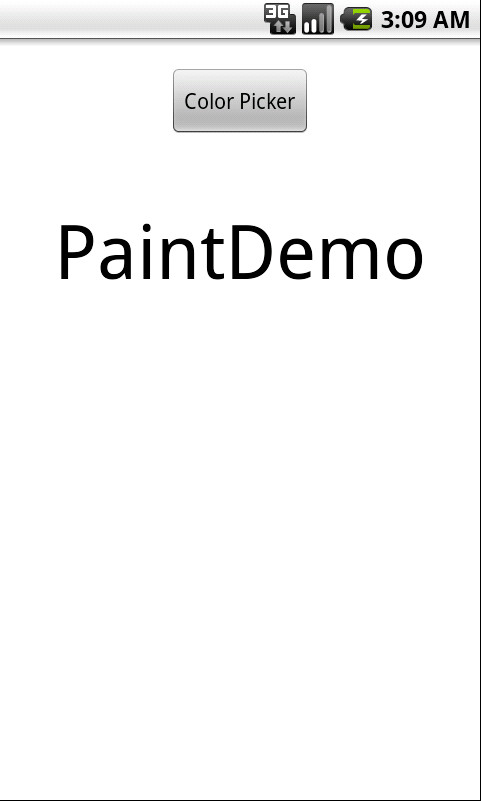
?
2.调色板对话框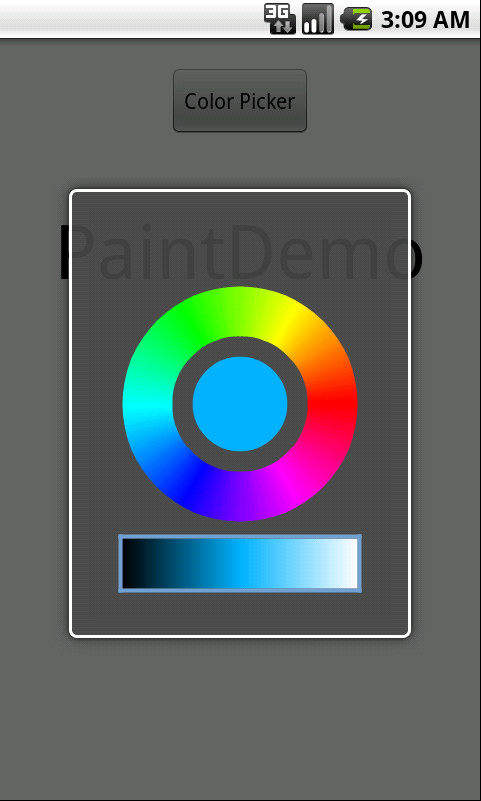
?
3. 选择颜色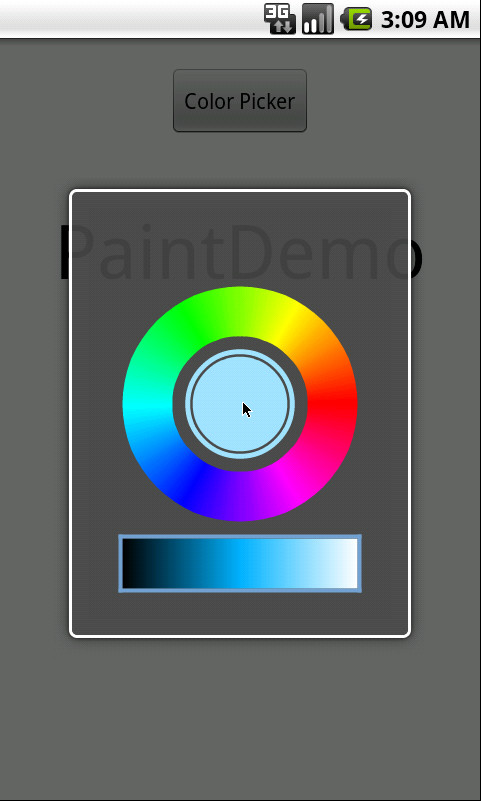
?
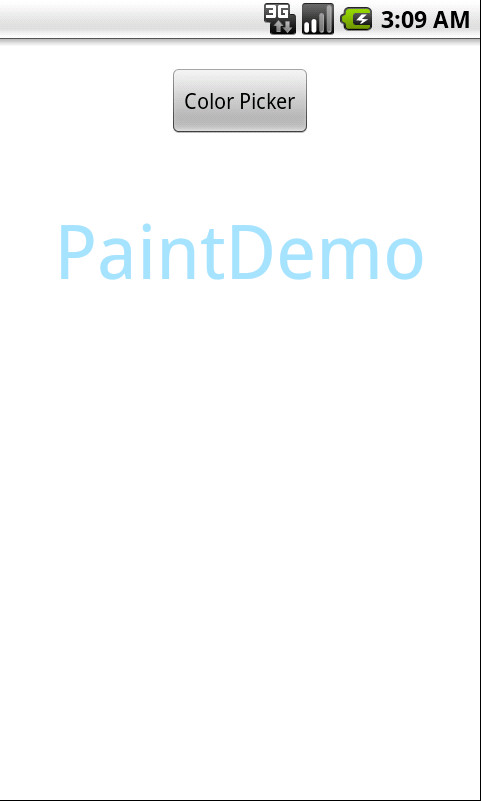
4.改变字体颜色
?
?
调色板对话框
ColorPickerDialog.java
?
package com.dwood.paintdemo;import android.app.Dialog;import android.content.Context;import android.graphics.Canvas;import android.graphics.Color;import android.graphics.LinearGradient;import android.graphics.Paint;import android.graphics.RectF;import android.graphics.Shader;import android.graphics.SweepGradient;import android.os.Bundle;import android.util.Log;import android.view.MotionEvent;import android.view.View;import android.view.WindowManager;public class ColorPickerDialog extends Dialog {private final boolean debug = true;private final String TAG = "ColorPicker";Context context;private String title;//标题private int mInitialColor;//初始颜色 private OnColorChangedListener mListener;/** * 初始颜色黑色 * @param context * @param title 对话框标题 * @param listener 回调 */ public ColorPickerDialog(Context context, String title, OnColorChangedListener listener) { this(context, Color.BLACK, title, listener); } /** * * @param context * @param initialColor 初始颜色 * @param title 标题 * @param listener 回调 */ public ColorPickerDialog(Context context, int initialColor, String title, OnColorChangedListener listener) { super(context); this.context = context; mListener = listener; mInitialColor = initialColor; this.title = title; } @Override protected void onCreate(Bundle savedInstanceState) { super.onCreate(savedInstanceState); WindowManager manager = getWindow().getWindowManager();int height = (int) (manager.getDefaultDisplay().getHeight() * 0.5f);int width = (int) (manager.getDefaultDisplay().getWidth() * 0.7f);ColorPickerView myView = new ColorPickerView(context, height, width); setContentView(myView); setTitle(title); } private class ColorPickerView extends View { private Paint mPaint;//渐变色环画笔 private Paint mCenterPaint;//中间圆画笔 private Paint mLinePaint;//分隔线画笔 private Paint mRectPaint;//渐变方块画笔 private Shader rectShader;//渐变方块渐变图像 private float rectLeft;//渐变方块左x坐标 private float rectTop;//渐变方块右x坐标 private float rectRight;//渐变方块上y坐标 private float rectBottom;//渐变方块下y坐标 private final int[] mCircleColors;//渐变色环颜色 private final int[] mRectColors;//渐变方块颜色 private int mHeight;//View高 private int mWidth;//View宽 private float r;//色环半径(paint中部) private float centerRadius;//中心圆半径 private boolean downInCircle = true;//按在渐变环上 private boolean downInRect;//按在渐变方块上 private boolean highlightCenter;//高亮 private boolean highlightCenterLittle;//微亮 public ColorPickerView(Context context, int height, int width) {super(context);this.mHeight = height - 36;this.mWidth = width;setMinimumHeight(height - 36);setMinimumWidth(width);//渐变色环参数 mCircleColors = new int[] {0xFFFF0000, 0xFFFF00FF, 0xFF0000FF, 0xFF00FFFF, 0xFF00FF00,0xFFFFFF00, 0xFFFF0000}; Shader s = new SweepGradient(0, 0, mCircleColors, null); mPaint = new Paint(Paint.ANTI_ALIAS_FLAG); mPaint.setShader(s); mPaint.setStyle(Paint.Style.STROKE); mPaint.setStrokeWidth(50); r = width / 2 * 0.7f - mPaint.getStrokeWidth() * 0.5f; //中心圆参数 mCenterPaint = new Paint(Paint.ANTI_ALIAS_FLAG); mCenterPaint.setColor(mInitialColor); mCenterPaint.setStrokeWidth(5); centerRadius = (r - mPaint.getStrokeWidth() / 2 ) * 0.7f; //边框参数 mLinePaint = new Paint(Paint.ANTI_ALIAS_FLAG); mLinePaint.setColor(Color.parseColor("#72A1D1")); mLinePaint.setStrokeWidth(4); //黑白渐变参数 mRectColors = new int[]{0xFF000000, mCenterPaint.getColor(), 0xFFFFFFFF}; mRectPaint = new Paint(Paint.ANTI_ALIAS_FLAG); mRectPaint.setStrokeWidth(5); rectLeft = -r - mPaint.getStrokeWidth() * 0.5f; rectTop = r + mPaint.getStrokeWidth() * 0.5f + mLinePaint.getStrokeMiter() * 0.5f + 15; rectRight = r + mPaint.getStrokeWidth() * 0.5f; rectBottom = rectTop + 50;}@Overrideprotected void onDraw(Canvas canvas) {//移动中心 canvas.translate(mWidth / 2, mHeight / 2 - 50); //画中心圆 canvas.drawCircle(0, 0, centerRadius, mCenterPaint); //是否显示中心圆外的小圆环 if (highlightCenter || highlightCenterLittle) { int c = mCenterPaint.getColor(); mCenterPaint.setStyle(Paint.Style.STROKE); if(highlightCenter) { mCenterPaint.setAlpha(0xFF); }else if(highlightCenterLittle) { mCenterPaint.setAlpha(0x90); } canvas.drawCircle(0, 0, centerRadius + mCenterPaint.getStrokeWidth(), mCenterPaint); mCenterPaint.setStyle(Paint.Style.FILL); mCenterPaint.setColor(c); } //画色环 canvas.drawOval(new RectF(-r, -r, r, r), mPaint); //画黑白渐变块 if(downInCircle) { mRectColors[1] = mCenterPaint.getColor(); } rectShader = new LinearGradient(rectLeft, 0, rectRight, 0, mRectColors, null, Shader.TileMode.MIRROR); mRectPaint.setShader(rectShader); canvas.drawRect(rectLeft, rectTop, rectRight, rectBottom, mRectPaint); float offset = mLinePaint.getStrokeWidth() / 2; canvas.drawLine(rectLeft - offset, rectTop - offset * 2, rectLeft - offset, rectBottom + offset * 2, mLinePaint);//左 canvas.drawLine(rectLeft - offset * 2, rectTop - offset, rectRight + offset * 2, rectTop - offset, mLinePaint);//上 canvas.drawLine(rectRight + offset, rectTop - offset * 2, rectRight + offset, rectBottom + offset * 2, mLinePaint);//右 canvas.drawLine(rectLeft - offset * 2, rectBottom + offset, rectRight + offset * 2, rectBottom + offset, mLinePaint);//下super.onDraw(canvas);}@Overridepublic boolean onTouchEvent(MotionEvent event) {float x = event.getX() - mWidth / 2; float y = event.getY() - mHeight / 2 + 50; boolean inCircle = inColorCircle(x, y, r + mPaint.getStrokeWidth() / 2, r - mPaint.getStrokeWidth() / 2); boolean inCenter = inCenter(x, y, centerRadius); boolean inRect = inRect(x, y); switch (event.getAction()) { case MotionEvent.ACTION_DOWN: downInCircle = inCircle; downInRect = inRect; highlightCenter = inCenter; case MotionEvent.ACTION_MOVE: if(downInCircle && inCircle) {//down按在渐变色环内, 且move也在渐变色环内 float angle = (float) Math.atan2(y, x); float unit = (float) (angle / (2 * Math.PI)); if (unit < 0) { unit += 1; } mCenterPaint.setColor(interpCircleColor(mCircleColors, unit)); if(debug) Log.v(TAG, "色环内, 坐标: " + x + "," + y); }else if(downInRect && inRect) {//down在渐变方块内, 且move也在渐变方块内 mCenterPaint.setColor(interpRectColor(mRectColors, x)); } if(debug) Log.v(TAG, "[MOVE] 高亮: " + highlightCenter + "微亮: " + highlightCenterLittle + " 中心: " + inCenter); if((highlightCenter && inCenter) || (highlightCenterLittle && inCenter)) {//点击中心圆, 当前移动在中心圆 highlightCenter = true; highlightCenterLittle = false; } else if(highlightCenter || highlightCenterLittle) {//点击在中心圆, 当前移出中心圆 highlightCenter = false; highlightCenterLittle = true; } else { highlightCenter = false; highlightCenterLittle = false; } invalidate(); break; case MotionEvent.ACTION_UP: if(highlightCenter && inCenter) {//点击在中心圆, 且当前启动在中心圆 if(mListener != null) { mListener.colorChanged(mCenterPaint.getColor()); ColorPickerDialog.this.dismiss(); } } if(downInCircle) { downInCircle = false; } if(downInRect) { downInRect = false; } if(highlightCenter) { highlightCenter = false; } if(highlightCenterLittle) { highlightCenterLittle = false; } invalidate(); break; } return true;}@Overrideprotected void onMeasure(int widthMeasureSpec, int heightMeasureSpec) {super.onMeasure(mWidth, mHeight);}/** * 坐标是否在色环上 * @param x 坐标 * @param y 坐标 * @param outRadius 色环外半径 * @param inRadius 色环内半径 * @return */private boolean inColorCircle(float x, float y, float outRadius, float inRadius) {double outCircle = Math.PI * outRadius * outRadius;double inCircle = Math.PI * inRadius * inRadius;double fingerCircle = Math.PI * (x * x + y * y);if(fingerCircle < outCircle && fingerCircle > inCircle) {return true;}else {return false;}}/** * 坐标是否在中心圆上 * @param x 坐标 * @param y 坐标 * @param centerRadius 圆半径 * @return */private boolean inCenter(float x, float y, float centerRadius) {double centerCircle = Math.PI * centerRadius * centerRadius;double fingerCircle = Math.PI * (x * x + y * y);if(fingerCircle < centerCircle) {return true;}else {return false;}}/** * 坐标是否在渐变色中 * @param x * @param y * @return */private boolean inRect(float x, float y) {if( x <= rectRight && x >=rectLeft && y <= rectBottom && y >=rectTop) {return true;} else {return false;}}/** * 获取圆环上颜色 * @param colors * @param unit * @return */private int interpCircleColor(int colors[], float unit) { if (unit <= 0) { return colors[0]; } if (unit >= 1) { return colors[colors.length - 1]; } float p = unit * (colors.length - 1); int i = (int)p; p -= i; // now p is just the fractional part [0...1) and i is the index int c0 = colors[i]; int c1 = colors[i+1]; int a = ave(Color.alpha(c0), Color.alpha(c1), p); int r = ave(Color.red(c0), Color.red(c1), p); int g = ave(Color.green(c0), Color.green(c1), p); int b = ave(Color.blue(c0), Color.blue(c1), p); return Color.argb(a, r, g, b); }/** * 获取渐变块上颜色 * @param colors * @param x * @return */private int interpRectColor(int colors[], float x) {int a, r, g, b, c0, c1; float p; if (x < 0) { c0 = colors[0]; c1 = colors[1]; p = (x + rectRight) / rectRight; } else { c0 = colors[1]; c1 = colors[2]; p = x / rectRight; } a = ave(Color.alpha(c0), Color.alpha(c1), p); r = ave(Color.red(c0), Color.red(c1), p); g = ave(Color.green(c0), Color.green(c1), p); b = ave(Color.blue(c0), Color.blue(c1), p); return Color.argb(a, r, g, b);}private int ave(int s, int d, float p) { return s + Math.round(p * (d - s)); } } /** * 回调接口 * @author <a href="clarkamx@gmail.com">LynK</a> * * Create on 2012-1-6 上午8:21:05 * */ public interface OnColorChangedListener { /** * 回调函数 * @param color 选中的颜色 */ void colorChanged(int color); } public String getTitle() {return title;}public void setTitle(String title) {this.title = title;}public int getmInitialColor() {return mInitialColor;}public void setmInitialColor(int mInitialColor) {this.mInitialColor = mInitialColor;}public OnColorChangedListener getmListener() {return mListener;}public void setmListener(OnColorChangedListener mListener) {this.mListener = mListener;}}?
测试界面?
PaintDemoActivity.java
package com.dwood.paintdemo;import android.app.Activity;import android.content.Context;import android.os.Bundle;import android.view.View;import android.widget.Button;import android.widget.TextView;public class PaintDemoActivity extends Activity { Context context; private Button btnColorPicker; private TextView tvText; private ColorPickerDialog dialog; @Override public void onCreate(Bundle savedInstanceState) { context = this; super.onCreate(savedInstanceState); setContentView(R.layout.main); initViews(); } /** * 初始化UI */ private void initViews() { btnColorPicker = (Button) findViewById(R.id.btn_color_picker); btnColorPicker.setOnClickListener(new View.OnClickListener() {@Overridepublic void onClick(View v) {dialog = new ColorPickerDialog(context, tvText.getTextColors().getDefaultColor(), getResources().getString(R.string.btn_color_picker), new ColorPickerDialog.OnColorChangedListener() {@Overridepublic void colorChanged(int color) {tvText.setTextColor(color);}});dialog.show();}}); tvText = (TextView) findViewById(R.id.tv_text); }}?源码也放出.