Spring资源抽象接口介绍
Spring资源抽象接口
?
JDK所提供的访问资源的类(如java.net.URL、File等)并不能很好地满足各种底层资源的访问需求,比如缺少从类路径或者Web容器的上下文获取资源的操作类。有鉴于此,Spring设计了一个Resource接口,它为应用提供了更强的访问底层资源的能力。该接口拥有对应不同资源类型的实现类。先来了解一下Resource接口的主要方法:
?
?
public interface InputStreamSource { //每次调用都将返回一个新鲜的资源对应的java.io. InputStream字节流,//调用者在使用完毕后必须关闭该资源。InputStream getInputStream() throws IOException; } ?
?
public interface Resource extends InputStreamSource {//资源是否存在。boolean exists();//是否可以读boolean isReadable();//资源是否打开boolean isOpen();//如果底层资源可以表示为urL,则返回url对象URL getURL() throws IOException;URI getURI() throws IOException;//如果底层资源对应的一个文件,该方法返回对应的File对象File getFile() throws IOException;//返回当前Resource代表的底层文件资源的长度,一般是值代表的文件资源的长度。long contentLength() throws IOException;//最后修改时间long lastModified() throws IOException; //通过path 得到一个Resource对象Resource createRelative(String relativePath) throws IOException; //获取资源名称String getFilename(); //资源描述String getDescription();} ?
Resource在spring框架中起着不可或缺的作用,spring框架使用Resource装在各种资源,这些资源包括配置文件资源、国际化属性文件资源等。下面我们来了解一下Resource的具体实现类,如下图
?
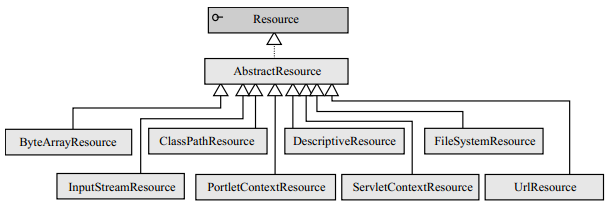
1.ByteArrayResource:二进制数组表示的资源,二进制数组资源可以在内存中通过程序构造
?
2.ClassPathResource:类路径下的资源
?
3.FileSystemResource: 文件系统资源
?
4.InputStreamResource: 输入流返回表示资源
?
5.ServletContextResource: 基于web容器上下文资源
?
6.UrlResource: 对java.io.URL的封装,可以表示很多的协议的网络资源(http,ftp,文件系统资源)
?
有了这个抽象的资源类后,我们就可以将spring的配置信息放置在任何地方,只要最终可以通过Resource接口返回配置信息即可
?
7.PortletContextResource: 基于web容器上下文资源
?
8.DescriptiveResource:
?
假如有一个文件位于web应用的类路径下,用户可以通过以下方式对这个资源进行访问:
?
1.通过FileSystemResource以文件系统绝对路径的方式进行访问
?
2.通过ClassPathResource以类路径的方式进行访问
?
3.通过ServletContextResource以相对于Web应用根目录的方式进行访问
?
下面,我们分别通过FileSystemResource和ClassPathResource访问同一个文件资源:
?
?
package com.fortune.test.resource;import org.springframework.core.io.ClassPathResource;import org.springframework.core.io.FileSystemResource;import org.springframework.core.io.Resource;import java.io.IOException;import java.io.InputStream;/** * Created with IntelliJ IDEA. * User: Alan * Date: 12-5-18 * Time: 上午10:58 */public class FileSourceExample { public static void main(String args[]){ try{ String filePath ="D:/maskerSpring/chapter3/WebRoot/WEB-INF/classes/conf/file1.txt"; //①使用系统文件路径方式加载文件 Resource res1 = new FileSystemResource(filePath); //②使用类路径方式加载文件 Resource res2 = new ClassPathResource("/conf/file1.txt"); InputStream ins1 = res1.getInputStream(); InputStream ins2 = res2.getInputStream(); System.out.println("res1:"+res1.getFilename()); System.out.println("res2:"+res2.getFilename()); }catch (IOException e){ e.printStackTrace(); } }}?在获得资源后,用户就可以通过Resource接口定义的多个方法访问文件的数据和其它的信息:
?
如可以通过getFileName()直接获取文件的输入流。此外,还可以通过createRelative(String relativePath)在资源相对地址上创建新的文件。
?
在Web应用中,用户还可以通过ServletContextResource以相对于Web应用根目录的方式访问文件资源,如下所示:
?
?
<%@ page import="org.springframework.core.io.Resource" %><%@ page import="org.springframework.web.context.support.ServletContextResource" %><%@ page import="org.springframework.web.util.WebUtils" %><%@ page contentType="text/html;charset=UTF-8" language="java" %><% //①注意文件资源地址以相对于Web应用根路径的方式表示 Resource res3 = new ServletContextResource(application,"/WEB-INF/classes/conf/file1.txt"); out.print(res3.getFilename()+"<br/>"); out.print(WebUtils.getTempDir(application).getAbsolutePath());%>
?
对于位于远程服务器(Web服务器或FTP服务器)的文件资源,用户可以方便地通过UrlResource进行访问。
?
资源加载时默认采用系统编码读取资源内容,如果资源文件采用特殊的编码格式,那么可以通过EncodedResource对资源进行编码,以保证资源内容操作的正确性:
?
?
package com.fortune.test.resource;import org.springframework.core.io.ClassPathResource;import org.springframework.core.io.Resource;import org.springframework.core.io.support.EncodedResource;import org.springframework.util.FileCopyUtils;/** * Created with IntelliJ IDEA. * User: Alan * Date: 12-5-18 * Time: 下午12:15 */public class EncodedResourceExample { public static void main(String args[]) throws Throwable { Resource res = new ClassPathResource("conf/file1.txt"); EncodedResource encRes = new EncodedResource(res, "UTF-8"); String content = FileCopyUtils.copyToString(encRes.getReader()); System.out.println(content); }}