Android曲线绘制demo
一个可交互的Android绘制曲线的demo:
?
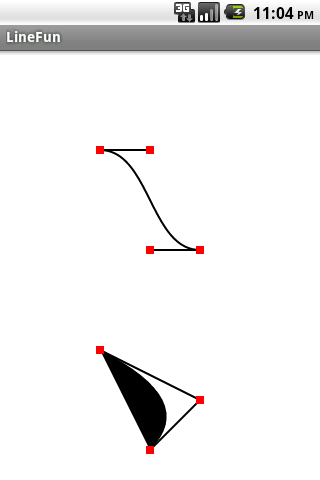
?
?
package com.ray.demo;import android.app.Activity;import android.content.Context;import android.graphics.Canvas;import android.graphics.Color;import android.graphics.Paint;import android.graphics.Paint.Style;import android.graphics.Path;import android.graphics.Point;import android.graphics.RectF;import android.os.Bundle;import android.view.MotionEvent;import android.view.View;public class LineFunActivity extends Activity { @Override public void onCreate(Bundle savedInstanceState) { super.onCreate(savedInstanceState); setContentView(new SampleView(this)); } private class SampleView extends View{ public static final int RECT_SIZE = 8; private Point mSelectedPoint = null;public static final int POINT_ARRAY_SIZE = 7;public static final int C_START = 0;public static final int C_END = 1;public static final int C_CONTROL_1 = 2;public static final int C_CONTROL_2 = 3;public static final int Q_START = 4;public static final int Q_END = 5;public static final int Q_CONTROL = 6;private Point[] mPoints = new Point[POINT_ARRAY_SIZE];public SampleView(Context context) {super(context);mPoints[C_START] = new Point(100,100);mPoints[C_END] = new Point(200,200);mPoints[C_CONTROL_1] = new Point (150,100);mPoints[C_CONTROL_2] = new Point(150,200);mPoints[Q_START] = new Point(100,300);mPoints[Q_END] = new Point(150,400);mPoints[Q_CONTROL] = new Point(200,350);}@Overrideprotected void onDraw(Canvas canvas) {super.onDraw(canvas);canvas.drawColor(Color.WHITE);// set up paintPaint paint = new Paint(Paint.ANTI_ALIAS_FLAG);paint.setColor(Color.BLACK);// draw the cubic linePath path = new Path();path.moveTo(mPoints[C_START].x,mPoints[C_START].y);path.cubicTo(mPoints[C_CONTROL_1].x, mPoints[C_CONTROL_1].y, mPoints[C_CONTROL_2].x, mPoints[C_CONTROL_2].y, mPoints[C_END].x, mPoints[C_END].y);paint.setStrokeWidth(2);paint.setStyle(Style.STROKE);canvas.drawPath(path, paint);canvas.drawLine(mPoints[C_START].x,mPoints[C_START].y, mPoints[C_CONTROL_1].x, mPoints[C_CONTROL_1].y, paint);canvas.drawLine(mPoints[C_END].x, mPoints[C_END].y, mPoints[C_CONTROL_2].x, mPoints[C_CONTROL_2].y, paint);// draw the quad linepaint.setColor(Color.BLACK);paint.setStyle(Style.FILL);paint.setStrokeWidth(2);path.reset();path.moveTo(mPoints[Q_START].x, mPoints[Q_START].y);path.quadTo(mPoints[Q_CONTROL].x, mPoints[Q_CONTROL].y, mPoints[Q_END].x, mPoints[Q_END].y);canvas.drawPath(path, paint);canvas.drawLine(mPoints[Q_START].x, mPoints[Q_START].y, mPoints[Q_CONTROL].x, mPoints[Q_CONTROL].y, paint);canvas.drawLine(mPoints[Q_END].x, mPoints[Q_END].y, mPoints[Q_CONTROL].x, mPoints[Q_CONTROL].y, paint);// draw control pointspaint.setColor(Color.RED);paint.setStyle(Style.FILL);for (int i=0; i<POINT_ARRAY_SIZE; i++){canvas.drawRect(pointToRect(mPoints[i]),paint);}}@Overridepublic boolean onTouchEvent(MotionEvent event) {switch (event.getAction()) {case MotionEvent.ACTION_DOWN:for (int i=0; i<POINT_ARRAY_SIZE; i++){if (pointToRect(mPoints[i]).contains(event.getX(),event.getY())){mSelectedPoint = mPoints[i];}}break;case MotionEvent.ACTION_MOVE:if ( null != mSelectedPoint){mSelectedPoint.x = (int) event.getX();mSelectedPoint.y = (int) event.getY();invalidate();}break;case MotionEvent.ACTION_UP:mSelectedPoint = null;break;default:break;}return true;}private RectF pointToRect(Point p){return new RectF(p.x -RECT_SIZE/2, p.y - RECT_SIZE/2,p.x + RECT_SIZE/2, p.y + RECT_SIZE/2);} }} 1 楼 unicorn25 2012-05-17 终于回归了。。。还以为楼主就此休博了呢 2 楼 raymondlueng 2012-05-19 unicorn25 写道终于回归了。。。还以为楼主就此休博了呢谢谢朋友支持! 3 楼 nsd 2012-06-14 好久没你消息了 4 楼 raymondlueng 2012-06-18 nsd 写道好久没你消息了
学习去了,积累不够,呵呵