用MD5处理明文密码加密
很多的网络相关的软件都需要用户名密码登录,在开发的时候像这些密码都是保存在SharedPreferences中,这些密码保存在/data/data/包名/shared_prefs下,保存在一个XML文件中,如下:
可以用FileBrower查看
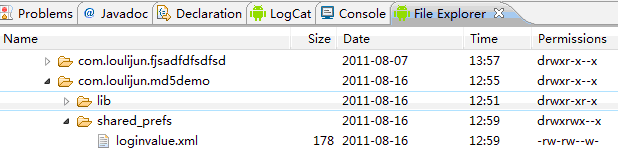
开始说道正题,MD5加密算法虽然现在有些人已经将其解开了,但是它的加密机制依然很强大,我想绝大对数还是不会解开的。MD5加密算法是单向加密,只能用你的密码才能解开,要不就是会解密算法,否则想都别想解开。为了防止这种情况的发生。还可以对加密过的密码进行再次加密。
?
下面是个小例子:
main.xml<?xml version="1.0" encoding="utf-8"?> <LinearLayout xmlns:android="http://schemas.android.com/apk/res/android" android:orientation="vertical" android:layout_width="fill_parent" android:layout_height="fill_parent" > <EditText android:id="@+id/username" android:layout_width="fill_parent" android:layout_height="wrap_content" android:layout_marginLeft="10dp" android:layout_marginTop="20dp" android:layout_marginRight="10dp" android:hint="帐号" /> <EditText android:id="@+id/password" android:password="true" android:layout_width="fill_parent" android:layout_height="wrap_content" android:layout_marginLeft="10dp" android:layout_marginTop="10dp" android:layout_marginRight="10dp" android:hint="密码" /> <Button android:id="@+id/save" android:text="保存" android:layout_width="fill_parent" android:layout_height="wrap_content" android:layout_marginLeft="10dp" android:layout_marginTop="10dp" android:layout_marginRight="10dp" /> <Button android:id="@+id/login" android:layout_width="fill_parent" android:layout_height="wrap_content" android:layout_marginLeft="10dp" android:layout_marginTop="10dp" android:layout_marginRight="10dp" android:text="登录" /> </LinearLayout>
?
?login.xml
<?xml version="1.0" encoding="utf-8"?> <LinearLayout xmlns:android="http://schemas.android.com/apk/res/android" android:layout_width="match_parent" android:layout_height="match_parent" android:orientation="vertical"> <TextView android:layout_width="fill_parent" android:layout_height="wrap_content" android:text="login successful!" /> </LinearLayout>
?
?login.java
package com.loulijun.md5demo; import android.app.Activity; import android.os.Bundle; public class Login extends Activity { @Override protected void onCreate(Bundle savedInstanceState) { // TODO Auto-generated method stub super.onCreate(savedInstanceState); setContentView(R.layout.login); } } ?
MD5Demo.java
package com.loulijun.md5demo; import java.security.MessageDigest; import android.app.Activity; import android.content.Intent; import android.content.SharedPreferences; import android.os.Bundle; import android.view.View; import android.widget.Button; import android.widget.EditText; import android.widget.Toast; public class MD5Demo extends Activity { private EditText username,password; private Button savebtn,loginbtn; String user,pass; @Override public void onCreate(Bundle savedInstanceState) { super.onCreate(savedInstanceState); setContentView(R.layout.main); username = (EditText)findViewById(R.id.username); password = (EditText)findViewById(R.id.password); savebtn = (Button)findViewById(R.id.save); loginbtn = (Button)findViewById(R.id.login); savebtn.setOnClickListener(new Button.OnClickListener() { @Override public void onClick(View v) { SharedPreferences pre = getSharedPreferences("loginvalue",MODE_WORLD_WRITEABLE); pass = MD5(password.getText().toString()); user = username.getText().toString(); if(!pass.equals("")&&!user.equals("")) { pre.edit().putString("username", username.getText().toString()). putString("password",encryptmd5(pass)).commit(); Toast.makeText(getApplicationContext(), "保存成功!", Toast.LENGTH_SHORT).show(); }else { Toast.makeText(getApplicationContext(), "密码不能为空!", Toast.LENGTH_LONG).show(); } } }); loginbtn.setOnClickListener(new Button.OnClickListener() { @Override public void onClick(View v) { SharedPreferences sp = getSharedPreferences("loginvalue", MODE_WORLD_READABLE); String loginuser = sp.getString("username", null); String loginpass = sp.getString("password", null); user = username.getText().toString(); pass = password.getText().toString(); String passmd5 = MD5(pass); String encryptmd5 = encryptmd5(passmd5); System.out.println("username="+loginuser+"-------------password="+loginpass); System.out.println("user=="+user+"-------------encryptmd5=="+encryptmd5); if(!user.equals("")&&!pass.equals("")) { if( user.equals(loginuser)&& encryptmd5.equals(loginpass)) { Intent intent = new Intent(); intent.setClass(MD5Demo.this, Login.class); MD5Demo.this.startActivity(intent); finish(); }else { Toast.makeText(getApplicationContext(), "密码是错误的!", Toast.LENGTH_LONG).show(); } }else { Toast.makeText(getApplicationContext(), "密码不能为空!", Toast.LENGTH_LONG).show(); } } }); } //MD5加密,32位 public static String MD5(String str) { MessageDigest md5 = null; try { md5 = MessageDigest.getInstance("MD5"); }catch(Exception e) { e.printStackTrace(); return ""; } char[] charArray = str.toCharArray(); byte[] byteArray = new byte[charArray.length]; for(int i = 0; i < charArray.length; i++) { byteArray[i] = (byte)charArray[i]; } byte[] md5Bytes = md5.digest(byteArray); StringBuffer hexValue = new StringBuffer(); for( int i = 0; i < md5Bytes.length; i++) { int val = ((int)md5Bytes[i])&0xff; if(val < 16) { hexValue.append("0"); } hexValue.append(Integer.toHexString(val)); } return hexValue.toString(); } // 可逆的加密算法 public static String encryptmd5(String str) { char[] a = str.toCharArray(); for (int i = 0; i < a.length; i++) { a[i] = (char) (a[i] ^ 'l'); } String s = new String(a); return s; } } ?
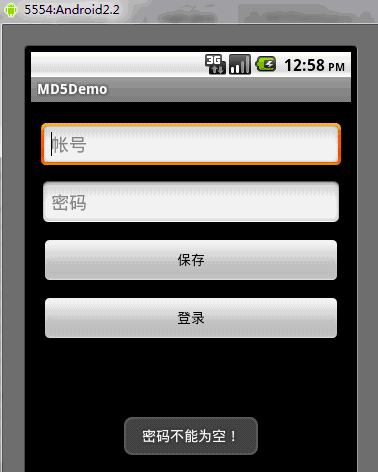
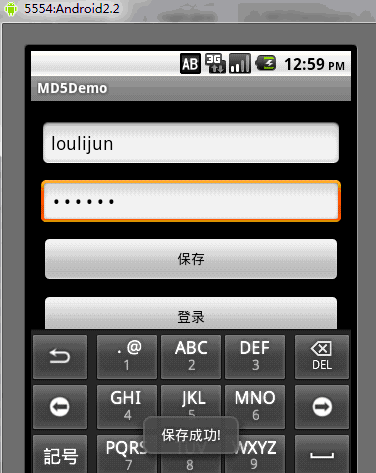
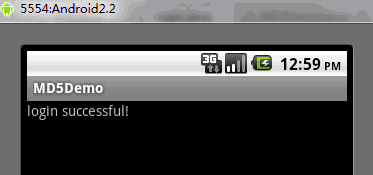
?程序很简单,下面是运行的效果:
?
?
?
?
转自:http://hualang.iteye.com/blog/1150795