wordpress显示文章浏览次数和热门文章排行
因为wordpress没有内置的显示浏览次数的小工具,那么我们只有自己加一个功能或者下载一个插件,常见的显示浏览次数的插件有WP-PostViews Plus等几种插件,很多人应该用过这块插件,我现在这款主题也用的这个,感觉还行吧。看个人喜欢,如果不喜欢用插件也可以使用加入代码的方法。
可以将下面代码加入到functiuons.php中去。
?
01function getPostViews($postID){02$count_key = 'post_views_count';03$count = get_post_meta($postID, $count_key, true);04if($count==''){05delete_post_meta($postID, $count_key);06add_post_meta($postID, $count_key, '0');07return "0 View";08}09return $count.' Views';10}11function setPostViews($postID) {12$count_key = 'post_views_count';13$count = get_post_meta($postID, $count_key, true);14if($count==''){15$count = 0;16delete_post_meta($postID, $count_key);17add_post_meta($postID, $count_key, '0');18}else{19$count++;20update_post_meta($postID, $count_key, $count);21}22}第二步,将如下代码插入single.php文件的主循环内
<?php setPostViews(get_the_ID()); ?><?php echo getPostViews(get_the_ID()); ?>第三步,需要在哪个页面或者栏目显示文章的浏览次数,就在相应的模板文件(比如首页:index.php,分类目录页:archive.php,侧边栏:sidebar.php)里面添加上面第二行的代码即可。
2、WP-PostViews Plus有自带的小工具功能可以使用,挺方便的,不过一些代码控就喜欢精简就自己把代码嵌入到sidebar.php中就可以了。
在主题文件sidebar.php文件中的相应位位置添加代码
显示阅读次数最多的文章或页面:
<?php if (function_exists(‘get_most_viewed’)): ?><?php get_most_viewed(); ?><?php endif; ?>只显示阅读次数最多的文章:
<?php if (function_exists(‘get_most_viewed’)): ?><?php get_most_viewed(‘post’); ?><?php endif; ?>只想显示10篇阅读次数最多的文章:
<?php if (function_exists(‘get_most_viewed’)): ?><?php get_most_viewed(‘post’,10); ?><?php endif; ?>在get_most_viewed 函数中的参数10决定要显示的篇数
显示显示某类别下的阅读次数最多的文章:
<?php if (function_exists(‘get_most_viewed_category’)): ?><?php get_most_viewed_category(the_catagory_ID(false)); ?><?php endif; ?>在get_most_viewed_category函数类别ID决定显示的分类
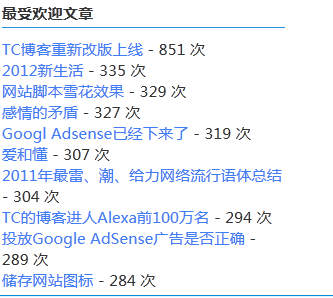
下面就是TC右边的效果图。现在没有时间写样式了。所以大家看看啊。