Android 4.0 Launcher源码分析系列(二)
原文:http://mobile.51cto.com/hot-314700.htm
上一节我们研究了Launcher的整体结构,这一节我们看看整个Laucher的入口点,同时Laucher在加载了它的布局文件Laucher.xml时都干了些什么。
我们在源代码中可以找到LauncherApplication, 它继承了Application类,当整个Launcher启动时,它就是整个程序的入口。我们先来看它们在AndroidManifest.xml中是怎么配置的。
- <application
- android:name="com.android.launcher2.LauncherApplication"
- android:label="@string/application_name"
- android:icon="@drawable/ic_launcher_home"
- android:hardwareAccelerated="@bool/config_hardwareAccelerated"
- android:largeHeap="@bool/config_largeHeap">
首先通过android:name指定了整个Launcher的Application也就是入口是在 com.android.launcher2.LauncherApplication这个路径下,android:lable指定了桌面的名字是叫 Launcher,如果要改名字就改values文件夹的string.xml中的相应属性就可以了。android:icon指定了Laucher的图标,这个图标可以在应用程序管理器中看见,如下图所示,是个可爱机器人住在一个小房子里面,如果需要更改Laucher的图片,重新设置这个属性就可以了。

android:hardwareAccelerated="@bool/config_hardwareAccelerated" 指定了整个应用程序是启用硬件加速的,这样整个应用程序的运行速度会更快。
android:largeHeap="@bool/config_largeHeap" 指定了应用程序使用了大的堆内存,能在一定程度上避免,对内存out of memory错误的出现。我们可以在values文件夹的config.xml中看到对是否启用硬件加速和大内存的配置。如下所示:
- <bool name="config_hardwareAccelerated">true</bool>
- <bool name="config_largeHeap">false</bool>
在Application中onCreate()方法通过:sIsScreenLarge = screenSize == Configuration.SCREENLAYOUT_SIZE_LARGE || screenSize == Configuration.SCREENLAYOUT_SIZE_XLARGE; 和sScreenDensity = getResources().getDisplayMetrics().density;来判断是否是大屏幕,同时得到它的屏幕密度。同时通过mIconCache = new IconCache(this); 来设置了应用程序的图标的cache,然后申明了LauncherModel,mModel = new LauncherModel(this, mIconCache); LauncherModel主要用于加载桌面的图标、插件和文件夹,同时LaucherModel是一个广播接收器,在程序包发生改变、区域、或者配置文件发生改变时,都会发送广播给LaucherModel,LaucherModel会根据不同的广播来做相应加载操作,此部分会在后面做详细介绍。
在LauncherApplication完成初始化工作之后,我们就来到了Launcher.java的onCreate()方法,同样是启动桌面时的一系列初始化工作。
首先需要注意的是在加载launcher布局文件时的一个TraceView的调试方法,它能够对在他们之间的方法进行图形化的性能分析,并且能够具体到method 代码如下:
- if (PROFILE_STARTUP) {
- android.os.Debug.startMethodTracing(
- Environment.getDataDirectory() + "/data/com.android.launcher/launcher");
- }
- if (PROFILE_STARTUP) {
- android.os.Debug.stopMethodTracing();
- }
我指定的生成性能分析的路径是:/data/data/com.android.launcher/launcher,启动launcher后我们会发现在指定的目录下生成了launcher.trace文件,如下图所示:
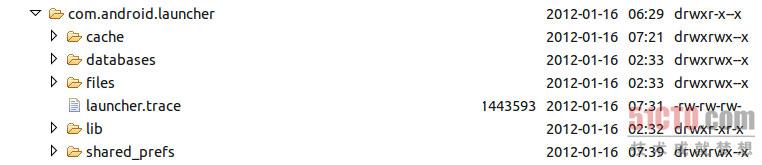
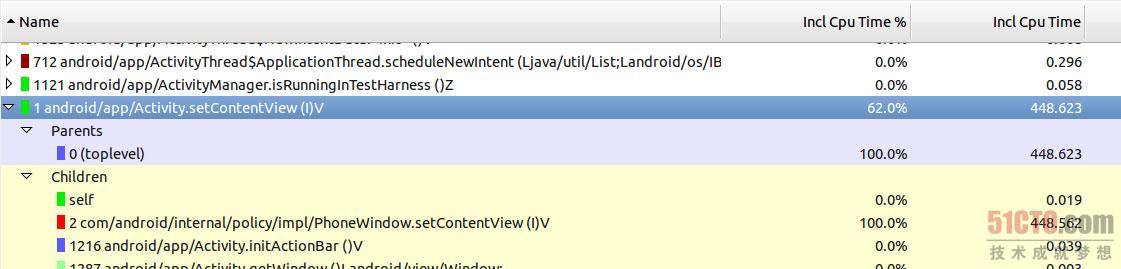
把launcher.trace文件通过DDMS pull到电脑上,在SDK的tools目录里,执行traceview工具来打开launcher.trace .如下图所示:
点击查看大图
可以看到setContentView使用了448.623ms,占整个跟踪代码时间的62%,所以说在加载布局文件时,肯定经过了一系列的加载运算,我们接着分析。
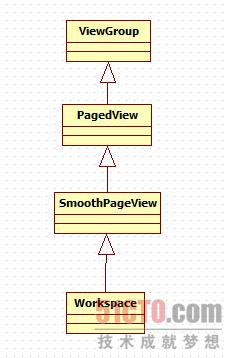
当加载launcher布局文件的过程时,最为关键的时对整个workspace的加载,workspace是一个自定义组件,它的继承关系如下所示,可以看到Workspace实际上也是一个ViewGroup,可以加入其他控件。
当ViewGroup组件进行加载的时候首先会读取本控件对应的XML文件,然后Framework层会执行它的onMeasure()方法,根据它所包含的子控件大小来计算出整个控件要在屏幕上占的大小。Workspace重写了ViewGroup的onMeasure方法(在PagedView中),在workspace中是对5个子CellLayout进行测量,的方法如下, 具体含义请看注释:
- @Override
- protected void onMeasure(int widthMeasureSpec, int heightMeasureSpec) {
- if (!mIsDataReady) {
- super.onMeasure(widthMeasureSpec, heightMeasureSpec);
- return;
- }
- //得到宽度的模式(在配置文件中对应的是match_parent 或者 wrap_content)和其大小
- final int widthMode = MeasureSpec.getMode(widthMeasureSpec);
- final int widthSize = MeasureSpec.getSize(widthMeasureSpec);
- //宽度必须是match_parent,否则会抛出异常。
- if (widthMode != MeasureSpec.EXACTLY) {
- throw new IllegalStateException("Workspace can only be used in EXACTLY mode.");
- }
- /* Allow the height to be set as WRAP_CONTENT. This allows the particular case
- * of the All apps view on XLarge displays to not take up more space then it needs. Width
- * is still not allowed to be set as WRAP_CONTENT since many parts of the code expect
- * each page to have the same width.
- */
- //高度允许是wrap_content,因为在大屏幕的情况下,会占了多余的位置
- final int heightMode = MeasureSpec.getMode(heightMeasureSpec);
- int heightSize = MeasureSpec.getSize(heightMeasureSpec);
- int maxChildHeight = 0;
- //得到在竖值方向上和水平方向上的Padding
- final int verticalPadding = mPaddingTop + mPaddingBottom;
- final int horizontalPadding = mPaddingLeft + mPaddingRight;
- // The children are given the same width and height as the workspace
- // unless they were set to WRAP_CONTENT
- if (DEBUG) Log.d(TAG, "PagedView.onMeasure(): " + widthSize + ", " + heightSize + " mPaddingTop="+mPaddingTop + " mPaddingBottom="+mPaddingBottom);
- final int childCount = getChildCount();
- //对workspace的子View进行遍历,从而对它的几个子view进行测量。
- for (int i = 0; i < childCount; i++) {
- // disallowing padding in paged view (just pass 0)
- final View child = getPageAt(i);
- final LayoutParams lp = (LayoutParams) child.getLayoutParams();
- int childWidthMode;
- if (lp.width == LayoutParams.WRAP_CONTENT) {
- childWidthMode = MeasureSpec.AT_MOST;
- } else {
- childWidthMode = MeasureSpec.EXACTLY;
- }
- int childHeightMode;
- if (lp.height == LayoutParams.WRAP_CONTENT) {
- childHeightMode = MeasureSpec.AT_MOST;
- } else {
- childHeightMode = MeasureSpec.EXACTLY;
- }
- final int childWidthMeasureSpec =
- MeasureSpec.makeMeasureSpec(widthSize - horizontalPadding, childWidthMode);
- final int childHeightMeasureSpec =
- MeasureSpec.makeMeasureSpec(heightSize - verticalPadding, childHeightMode);
- //对子View的大小进行设置,传入width和height参数
- child.measure(childWidthMeasureSpec, childHeightMeasureSpec);
- maxChildHeight = Math.max(maxChildHeight, child.getMeasuredHeight());
- if (DEBUG) Log.d(TAG, "\tmeasure-child" + i + ": " + child.getMeasuredWidth() + ", "
- + child.getMeasuredHeight());
- }
- if (heightMode == MeasureSpec.AT_MOST) {
- heightSize = maxChildHeight + verticalPadding;
- }
- //存储测量后的宽度和高度
- setMeasuredDimension(widthSize, heightSize);
- // We can't call getChildOffset/getRelativeChildOffset until we set the measured dimensions.
- // We also wait until we set the measured dimensions before flushing the cache as well, to
- // ensure that the cache is filled with good values.
- invalidateCachedOffsets();
- updateScrollingIndicatorPosition();
- if (childCount > 0) {
- mMaxScrollX = getChildOffset(childCount - 1) - getRelativeChildOffset(childCount - 1);
- } else {
- mMaxScrollX = 0;
- }
- }
测量完毕之后就可以对子控件进行布局了,这时候Framework层会调用PagedView中重写的onLayout方法。
- @Override
- protected void onLayout(boolean changed, int left, int top, int right, int bottom) {
- if (!mIsDataReady) {
- return;
- }
- if (DEBUG) Log.d(TAG, "PagedView.onLayout()");
- //竖值方向的Padding
- final int verticalPadding = mPaddingTop + mPaddingBottom;
- final int childCount = getChildCount();
- int childLeft = 0;
- if (childCount > 0) {
- if (DEBUG) Log.d(TAG, "getRelativeChildOffset(): " + getMeasuredWidth() + ", "
- + getChildWidth(0));
- childLeft = getRelativeChildOffset(0);
- //偏移量为0
- if (DEBUG) Log.d(TAG, "childLeft:"+childLeft);
- // Calculate the variable page spacing if necessary
- // 如果mPageSpacing小于0的话,就重新计算mPageSpacing,并且给它赋值。
- if (mPageSpacing < 0) {
- setPageSpacing(((right - left) - getChildAt(0).getMeasuredWidth()) / 2);
- }
- }
- for (int i = 0; i < childCount; i++) {
- final View child = getPageAt(i);
- if (child.getVisibility() != View.GONE) {
- final int childWidth = getScaledMeasuredWidth(child);
- final int childchildHeight = child.getMeasuredHeight();
- int childTop = mPaddingTop;
- if (mCenterPagesVertically) {
- childTop += ((getMeasuredHeight() - verticalPadding) - childHeight) / 2;
- }
- if (DEBUG) Log.d(TAG, "\tlayout-child" + i + ": " + childLeft + ", " + childTop);
- //把5个CellLayout布局到相应的位置,layout的4个参数分别是 左、上、右、下。
- child.layout(childLeft, childTop,
- childLeft + child.getMeasuredWidth(), childTop + childHeight);
- childLeft += childWidth + mPageSpacing;
- }
- }
- //第一次布局完毕之后,就根据当前页偏移量(当前页距离Workspace最左边的距离)滚动到默认的页面去,第一次布局时
- //默认的当前页是3,则它的便宜量就是两个CellLayout的宽度。
- if (mFirstLayout && mCurrentPage >= 0 && mCurrentPage < getChildCount()) {
- setHorizontalScrollBarEnabled(false);
- int newX = getChildOffset(mCurrentPage) - getRelativeChildOffset(mCurrentPage);
- //滚动到指定的位置
- scrollTo(newX, 0);
- mScroller.setFinalX(newX);
- if (DEBUG) Log.d(TAG, "newX is "+newX);
- setHorizontalScrollBarEnabled(true);
- mFirstLayout = false;
- }
- if (mFirstLayout && mCurrentPage >= 0 && mCurrentPage < getChildCount()) {
- mFirstLayout = false;
- }
- }