Android--底部菜单栏实现
底部菜单栏实现
效果图:
[img]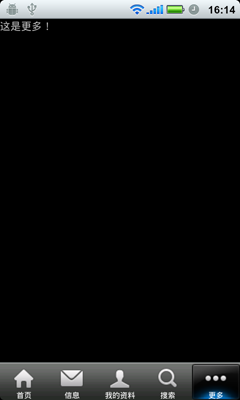
[/img]
工程结构图:
[img]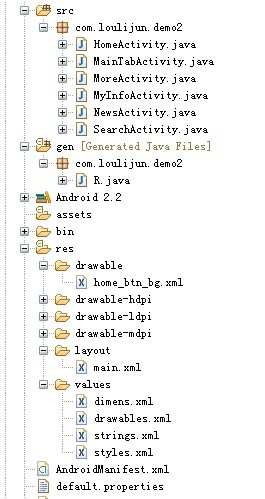
[/img]
main.xml:
drawable/home_btn_bg.xml:切换时的效果
string/dimens.xml 尺寸文件:
string/drawables.xml 设置为透明
string/styles.xml 样式文件
主要的代码package com.loulijun.demo2;import android.app.TabActivity;import android.content.Intent;import android.os.Bundle;import android.view.Window;import android.widget.RadioGroup;import android.widget.TabHost;import android.widget.RadioGroup.OnCheckedChangeListener;public class MainTabActivity extends TabActivity implements OnCheckedChangeListener{private RadioGroup mainTab;private TabHost tabhost;private Intent iHome;private Intent iNews;private Intent iInfo;private Intent iSearch;private Intent iMore; @Override public void onCreate(Bundle savedInstanceState) { super.onCreate(savedInstanceState); requestWindowFeature(Window.FEATURE_NO_TITLE); setContentView(R.layout.main); mainTab=(RadioGroup)findViewById(R.id.main_tab); mainTab.setOnCheckedChangeListener(this); tabhost = getTabHost(); iHome = new Intent(this, HomeActivity.class); tabhost.addTab(tabhost.newTabSpec("iHome") .setIndicator(getResources().getString(R.string.main_home), getResources().getDrawable(R.drawable.icon_1_n)) .setContent(iHome)); iNews = new Intent(this, NewsActivity.class);tabhost.addTab(tabhost.newTabSpec("iNews") .setIndicator(getResources().getString(R.string.main_news), getResources().getDrawable(R.drawable.icon_2_n)) .setContent(iNews));iInfo = new Intent(this, MyInfoActivity.class);tabhost.addTab(tabhost.newTabSpec("iInfo") .setIndicator(getResources().getString(R.string.main_my_info), getResources().getDrawable(R.drawable.icon_3_n)) .setContent(iInfo));iSearch = new Intent(this,SearchActivity.class);tabhost.addTab(tabhost.newTabSpec("iSearch") .setIndicator(getResources().getString(R.string.menu_search), getResources().getDrawable(R.drawable.icon_4_n)) .setContent(iSearch));iMore = new Intent(this, MoreActivity.class); tabhost.addTab(tabhost.newTabSpec("iMore") .setIndicator(getResources().getString(R.string.more), getResources().getDrawable(R.drawable.icon_5_n)) .setContent(iMore)); } @Overridepublic void onCheckedChanged(RadioGroup group, int checkedId) {switch(checkedId){case R.id.radio_button0:this.tabhost.setCurrentTabByTag("iHome");break;case R.id.radio_button1:this.tabhost.setCurrentTabByTag("iNews");break;case R.id.radio_button2:this.tabhost.setCurrentTabByTag("iInfo");break;case R.id.radio_button3:this.tabhost.setCurrentTabByTag("iSearch");break;case R.id.radio_button4:this.tabhost.setCurrentTabByTag("iMore");break;}} }