java学习笔记:模拟浏览器,访问网址
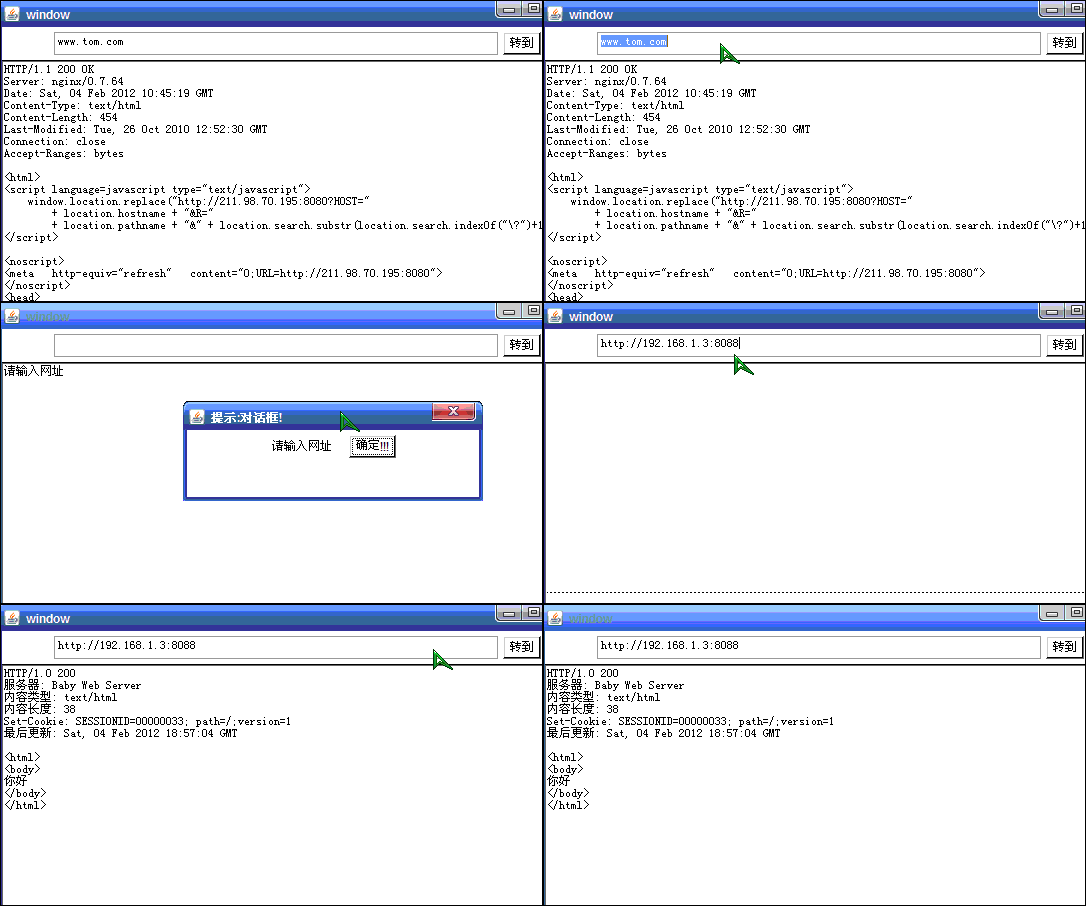
?
/*使用UI界面,输入url地址,访问指定端口的服务1.当不输入端口时,默认访问80端口2.可以访问服务器指定端口和指定路径下的文件 关于对url的处理 我们先来手动截取一下,不要怕麻烦 java类中其实有相应的方法的 本例中网页代码没解析 [示例]:模拟浏览器,访问网址*/import java.awt.*;import java.awt.event.*;import java.io.*;import java.net.*;class Demo{ public static void main(String[] args) throws Exception { new MyWindow(); } public static void sop(Object obj) //打印 { System.out.println(obj); }}class MyWindow{ private Frame frm; private TextField textd; private Button but; private TextArea texta; private Dialog dlg; //对话框应该在需要的时候再初始化 private Label lab; private Button okButn; MyWindow() //构造方法 { init(); //初始化 } public void init() //初始化 { frm= new Frame("window"); //创建窗体 frm.setBounds(300,100,600,500); //距左300,距上100,横向600,纵向500 frm.setLayout(new FlowLayout()); //界面模式:边界模式 textd = new TextField(60); //创建单行文本框 but= new Button("转到"); //创建按钮 texta = new TextArea(27,82); //创建文本区域 dlg = new Dialog(frm,"提示:对话框!",true); //创建对话框 lab = new Label("请正确网址或路径!"); //创建标签.可后期设置文本 okButn = new Button("确定!!!"); //创建弹出对话框中的"确定"按钮 dlg.setBounds(400,200,300,100); //设置对话框坐标 dlg.setLayout(new FlowLayout()); //设置对话框界面为边界模式 dlg.add(lab); //在对话框中加入组件标签和按钮 dlg.add(okButn); frm.add(textd); //在窗体中加入组件 frm.add(but); frm.add(texta); myEvent(); //初始化事件监听器 frm.setVisible(true); } private void showSerData() throws Exception { texta.setText(""); //将区域文本清空 String urlStr = textd.getText(); //获取地址栏中的字符串 if(urlStr.equals("")) //如果地址栏为空,弹出提示框 { texta.setText("请输入网址"); String worningInfo = "请输入网址"; lab.setText(worningInfo); dlg.setVisible(true); //显示提示框 return; } if(!urlStr.endsWith("/")) { urlStr=urlStr+"/"; //如果地址没有斜杠就添加 } int index1=urlStr.indexOf("//")+2; //从指定字符串开始索引,加2后就是ip开始了 int index2=urlStr.indexOf("/",index1); //从index1开始取,也就是从host开始 String str= urlStr.substring(index1,index2);// www.tom.com:80 sop("str: "+str); int port=0; String host=null; String path=null; if(!str.contains(":")) //如果只写host,未写端口号 { host=str; port=80; path=""; } else //如果指定host地址和端口,或者还加了路径 { String hostPort[] =str.split(":"); //分割出host地址和端口号 host=hostPort[0]; port =Integer.parseInt(hostPort[1]); path = urlStr.substring(index2+1); //路径不包含最左边的斜杠, /C:/webpages } sop(host+port+path); client(host,port,path); //网址处理完毕,准备发送 } public void client(String host,int port,String path) throws Exception { Socket sock = new Socket(host,port); //准备向服务端发送浏览器请求 PrintWriter priOut= new PrintWriter(sock.getOutputStream(),true); priOut.println("GET /"+path+" HTTP/1.1"); priOut.println("Accept: */*"); priOut.println("Accept-Language: zh-cn"); priOut.println("Accept-Encoding: gzip, deflate"); priOut.println("Host: 这个随便写"); priOut.println("Connection: Keep-Alive"); priOut.println(); //空行 sop("向服务端请求完毕>>>>>>>>>>>>>>>>>>>>>>>>>>"); sop("准备接受服务端数据......................"); //接收服务器返回的信息 BufferedReader bufr = new BufferedReader(new InputStreamReader(sock.getInputStream())); BufferedWriter bufw = new BufferedWriter(new FileWriter("c:\\rrr.txt"));//写到硬盘上 String lineIn=null; while(true) { lineIn=bufr.readLine(); if(lineIn!=null) { bufw.write(lineIn);//写到rrr.txt中 bufw.newLine(); texta.append(lineIn+System.getProperty("line.separator")); //UI界面中的显示 sop(lineIn);//控制台也打印下 } else { break; } } bufw.flush(); bufw.close(); sock.close(); } private void myEvent() //为各个事件源组件添加事件监听器 { okButn.addActionListener //命令按钮活动事件监听器 ( new ActionListener() { public void actionPerformed(ActionEvent e) { dlg.setVisible(false); //隐藏对话框 textd.setText(""); texta.setText(""); } } ); dlg.addWindowListener//.对话框窗体监听器 ( new WindowAdapter() { public void windowClosing(WindowEvent e) //点击对话框的叉叉后 { dlg.setVisible(false); //隐藏对话框 textd.setText(""); texta.setText(""); } } ); but.addActionListener //"转到" 按钮活动监听器 ( new ActionListener() { public void actionPerformed(ActionEvent e) //只有这一个方法要覆盖 { try { showSerData(); } catch(Exception e2) {} } } ); frm.addWindowListener //窗体监听器 ( new WindowAdapter() { public void windowClosing(WindowEvent e) { System.exit(0); } } ); //如果我们不想用鼠标点击"转到"按钮,想直接按回车就完成操作? //什么是事件源? 是textd组建 ,因为此时焦点还在textd单行文本框中 textd.addKeyListener ( new KeyAdapter() { public void keyPressed(KeyEvent e) { if(e.getKeyCode()==KeyEvent.VK_ENTER) //按回车 { try { showSerData(); } catch(Exception e1) {} } } } ); } public static void sop(Object obj) //打印 { System.out.println(obj); }}?