Spring3 REST MVC框架,提速你的Web开发 适应ajax请求
最近在Java web 项目中需要采用非常简单的REST框架,Struts2、webwork、JSF 经过一番比较,最后选择了Spring3,理由只有一个 “简单,好用,并满足需要”。很久以前就Rod Johnson大叔说?Spring3?全面支持REST风格的Web服务,"We're really seeing extensive interest and growth in REST, and it will have comprehensive support for RESTful Web services," said Johnson,今天亲自尝试了一下,真有点相识恨晚的感觉,如果在这次项目运用没有太大的问题,将来在其他项目会大量运用。
工作原理如图所示: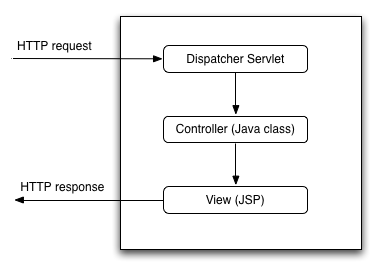
*根据HTTP请求的URL,调用相应的DispatcherServlet控制器。
*提供一个视图是作为HTTP响应发送。
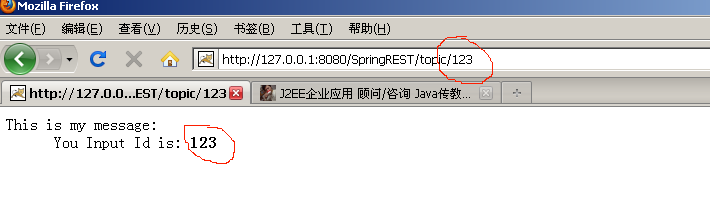
页面上最终运行效果,如图所示:
主要代码:
清单1:TopicController
package com.javabloger.springrest.action;
import javax.servlet.http.HttpServletRequest;
import javax.servlet.http.HttpServletResponse;
import org.springframework.stereotype.Controller;
import org.springframework.web.bind.annotation.PathVariable;
import org.springframework.web.bind.annotation.RequestMapping;
import org.springframework.web.bind.annotation.RequestMethod;
@Controller
@RequestMapping("/topic")??//url映射的名称
public class TopicController {
??? @RequestMapping(value = "/{id}",method=RequestMethod.GET)
??? public String helloWorld(
??? ??? ??? @PathVariable Long id,?
??? ??? ??? HttpServletRequest request,
??? ??? ??? HttpServletResponse response) {
??? ??? ??? request.setAttribute("message", "You Input Topci Id is: <b>"+id+"</b>");?
??? ??? return? "topic" ;???// 对应 /WEB-INF/jsp 目录下的 topic.jsp 文件
??? }
??? ????
??? @RequestMapping(value="/add")
??? public String test(HttpServletRequest request,???
??????????? HttpServletResponse response){
??? ??? System.out.println("Hello www.JavaBloger.com ");
??? ??? request.setAttribute("message", "Hello JavaBloger ! ,@RequestMapping(value='/add')");?
??? ??? return "topic";??// 对应 /WEB-INF/jsp 目录下的 topic.jsp 文件
??? ????
??? }
}
清单2 :UserController
package com.javabloger.springrest.action;
import javax.servlet.http.HttpServletRequest;
import javax.servlet.http.HttpServletResponse;
import org.springframework.stereotype.Controller;
import org.springframework.web.bind.annotation.RequestMapping;
import com.javabloger.springrest.pojo.Users;
@Controller
@RequestMapping("/user")
public class UserController {
//添加对POST方法的支持
???? @RequestMapping(value="/login" ?method ={RequestMethod.GET,RequestMethod.POST})
??? public String test(HttpServletRequest request,???
??????????? HttpServletResponse response,Users? userinfo){???// 非常方便可以直接在方法里面放入对象,
//同时,此注解方法签名支持ajax请求,ajax请求必须已POST方式发送。
??? ??? ?if (userinfo.getUsername().equals("username") &&?
??? ??? ??? ??? ?userinfo.getPassword().equals("password")
??? ??? ???? )
??? ??? ?{
??? ??? ??? ?request.setAttribute("user", userinfo);?
??? ??? ??? ?return "users/list";???//判断,将跳转不同的页面
??? ??? ?}
??? ??? ?else{
??? ??? ??? ?return "users/loginerr";??//判断,将跳转不同的页面
??? ??? ?}
??? }
}
清单3:web.xml
?? <servlet>???
????? <servlet-name>springmvc</servlet-name>???
????? <servlet-class>org.springframework.web.servlet.DispatcherServlet</servlet-class>???
????? <load-on-startup>2</load-on-startup>???
?? </servlet>???
?<servlet-mapping>???
???? <servlet-name>springmvc</servlet-name>???
???? <url-pattern>/</url-pattern>???
?</servlet-mapping>???
清单4:springmvc-servlet.xml
<?xml version="1.0" encoding="UTF-8"?>
<beans xmlns="http://www.springframework.org/schema/beans"
??? xmlns:xsi="http://www.w3.org/2001/XMLSchema-instance" xmlns:context="http://www.springframework.org/schema/context"
??? xmlns:aop="http://www.springframework.org/schema/aop" xmlns:p="http://www.springframework.org/schema/p"
??? xmlns:tx="http://www.springframework.org/schema/tx" xmlns:jdbc="http://www.springframework.org/schema/jdbc"
??? xsi:schemaLocation="http://www.springframework.org/schema/beans??
??????????? http://www.springframework.org/schema/beans/spring-beans-3.0.xsd??
??????????? http://www.springframework.org/schema/context??
??????????? http://www.springframework.org/schema/context/spring-context-3.0.xsd??
??????????? http://www.springframework.org/schema/tx??
??????????? http://www.springframework.org/schema/tx/spring-tx-3.0.xsd??
??????????? http://www.springframework.org/schema/jdbc??
??????????? http://www.springframework.org/schema/jdbc/spring-jdbc-3.0.xsd">
??? <bean
??? ??? />
??? <bean
??? ??? />
??? <! 自动搜索@Controller标注的类 >
??? <context:component-scan base-package="com.javabloger.springrest.action" />
??? <bean
??? ??? />
??? <bean
??? ??? />
??? <! Default ViewResolver >
??? <bean id="viewResolver"
??? ??? />
??? ??? <property name="prefix" value="/WEB-INF/jsp/" />
??? ??? <property name="suffix" value=".jsp"></property>
??? </bean>
??? <bean id="messageSource"
??? ??? />
</beans>
在jsp中通过jquery 提交ajax请求的方式
var jsondata = ?jQuery.parseJSON('{"activityName":"John"}');
alert(jsondata.activityName);
jQuery.ajax( {
type : 'POST',
url : 'activity/test.do',
data : jsondata,
dataType : 'json',
success : function(data) {
alert(data.success);
},
error : function(e) {
alert("error"+e);
}
});
?
?