android Notification的使用
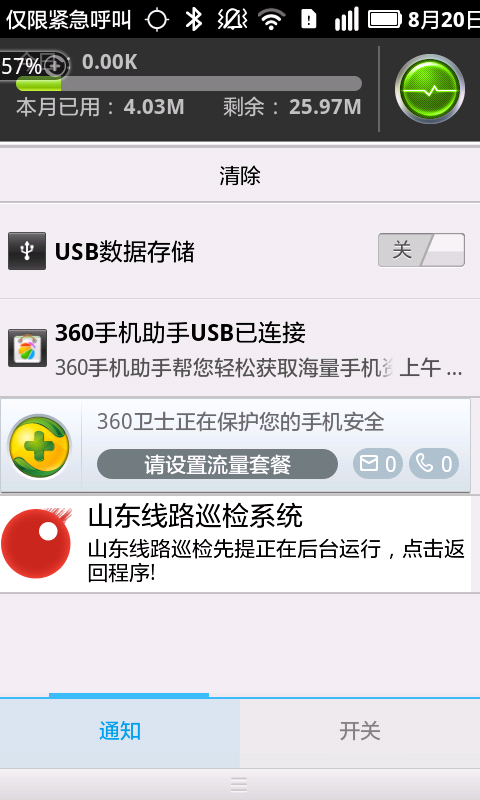
今天给大家分享下Notification的使用,下面这个例子是通过将应用放到后台运行并在通知烂显示应用正在运行,点击通知返回最后操作的activity。
首先介绍下我的环境,我用的android1.6,大家都知道把程序放入后台除代码实现外,还可以按Home键,但是只有在2.0以后才能监听Home键事件,通过从写onAttachedToWindow ()方法然后把改变窗口的类型为WindowManager.LayoutParams.TYPE_KEYGUARD这样就能在onEvent()方法中拦截。但是1.6就比较蛋疼了,我采用的方法比较笨,虽然不能拦截Home键,但是我们可以利用Activity的生命周期来实现,当一个Activity从屏幕上消失时,调用的方法是onStop()---onPause()方法,其实这2个方法我们都可以使用。就是在这个方法里我们要判断我们当前的操作是Activity和Activity之间的跳转过程还是因为按了Home键才触发的,首先我定义了一个boolean属性来标识这个值,当我每次跳转activity的是时候就把这个值设置为true,反之则设置为false并且取消通知显示。如果当这个值为false的时候就把程序放到后台。这里需要注意的是如果是activity方法跳转这里需要在onResume()方法中再把这个boolean值设置成false。
下面是实现代码:
import android.app.Activity;import android.os.Bundle;import com.metarnet.customize.view.NotificationExtend;public class BaseActivity extends Activity {public NotificationExtend notify;@Overrideprotected void onCreate(Bundle savedInstanceState) {super.onCreate(savedInstanceState);}@Overrideprotected void onResume() {super.onResume();if (notify != null) {notify.cancelNotification();}}protected void moveTaskToBack() {notify = new NotificationExtend(this);notify.showNotification();}}这是我写的一个activity的一个基类,方便每个activity实现功能。
下面是具体实现的activity类:
import android.app.AlertDialog;import android.content.DialogInterface;import android.content.DialogInterface.OnClickListener;import android.os.Bundle;import android.view.KeyEvent;import com.metarnet.R;/** * * @author yangzhiqiang * */public class LoginActivity extends BaseActivity {private boolean isForward = false;@Overrideprotected void onCreate(Bundle savedInstanceState) {super.onCreate(savedInstanceState);}@Overridepublic boolean onKeyDown(int keyCode, KeyEvent event) {if (keyCode == KeyEvent.KEYCODE_BACK) {// 如果是返回键就提示用户是否要将程序放入后台returnMaskTask();}return true;}private void returnMaskTask() {final AlertDialog.Builder builder = new AlertDialog.Builder(this);builder.setTitle(R.string.common_prompt);builder.setMessage(R.string.login_alert_exit_info);builder.setNeutralButton(R.string.common_backgrounp,new OnClickListener() {@Overridepublic void onClick(DialogInterface dialog, int which) {//点击放入后台按钮就将调用moveTaskToBack(true)方法将程序放入后台这时候会调用onPause()方法//这是在onPause()方法中会调用父类的启动通知的方法isForward = false;moveTaskToBack(true);}});builder.setNegativeButton(R.string.common_cancel, null);builder.show();}@Overrideprotected void onResume() {isForward = false;super.onResume();}@Overrideprotected void onPause() {if (!isForward) {super.moveTaskToBack();}super.onPause();}}下面是通知的具体实现类:
import android.app.Notification;import android.app.NotificationManager;import android.app.PendingIntent;import android.content.Context;import android.content.Intent;import android.widget.RemoteViews;import com.metarnet.R;/** * 显示通知 * * @author yangzhiqiang * */public class NotificationExtend {private Context context;public NotificationExtend(Context context) {super();this.context = context;}public void showNotification() {NotificationManager manager = (NotificationManager) context.getSystemService(Context.NOTIFICATION_SERVICE);Notification notification = new Notification(R.drawable.icon,context.getString(R.string.app_name),System.currentTimeMillis());// 设置通知不能被清除按钮清除也可以设置为FLAG_AUTO_CANCEL,表示可以清楚notification.flags |= Notification.FLAG_NO_CLEAR;// 这个标识将通知放入通知的正在运行栏目notification.flags |= Notification.FLAG_ONGOING_EVENT;notification.flags |= Notification.FLAG_SHOW_LIGHTS;notification.defaults = Notification.DEFAULT_LIGHTS;// 这里我是自定义通知的布局notification.contentView = new RemoteViews(context.getPackageName(),R.layout.custoim_notifition);notification.contentView.setImageViewResource(R.id.image,R.drawable.icon);notification.contentView.setTextViewText(R.id.title,context.getString(R.string.app_name));notification.contentView.setTextViewText(R.id.text,context.getString(R.string.notify_content));try {// 这里设置点击通知后将放回的activity,我这里设置的返回原activityIntent intent = new Intent(context, context.getClass());// 这里是设置activity的启动模式,分别有4种,我这里是用的FLAG_ACTIVITY_SINGLE_TOP作用是在返回的时候用原来的activity的实例而不是建立新的// 应为这个时候当前的activity在当前的activity栈顶intent.setFlags(Intent.FLAG_ACTIVITY_SINGLE_TOP);PendingIntent pi = PendingIntent.getActivity(context, 0, intent,PendingIntent.FLAG_UPDATE_CURRENT);notification.contentIntent = pi;manager.notify(0, notification);} catch (Exception e) {e.printStackTrace();}}public void cancelNotification() {NotificationManager notificationManager = (NotificationManager) context.getSystemService(android.content.Context.NOTIFICATION_SERVICE);notificationManager.cancel(0);}}其中PendingIntent中的PendingIntent.FLAG_UPDATE_CURRENT属性的作用是如果我在从系统中提取一个PendingIntent,而系统中有一个和你描述的PendingIntent对等的PendingInent, 那么系统会直接返回和该PendingIntent其实是同一token的PendingIntent,而不是一个新的token的PendingIntent。如果我们使用了FLAG_UPDATE_CURRENT的话,新的Intent会更新之前PendingIntent中的Intent对象数据,当然也会更新Intent中的Extras。
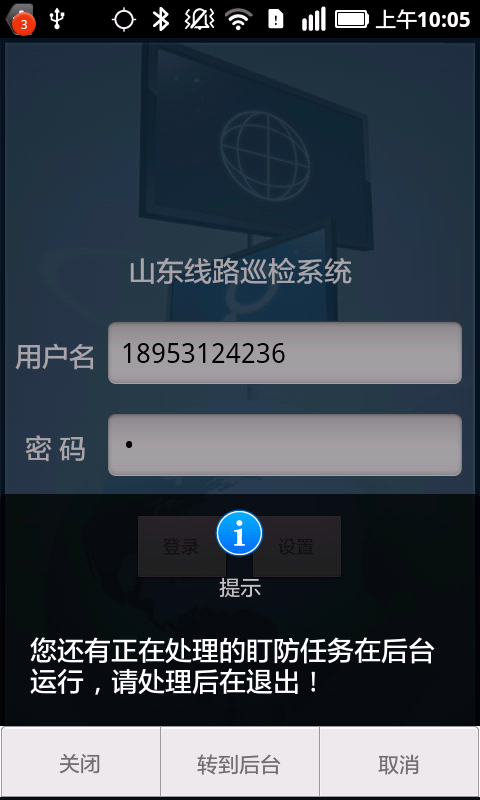
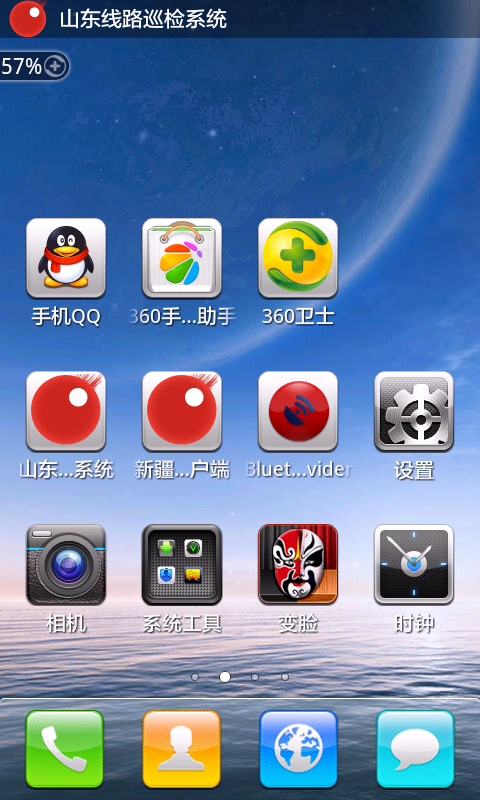
下面是效果图:
好了这里就讲完了,希望大家有什么好建议的可以提出来。o(∩_∩)o
- 1楼snwrking昨天 12:38
- 楼主还在用android1.6?不考虑升级一下吗?我觉得2.x系统升级了不少新东西。要是条件可以,可以直接升级4.1,流畅性好,整个4.x平台也更优异
- Re: yaoyeyzq昨天 18:33
- 回复snwrking呵呵,最近就是在考虑用2.2做,以前用1.6的时候要用到所以就把这些写出来,后面的版本写这个确实要好用得多。