使用ndk或linux下独立交叉编译(ffmpeg)
1、ndk 编译程序
- 在NDK的apps目录下创建helloworld目录,并且创建相关文件,目录结构如下:
helloworld
Application.mk
project
?? jni
????? Android.mk
????? helloworld.c
Application.mk:
- APP_PROJECT_PATH := $(call my-dir)/project??
- ??
- APP_MODULES?????? := helloworld??
Android.mk:
view plaincopy to clipboardprint?- LOCAL_PATH := $(call my-dir)??
- ??
- include $(CLEAR_VARS)??
- ??
- LOCAL_MODULE???? := helloworld??
- LOCAL_SRC_FILES := helloworld.c??
- ??
- #include $(BUILD_SHARED_LIBRARY)//编译动态库??
- include $(BUILD_EXECUTABLE)//编译可执行程序??
helloworld.c
view plaincopy to clipboardprint?- #include<stdio.h>??
- ??
- int?main(int?argc,?char?*argv[])??
- {??
- ?? printf("Hello world!\n");??
- ??return?0;??
- }</stdio.h>??
?
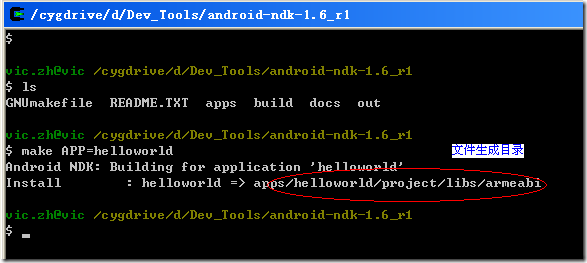
- 编译生成可执行程序(我是在win32下使用cygwin)。启动cygwin,在shell下进入到代码所在的目录(NDK_ROOT),输入:“make APP=helloworld”。
?
?
?
?
?
?
?
在NDK_ROOT/apps/helloworld/project/libs/armeabi/目录有生成了“helloworld”可执行程序。到这里编译已经完成了。
?
- 接下来就是把可执行程序复制到目标机器上,我的操作如下:
cd NDK_ROOT/apps/helloworld/project/libs/armeabi
adb push /data/helloworld
adb shell
chmod 777 /data/helloworld/helloworld
/data/helloworld/helloworld
如果没有权限问题,这里就OK了.
如果用windows cmd命令行下使用adb连接虚拟机会有权限问题,;我试着在 虚拟机上/Dev Tools/Terminal Emulator上用命令执行,也没有权限执行程序.可能只有cygwin使用的是root吧.
?
2、用传统交叉编译方式--也可以
* 在ubuntu 或标准linux下下载arm交叉编译工具
http://www.codesourcery.com/sgpp/lite/arm/portal/subscription?@template=lite
这个自己.做吧,别忘记export
* 编码,文件结构如下
--test
Makefile
include
??? --pchar.h
src
??? --main.c
??? --pchar.c
代码分别如下:
//*********************************************main.c***********************************/
/*
* Copyright (C) 2009 The Android Open Source Project
*
mu maytures -- two test function
*
*/
//#include <stdio.h>
#include "pchar.h"int main(int argc,char *argv[])
{
printf("===begin=!\n");
pchar();
printf("===end=!\n");
return 0;
}//void _start(int argc, char **argv) { exit( main(argc, argv) ); }
//*********************************************pchar.c***********************************/
#include "pchar.h"
int pchar()
{
printf("I'm char.=!\n");
return 0;
}//*********************************************pchar.h***********************************/
#include <stdio.h>
int pchar();//*********************************************Makefile***********************************/
CC= arm-none-linux-gnueabi-gcc
EXE=testall:$(EXE)
#CFLAGS= -Wall -O2?
INCLUDE = -I ./include#LIB = -static -llib
#LIBPATH = -L./lib
LIB = -static
$(EXE):./src/*.c
#?????? $(CROSS_COMPILE)gcc -o $@ hello.c
??????? $(CC) ./src/*.c -o $@ $(INCLUDE) $(LIB)clean:
??????? rm -rf test*****************************************************************************************************************
注:-static一定要有.??
ok .. make 就可以了,
$file test
查看一下生成的可执行文件是不是arm 下,static的.
-static选项在这里是必须的,不然android平台就不运行此程序。
这也说明了此平台上的C/C++库是不能被 C/C++程序动态连接的 。
进入tools目录,用adb工具下载到android平台,放到/data/data目录。
[cmz@KD1 jni]$ file test
test: ELF 32-bit LSB executable, ARM, version 1 (SYSV), for GNU/Linux 2.6.14, statically linked, for GNU/Linux 2.6.14, not stripped将生成的文件按(1)传入到虚拟机运行.就可以看到了.
?
3、ffmpeg移植到android.可以说用上面同样的方法。只是注意,要staitc的方式编译将生成的bin/ffmpeg二进制文件 ,传到虚拟机。
?
移到板子上 ffmpeg -i test.avs test.yuv
test.avs为测试文件.
?
?
?
?
?
?
上面的应用程序在编译时必须加上-static选项,也就是在编译时将函数都静态编译到程序中了,运行时不用再动态连接。如果不加此选项,在 android平台上就不让运行。
经过测试,将自己写的库放到/system/lib目录下,然后写个主程序来动态连接,也是无法运行。
看来此平台做了限制,不让C/C++的程序运行时动态连接到这些C/C++库。
?
?
http://blog.chinaunix.net/u3/90973/showart_1958940.html? ??
- 接下来就是把可执行程序复制到目标机器上,我的操作如下:
