一款二级菜单和使用自定义标签实现简单权限控制
因为要搞一个简单的权限系统,所以最近我进行了一些设计和实现。经过研究,根据业务需求,决定使用一个二级菜单和自定义标签来实现权限的控制。
?
首先来解决这款二级菜单,当然实现自己也肯定能实现,但是别人做好了自己就用吧。
其他技术你可以访问我的博客:http://cuisuqiang.iteye.com/
这个控件叫 chromemenu,官方网站是http://www.dynamicdrive.com/ ,当然我的附件里面已经带了一个,你可以直接下载看一下。
?
使用很简单,就是几个层和超链接,正好我可以控制层和超链接的显示来实现权限控制。
我们来定义一个标签web-html.tld:
<?xml version="1.0" encoding="UTF-8"?><!DOCTYPE taglib PUBLIC "-//Sun Microsystems, Inc.//DTD JSP Tag Library 1.2//EN" "http://java.sun.com/dtd/web-jsptaglibrary_1_2.dtd"><taglib><tlib-version>1.0</tlib-version><jsp-version>1.2</jsp-version><short-name>html</short-name><tag><name>resourceUrl</name><tag-class>com.nms.taglib.ResourceUrl</tag-class><body-content>JSP</body-content><attribute><name>key</name><rtexprvalue>true</rtexprvalue></attribute><attribute><name>href</name><rtexprvalue>true</rtexprvalue></attribute><attribute><name>rel</name><rtexprvalue>true</rtexprvalue></attribute><attribute><name>note</name><rtexprvalue>true</rtexprvalue></attribute><attribute><name>isModule</name><rtexprvalue>true</rtexprvalue></attribute></tag></taglib>?
在web.xml中配置一下:
<?xml version="1.0" encoding="UTF-8"?><web-app version="2.5" xmlns="http://java.sun.com/xml/ns/javaee"xmlns:xsi="http://www.w3.org/2001/XMLSchema-instance"xsi:schemaLocation="http://java.sun.com/xml/ns/javaee http://java.sun.com/xml/ns/javaee/web-app_2_5.xsd"><!-- 自定义标签 开始 --><jsp-config><taglib><taglib-uri>/tld/web-html</taglib-uri><taglib-location>/WEB-INF/tlds/web-html.tld</taglib-location></taglib></jsp-config><!-- 自定义标签 结束 --><welcome-file-list><welcome-file>index.jsp</welcome-file></welcome-file-list></web-app>?
看一下实现类:
package com.nms.taglib;import java.io.IOException;import javax.servlet.jsp.JspException;import javax.servlet.jsp.JspTagException;import javax.servlet.jsp.tagext.BodyTagSupport;/** * @说明 菜单生成 * @author 崔素强 */@SuppressWarnings("serial")public class ResourceUrl extends BodyTagSupport {@Overridepublic int doStartTag() throws JspException {try {// 从开放的接口取得是否允许Key资源的输出boolean isCheck = true;if(isCheck){StringBuffer results = new StringBuffer("");if("true".equals(isModule)){results.append("<li>");}results.append("<a ");if (href != null) {results.append(" href=\"");results.append(href);results.append("\"");}if (rel != null) {results.append(" rel=\"");results.append(rel);results.append("\"");}results.append(">");results.append(note);results.append("</a>");if("true".equals(isModule)){results.append("</li>");}pageContext.getOut().write(results.toString());}} catch (IOException ex) {throw new JspTagException("错误");}return EVAL_BODY_INCLUDE;}@Overridepublic int doEndTag() throws JspException {return EVAL_PAGE;}//权限验证标记protected String key;// 实际连接地址protected String href;// 对应的下拉板块protected String rel;// 是否是总标记protected String isModule;// 文字protected String note;public String getKey() {return key;}public void setKey(String key) {this.key = key;}public String getHref() {return href;}public void setHref(String href) {this.href = href;}public String getRel() {return rel;}public void setRel(String rel) {this.rel = rel;}public String getIsModule() {return isModule;}public void setIsModule(String isModule) {this.isModule = isModule;}public String getNote() {return note;}public void setNote(String note) {this.note = note;}/** * doStartTag()方法是遇到标签开始时会呼叫的方法,其合法的返回值是EVAL_BODY_INCLUDE与SKIP_BODY,前者表示将显示标签间的文字,后者表示不显示标签间的文字 * doEndTag()方法是在遇到标签结束时呼叫的方法,其合法的返回值是EVAL_PAGE与SKIP_PAGE,前者表示处理完标签后继续执行以下的JSP网页,后者是表示不处理接下来的JSP网页 * doAfterBody(),这个方法是在显示完标签间文字之后呼叫的,其返回值有EVAL_BODY_AGAIN与SKIP_BODY,前者会再显示一次标签间的文字,后者则继续执行标签处理的下一步 * EVAL_BODY_INCLUDE:把Body读入存在的输出流中,doStartTag()函数可用 * EVAL_PAGE:继续处理页面,doEndTag()函数可用 * SKIP_BODY:忽略对Body的处理,doStartTag()和doAfterBody()函数可用 * SKIP_PAGE:忽略对余下页面的处理,doEndTag()函数可用 * EVAL_BODY_BUFFERED:申请缓冲区,由setBodyContent()函数得到的BodyContent对象来处理tag的body,如果类实现了BodyTag,那么doStartTag()可用,否则非法 * EVAL_BODY_AGAIN:请求继续处理body,返回自doAfterBody(),这个返回值在你制作循环tag的时候是很有用的 * 预定的处理顺序是:doStartTag()返回SKIP_BODY,doAfterBodyTag()返回SKIP_BODY,doEndTag()返回EVAL_PAGE * 如果继承了TagSupport之后,如果没有改写任何的方法,标签处理的执行顺序是:doStartTag() ->不显示文字 * ->doEndTag()->执行接下来的网页 如果您改写了doStartTag(),则必须指定返回值, * 如果指定了EVAL_BODY_INCLUDE,则执行顺序是:doStartTag()->显示文字->doAfterBodyTag()->doEndTag()->执行下面的网页 */}?你要关注这行代码:
boolean isCheck = true;
?在使用时,你要根据 KEY 去判断是否显示某个菜单,具体实现就看你的了。
?
然后我们在JSP页面中进行使用:
<%@ page language="java" pageEncoding="UTF-8"%><%@ taglib uri="/tld/web-html" prefix="html"%><%String path = request.getContextPath();String basePath = request.getScheme()+"://"+request.getServerName()+":"+request.getServerPort()+path+"/";%><!DOCTYPE HTML PUBLIC "-//W3C//DTD HTML 4.01 Transitional//EN"><html> <head> <base href="<%=basePath%>"> <title>菜单示例</title><link rel="stylesheet" type="text/css" href="chromestyle.css" /><script type="text/javascript" src="chrome.js"></script> </head> <body><div id="chromemenu"><ul><html:resourceUrl href="#" key="" note="Model001" isModule="true"></html:resourceUrl><html:resourceUrl href="#" key="" note="Model002" isModule="true"></html:resourceUrl><html:resourceUrl href="#" key="" note="Model003" isModule="true" rel="dropmenu1"></html:resourceUrl><html:resourceUrl href="#" key="" note="Model004" isModule="true" rel="dropmenu2"></html:resourceUrl><html:resourceUrl href="#" key="" note="Model005" isModule="true" rel="dropmenu3"></html:resourceUrl><html:resourceUrl href="#" key="" note="Model006" isModule="true" rel="dropmenu4"></html:resourceUrl></ul></div><!--1st drop down menu --> <div id="dropmenu1" key="" note="a1"></html:resourceUrl><html:resourceUrl href="#" key="" note="a2"></html:resourceUrl><html:resourceUrl href="#" key="" note="a3"></html:resourceUrl></div><!--2nd drop down menu --> <div id="dropmenu2" style="width: 150px;"><html:resourceUrl href="#" key="" note="b1"></html:resourceUrl><html:resourceUrl href="#" key="" note="b2"></html:resourceUrl></div><!--3rd drop down menu --> <div id="dropmenu3" style="width: 150px;"><html:resourceUrl href="#" key="" note="c1"></html:resourceUrl><html:resourceUrl href="#" key="" note="c2"></html:resourceUrl><html:resourceUrl href="#" key="" note="c3"></html:resourceUrl><html:resourceUrl href="#" key="" note="c4"></html:resourceUrl></div><!--4rd drop down menu --> <div id="dropmenu4" style="width: 150px;"><html:resourceUrl href="#" key="" note="d1"></html:resourceUrl><html:resourceUrl href="#" key="" note="d2"></html:resourceUrl><html:resourceUrl href="#" key="" note="d3"></html:resourceUrl><html:resourceUrl href="#" key="" note="d4"></html:resourceUrl><html:resourceUrl href="#" key="" note="d5"></html:resourceUrl><html:resourceUrl href="#" key="" note="d6"></html:resourceUrl><html:resourceUrl href="#" key="" note="d7"></html:resourceUrl></div><script type="text/javascript">cssdropdown.startchrome("chromemenu");</script> </body></html>?如果是一级菜单,那么要设置:
isModule="true"
?
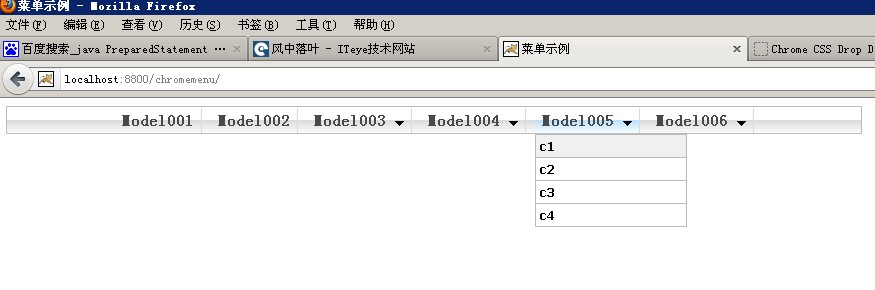
运行你看到了所有的菜单,你可以自己控制显示那个菜单。
?
这个权限就是很简单,就是根据某个Key去判断能否访问那个资源。当然在实际中应该是你请求的连接,这样再定义一个Filter去过滤所有请求,就能实现不能通过地址栏直接访问该资源。
本文出处:http://cuisuqiang.iteye.com/ 如果你喜欢请到ITeye与我交流。
private String userId;@Overridepublic void setPageContext(PageContext pageContext) {this.userId = (String) pageContext.getSession().getAttribute("CurrentUserId");super.setPageContext(pageContext);} 2 楼 yangzi010 昨天 感谢分享啊,楼主辛苦