android.源码启动模拟器
?
Android.源码中启动模拟器
?
?
Android源码中提供了完整的开发工具和交叉编译工具。正确编译源码后,就可以得到这些开发工具。如何在Android 源码中启动模拟器工具?
?
1、工作环境:
pc:Ubuntu xx
source:Android 2.x
tools: JDK 1.5
?
2、开发工具编译
#cd /dev_path/android/ ? ?#android 源码根目录
#make sdk ? ? ? ? ? ? ? ? ? ? ? ?#编译android源码版本 sdk
?
正确编译后在out目录下生成文件夹
#cd /out/host/linux-x86/sdk/android-sdk_eng.root_linux-x86
这里存放Android模拟器和所有的开发调试工具
#pwd ? ? ? ? ? ? ? ? ? ? ? ? ? ? ? ?#查看所在路径
/root/Android/out/host/linux-x86/sdk/android-sdk_eng.root_linux-x86
#ls -tral
-add-ons ? ? ? ? ? ? ? ? ? ? ? ? ? #需要增加的新工具路径
-docs ? ? ? ? ? ? ? ? ? ? ? ? ? ? ? ? #关于模拟器和各种开发工具的说明等
-documentation.html
-platforms ? ? ? ? ? ? ? ? ? ? ? ? #平台目录
-platform-tools ? ? ? ? ? ? ? ? ?#平台操作工具
-RELEASE_NOTES.html
-samples ? ? ? ? ? ? ? ? ? ? ? ? ? #运行的例子
-tools ? ? ? ? ? ? ? ? ? ? ? ? ? ? ? ?#对应于模拟器上的tools
?
?
3、创建模拟器
?
进入到tools目录
#cd tools
?
查看当前是否有设备
#./android list avd
?
有于还没有new一个虚拟设备故会出现如下提示
Available Android Virtual Devices: ?#空,说明还没有定义设备
?
使用命令
#./android create avd -n ANDROID -t 1
?
创建完成后出现模拟器设备的参数:
?
Created AVD 'ANDROID' based on Android AOSP (Preview),
with the following hardware config:
hw.camera=no
vm.heapSize=320
hw.lcd.density=160
disk.cachePartition.size=66MB
hw.sdCard=yes
disk.cachePartition=yes
hw.keyboard=yes
hw.audioOutput=yes
hw.audioInput=yes
hw.dPad=yes
hw.accelerometer=yes
hw.camera.maxVerticalPixels=480
hw.gps=yes
hw.ramSize=96
hw.touchScreen=yes
hw.battery=yes
hw.gsmModem=yes
hw.trackBall=yes
hw.camera.maxHorizontalPixels=640
?
使用./android list avd,查看是否创建成功.
?
#./android list avd
Available Android Virtual Devices:
?? ?Name: ANDROID
?? ?Path: /root/.android/avd/ANDROID.avd
??Target: Android AOSP (Preview) (API level AOSP)
?? ?Skin: HVGA
?
出现上面提示,说明创建‘ANDROID’成功
?
4、启动模拟器
?
#./emulator avd ANDROID
?
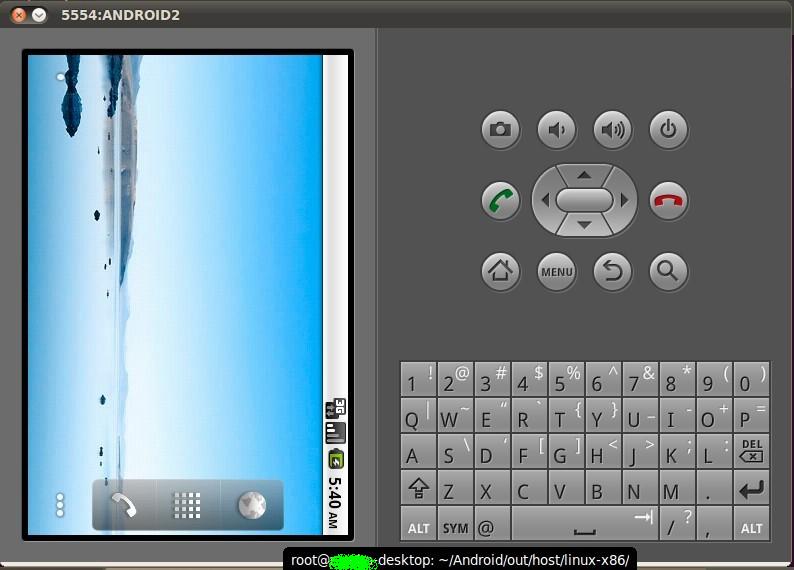
可以看到模拟器画面如下:
?
?
?
?
?
?
?
?