Windows Phone 7页面导航的方法
Windows Phone 7页面导航的方法 在继承PhoneApplicationPage的类中可以使用NavigationService提供的导航方法Navigate,即代码如下:this.NavigationService.Navigate(new Uri("/newPageName.xaml ", UriKind.Relative));注意第二个参数是UriKind.Relative NavigationService.Navigate MethodNavigates to the content specified by the uniform resource identifier (URI).Namespace: System.Windows.NavigationAssembly: Microsoft.Phone (in Microsoft.Phone.dll) Syntax
 public bool Navigate( Uri source)
ParameterssourceType: System.UriThe URI of the content to navigate to.Return ValueType: System.BooleanReturns Boolean. True if the navigation started successfully; otherwise, false. 示例说明我们以MainPage中点击鼠标跳转到另一个页面为例说明- 在MainPage中添加button按钮
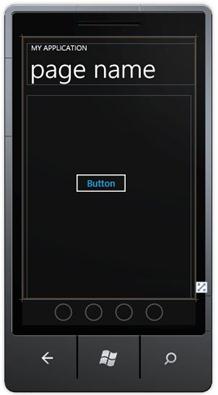
- 添加鼠标响应
鼠标选中Button,然后点击右键选择属性"Properties",在"Events"中添加鼠标单击Click事件,名称为"button1_Click"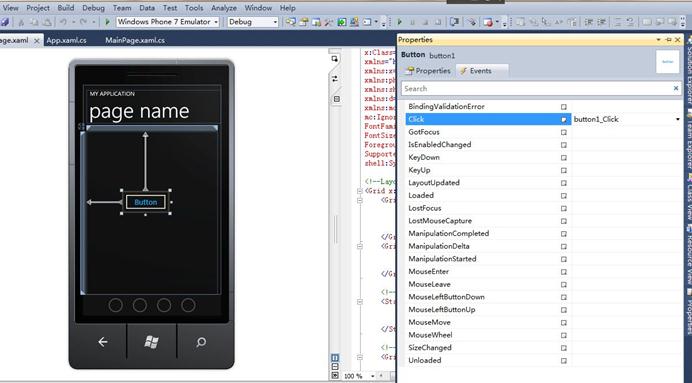 在鼠标响应事件private void button1_Click(object sender, RoutedEventArgs e)中添加如下代码: this.NavigationService.Navigate(new Uri("/Page1.xaml?name=aaaa", UriKind.Relative));此方法实现页面跳转到Page1,并将值aaaa传递给name。
 页面导航异常时的情况完美的页面导航,但是有趣的事情才刚刚开始。如果上例中跳转的目标页面Page1不存在会发生什么事情呢,我们尝试一下将上面的代码修改为:this.NavigationService.Navigate(new Uri("/Page111.xaml?name=aaaa", UriKind.Relative));首先声明Page111页面并不存在,点击Button后程序没有错误提示,而是直接退出,预想与结果出现偏差。如果我们的程序中页面动态生成,而在程序跳转时页面生成失败或者未生成,那我们的跳转结果就是程序退出,我们想要的结果是跳转到错误提示页面或者默认页面。 页面导航异常处理下面我们就来考虑如何进行页面跳转失败的异常处理。1. 考虑使用NavigationService.Navigate的返回值来判断跳转成功与否将上例的代码修改如下:private void button1_Click(object sender, RoutedEventArgs e){bool bTrans = this.NavigationService.Navigate(new Uri("/Page111.xaml?name=aaaa", UriKind.Relative));if (!bTrans){this.NavigationService.Navigate(new Uri("/MainPage.xaml", UriKind.Relative));}}单步调试发现,NavigationService.Navigate导航到不存在页面Page111.xaml时,其返回值也为True。据此了解,通过返回值判断跳转是否成功的方法不可取。仔细看看上一节中Navigate返回值的说明:True if the navigation started successfully。明白了,原来Navigation启动成功了,其返回值即为True,只是没有找到Page而已。2. 考虑是捕获NavigationService.NavigationFailed Event处理页面跳转异常的处理PhoneApplicationPage Members没有包含NavigationFailed事件处理,因此使用PhoneApplicationFrame Members的NavigationFailed事件处理。 本例中在App.xaml.cs中找到RootFrame_NavigationFailed方法,此方法就是本例中PhoneApplicationFrame捕获NavigationService.NavigationFailed Event处理页面跳转异常的处理。RootFrame是Windows Phone 7--Silverlight应用程序的根窗体(Frame),在此根窗体下silverlight的Page页被调用。 RootFrame被定义在App.xaml.cs中,如图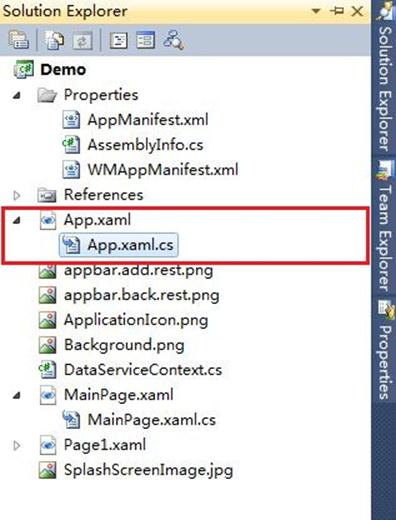 原来的代码如下:// Code to execute if a navigation failsprivate void RootFrame_NavigationFailed(object sender, NavigationFailedEventArgs e){if (System.Diagnostics.Debugger.IsAttached){// A navigation has failed; break into the debuggerSystem.Diagnostics.Debugger.Break();}}修改为:// Code to execute if a navigation failsprivate void RootFrame_NavigationFailed(object sender, NavigationFailedEventArgs e){if (System.Diagnostics.Debugger.IsAttached){// A navigation has failed; break into the debuggerSystem.Diagnostics.Debugger.Break();} e.Handled = true; if (RootFrame.CanGoBack){RootFrame.GoBack();}else{RootFrame.Navigate(new Uri("/MainPage.xaml", UriKind.Relative));}}Debug时发现还是不停执行System.Diagnostics.Debugger.Break();困惑!!!难道RootFrame找不到MainPage.xaml,那么尝试修改Uri指定的地址;
3. 修改Uri指定的地址将RootFrame.Navigate(new Uri("/MainPage.xaml", UriKind.Relative));修改为RootFrame.Navigate(new System.Uri("/Demo;component/MainPage.xaml", System.UriKind.Relative)); 即将RootFrame_NavigationFailed的处理方法修改如下:// Code to execute if a navigation failsprivate void RootFrame_NavigationFailed(object sender, NavigationFailedEventArgs e){if (System.Diagnostics.Debugger.IsAttached){// A navigation has failed; break into the debuggerSystem.Diagnostics.Debugger.Break();} e.Handled = true; if (RootFrame.CanGoBack){RootFrame.GoBack();}else{RootFrame.Navigate(new System.Uri("/Demo;component/MainPage.xaml", System.UriKind.Relative));}} 其中RootFrame.Navigate(new System.Uri("/Demo;component/MainPage.xaml", System.UriKind.Relative));的代码中,Demo为本例中Solution的名称,而且也是MainPage.xaml所在的文件夹名称。请注意在Windows Phone 7中文件都是以相对地址来读取的。4. 测试- Debug单步调试,第一次点击Button时,异常发生,在RootFrame_NavigationFailed的方法中,执行RootFrame.Navigate(new System.Uri("/Demo;component/MainPage.xaml", System.UriKind.Relative));
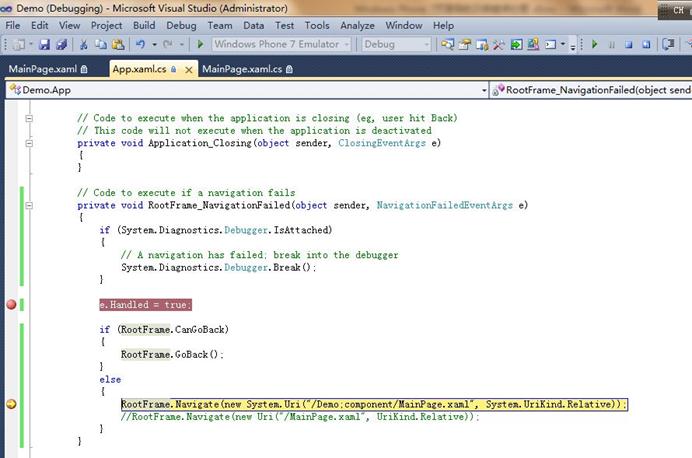 RootFrame重新定位MainPage.xaml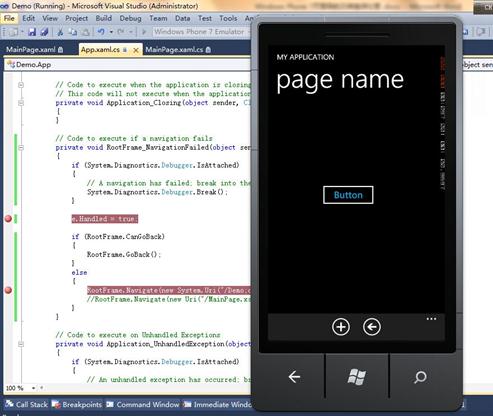
- 点击Button之外其他的按钮改变当前Page,如图效果

- 然后再次点击Button此时RootFrame.CanGoBack,执行if (RootFrame.CanGoBack){RootFrame.GoBack();}如图,返回上一个Page。
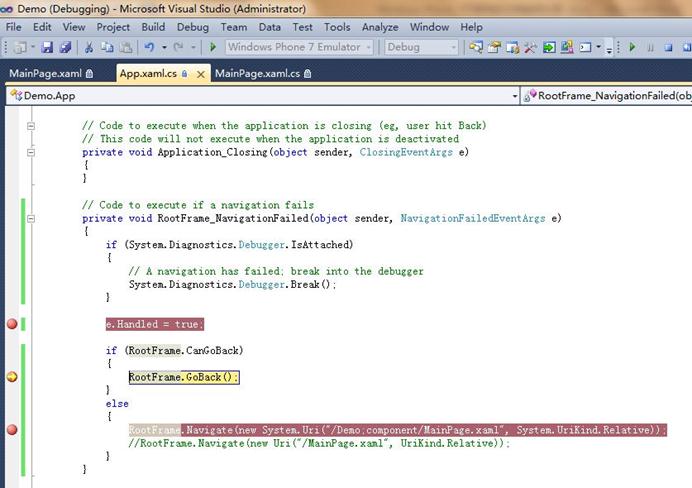 至此,通过RootFrame重定位Page,解决Page页跳转失败程序退出的现象。
结束语此解决方法肯定不是最好的解决方法,最好的方法永远在下一次时出现。本文也只是在初识Windows Phone 7开发的一个思考过程。也希望更多的问题在MSDN Windows Phone 7开发论坛(http://social.msdn.microsoft.com/Forums/zh-CN/windowsphonezhchs/threads)中讨论,大家共同思考和解决。本例是在Webcast一起学Windows Phone7开发系列课程的代码基础上做的修改,源代码请下载Navigation_Demo.zip 作者:雪松 出处:http://www.cnblogs.com/xuesong/
 Syntax
 public bool Navigate( Uri source)
ParameterssourceType: System.UriThe URI of the content to navigate to.Return ValueType: System.BooleanReturns Boolean. True if the navigation started successfully; otherwise, false. 示例说明我们以MainPage中点击鼠标跳转到另一个页面为例说明- 在MainPage中添加button按钮
- 添加鼠标响应
鼠标选中Button,然后点击右键选择属性"Properties",在"Events"中添加鼠标单击Click事件,名称为"button1_Click" 在鼠标响应事件private void button1_Click(object sender, RoutedEventArgs e)中添加如下代码: this.NavigationService.Navigate(new Uri("/Page1.xaml?name=aaaa", UriKind.Relative));此方法实现页面跳转到Page1,并将值aaaa传递给name。 页面导航异常时的情况完美的页面导航,但是有趣的事情才刚刚开始。如果上例中跳转的目标页面Page1不存在会发生什么事情呢,我们尝试一下将上面的代码修改为:this.NavigationService.Navigate(new Uri("/Page111.xaml?name=aaaa", UriKind.Relative));首先声明Page111页面并不存在,点击Button后程序没有错误提示,而是直接退出,预想与结果出现偏差。如果我们的程序中页面动态生成,而在程序跳转时页面生成失败或者未生成,那我们的跳转结果就是程序退出,我们想要的结果是跳转到错误提示页面或者默认页面。 页面导航异常处理下面我们就来考虑如何进行页面跳转失败的异常处理。1. 考虑使用NavigationService.Navigate的返回值来判断跳转成功与否将上例的代码修改如下:private void button1_Click(object sender, RoutedEventArgs e){bool bTrans = this.NavigationService.Navigate(new Uri("/Page111.xaml?name=aaaa", UriKind.Relative));if (!bTrans){this.NavigationService.Navigate(new Uri("/MainPage.xaml", UriKind.Relative));}}单步调试发现,NavigationService.Navigate导航到不存在页面Page111.xaml时,其返回值也为True。据此了解,通过返回值判断跳转是否成功的方法不可取。仔细看看上一节中Navigate返回值的说明:True if the navigation started successfully。明白了,原来Navigation启动成功了,其返回值即为True,只是没有找到Page而已。2. 考虑是捕获NavigationService.NavigationFailed Event处理页面跳转异常的处理PhoneApplicationPage Members没有包含NavigationFailed事件处理,因此使用PhoneApplicationFrame Members的NavigationFailed事件处理。 本例中在App.xaml.cs中找到RootFrame_NavigationFailed方法,此方法就是本例中PhoneApplicationFrame捕获NavigationService.NavigationFailed Event处理页面跳转异常的处理。RootFrame是Windows Phone 7--Silverlight应用程序的根窗体(Frame),在此根窗体下silverlight的Page页被调用。 RootFrame被定义在App.xaml.cs中,如图 原来的代码如下:// Code to execute if a navigation failsprivate void RootFrame_NavigationFailed(object sender, NavigationFailedEventArgs e){if (System.Diagnostics.Debugger.IsAttached){// A navigation has failed; break into the debuggerSystem.Diagnostics.Debugger.Break();}}修改为:// Code to execute if a navigation failsprivate void RootFrame_NavigationFailed(object sender, NavigationFailedEventArgs e){if (System.Diagnostics.Debugger.IsAttached){// A navigation has failed; break into the debuggerSystem.Diagnostics.Debugger.Break();} e.Handled = true; if (RootFrame.CanGoBack){RootFrame.GoBack();}else{RootFrame.Navigate(new Uri("/MainPage.xaml", UriKind.Relative));}}Debug时发现还是不停执行System.Diagnostics.Debugger.Break();困惑!!!难道RootFrame找不到MainPage.xaml,那么尝试修改Uri指定的地址;3. 修改Uri指定的地址将RootFrame.Navigate(new Uri("/MainPage.xaml", UriKind.Relative));修改为RootFrame.Navigate(new System.Uri("/Demo;component/MainPage.xaml", System.UriKind.Relative)); 即将RootFrame_NavigationFailed的处理方法修改如下:// Code to execute if a navigation failsprivate void RootFrame_NavigationFailed(object sender, NavigationFailedEventArgs e){if (System.Diagnostics.Debugger.IsAttached){// A navigation has failed; break into the debuggerSystem.Diagnostics.Debugger.Break();} e.Handled = true; if (RootFrame.CanGoBack){RootFrame.GoBack();}else{RootFrame.Navigate(new System.Uri("/Demo;component/MainPage.xaml", System.UriKind.Relative));}} 其中RootFrame.Navigate(new System.Uri("/Demo;component/MainPage.xaml", System.UriKind.Relative));的代码中,Demo为本例中Solution的名称,而且也是MainPage.xaml所在的文件夹名称。请注意在Windows Phone 7中文件都是以相对地址来读取的。4. 测试- Debug单步调试,第一次点击Button时,异常发生,在RootFrame_NavigationFailed的方法中,执行RootFrame.Navigate(new System.Uri("/Demo;component/MainPage.xaml", System.UriKind.Relative));
RootFrame重新定位MainPage.xaml - 点击Button之外其他的按钮改变当前Page,如图效果
- 然后再次点击Button此时RootFrame.CanGoBack,执行if (RootFrame.CanGoBack){RootFrame.GoBack();}如图,返回上一个Page。 至此,通过RootFrame重定位Page,解决Page页跳转失败程序退出的现象。
结束语此解决方法肯定不是最好的解决方法,最好的方法永远在下一次时出现。本文也只是在初识Windows Phone 7开发的一个思考过程。也希望更多的问题在MSDN Windows Phone 7开发论坛(http://social.msdn.microsoft.com/Forums/zh-CN/windowsphonezhchs/threads)中讨论,大家共同思考和解决。本例是在Webcast一起学Windows Phone7开发系列课程的代码基础上做的修改,源代码请下载Navigation_Demo.zip 作者:雪松 出处:http://www.cnblogs.com/xuesong/
示例说明我们以MainPage中点击鼠标跳转到另一个页面为例说明- 在MainPage中添加button按钮
- 添加鼠标响应
鼠标选中Button,然后点击右键选择属性"Properties",在"Events"中添加鼠标单击Click事件,名称为"button1_Click" 在鼠标响应事件private void button1_Click(object sender, RoutedEventArgs e)中添加如下代码: this.NavigationService.Navigate(new Uri("/Page1.xaml?name=aaaa", UriKind.Relative));此方法实现页面跳转到Page1,并将值aaaa传递给name。 页面导航异常时的情况完美的页面导航,但是有趣的事情才刚刚开始。如果上例中跳转的目标页面Page1不存在会发生什么事情呢,我们尝试一下将上面的代码修改为:this.NavigationService.Navigate(new Uri("/Page111.xaml?name=aaaa", UriKind.Relative));首先声明Page111页面并不存在,点击Button后程序没有错误提示,而是直接退出,预想与结果出现偏差。如果我们的程序中页面动态生成,而在程序跳转时页面生成失败或者未生成,那我们的跳转结果就是程序退出,我们想要的结果是跳转到错误提示页面或者默认页面。 页面导航异常处理下面我们就来考虑如何进行页面跳转失败的异常处理。1. 考虑使用NavigationService.Navigate的返回值来判断跳转成功与否将上例的代码修改如下:private void button1_Click(object sender, RoutedEventArgs e){bool bTrans = this.NavigationService.Navigate(new Uri("/Page111.xaml?name=aaaa", UriKind.Relative));if (!bTrans){this.NavigationService.Navigate(new Uri("/MainPage.xaml", UriKind.Relative));}}单步调试发现,NavigationService.Navigate导航到不存在页面Page111.xaml时,其返回值也为True。据此了解,通过返回值判断跳转是否成功的方法不可取。仔细看看上一节中Navigate返回值的说明:True if the navigation started successfully。明白了,原来Navigation启动成功了,其返回值即为True,只是没有找到Page而已。2. 考虑是捕获NavigationService.NavigationFailed Event处理页面跳转异常的处理PhoneApplicationPage Members没有包含NavigationFailed事件处理,因此使用PhoneApplicationFrame Members的NavigationFailed事件处理。 本例中在App.xaml.cs中找到RootFrame_NavigationFailed方法,此方法就是本例中PhoneApplicationFrame捕获NavigationService.NavigationFailed Event处理页面跳转异常的处理。RootFrame是Windows Phone 7--Silverlight应用程序的根窗体(Frame),在此根窗体下silverlight的Page页被调用。 RootFrame被定义在App.xaml.cs中,如图 原来的代码如下:// Code to execute if a navigation failsprivate void RootFrame_NavigationFailed(object sender, NavigationFailedEventArgs e){if (System.Diagnostics.Debugger.IsAttached){// A navigation has failed; break into the debuggerSystem.Diagnostics.Debugger.Break();}}修改为:// Code to execute if a navigation failsprivate void RootFrame_NavigationFailed(object sender, NavigationFailedEventArgs e){if (System.Diagnostics.Debugger.IsAttached){// A navigation has failed; break into the debuggerSystem.Diagnostics.Debugger.Break();} e.Handled = true; if (RootFrame.CanGoBack){RootFrame.GoBack();}else{RootFrame.Navigate(new Uri("/MainPage.xaml", UriKind.Relative));}}Debug时发现还是不停执行System.Diagnostics.Debugger.Break();困惑!!!难道RootFrame找不到MainPage.xaml,那么尝试修改Uri指定的地址;3. 修改Uri指定的地址将RootFrame.Navigate(new Uri("/MainPage.xaml", UriKind.Relative));修改为RootFrame.Navigate(new System.Uri("/Demo;component/MainPage.xaml", System.UriKind.Relative)); 即将RootFrame_NavigationFailed的处理方法修改如下:// Code to execute if a navigation failsprivate void RootFrame_NavigationFailed(object sender, NavigationFailedEventArgs e){if (System.Diagnostics.Debugger.IsAttached){// A navigation has failed; break into the debuggerSystem.Diagnostics.Debugger.Break();} e.Handled = true; if (RootFrame.CanGoBack){RootFrame.GoBack();}else{RootFrame.Navigate(new System.Uri("/Demo;component/MainPage.xaml", System.UriKind.Relative));}} 其中RootFrame.Navigate(new System.Uri("/Demo;component/MainPage.xaml", System.UriKind.Relative));的代码中,Demo为本例中Solution的名称,而且也是MainPage.xaml所在的文件夹名称。请注意在Windows Phone 7中文件都是以相对地址来读取的。4. 测试- Debug单步调试,第一次点击Button时,异常发生,在RootFrame_NavigationFailed的方法中,执行RootFrame.Navigate(new System.Uri("/Demo;component/MainPage.xaml", System.UriKind.Relative));
RootFrame重新定位MainPage.xaml - 点击Button之外其他的按钮改变当前Page,如图效果
- 然后再次点击Button此时RootFrame.CanGoBack,执行if (RootFrame.CanGoBack){RootFrame.GoBack();}如图,返回上一个Page。 至此,通过RootFrame重定位Page,解决Page页跳转失败程序退出的现象。
结束语此解决方法肯定不是最好的解决方法,最好的方法永远在下一次时出现。本文也只是在初识Windows Phone 7开发的一个思考过程。也希望更多的问题在MSDN Windows Phone 7开发论坛(http://social.msdn.microsoft.com/Forums/zh-CN/windowsphonezhchs/threads)中讨论,大家共同思考和解决。本例是在Webcast一起学Windows Phone7开发系列课程的代码基础上做的修改,源代码请下载Navigation_Demo.zip 作者:雪松 出处:http://www.cnblogs.com/xuesong/
 在鼠标响应事件private void button1_Click(object sender, RoutedEventArgs e)中添加如下代码: this.NavigationService.Navigate(new Uri("/Page1.xaml?name=aaaa", UriKind.Relative));此方法实现页面跳转到Page1,并将值aaaa传递给name。
 页面导航异常处理下面我们就来考虑如何进行页面跳转失败的异常处理。1. 考虑使用NavigationService.Navigate的返回值来判断跳转成功与否将上例的代码修改如下:private void button1_Click(object sender, RoutedEventArgs e){bool bTrans = this.NavigationService.Navigate(new Uri("/Page111.xaml?name=aaaa", UriKind.Relative));if (!bTrans){this.NavigationService.Navigate(new Uri("/MainPage.xaml", UriKind.Relative));}}单步调试发现,NavigationService.Navigate导航到不存在页面Page111.xaml时,其返回值也为True。据此了解,通过返回值判断跳转是否成功的方法不可取。仔细看看上一节中Navigate返回值的说明:True if the navigation started successfully。明白了,原来Navigation启动成功了,其返回值即为True,只是没有找到Page而已。2. 考虑是捕获NavigationService.NavigationFailed Event处理页面跳转异常的处理PhoneApplicationPage Members没有包含NavigationFailed事件处理,因此使用PhoneApplicationFrame Members的NavigationFailed事件处理。 本例中在App.xaml.cs中找到RootFrame_NavigationFailed方法,此方法就是本例中PhoneApplicationFrame捕获NavigationService.NavigationFailed Event处理页面跳转异常的处理。RootFrame是Windows Phone 7--Silverlight应用程序的根窗体(Frame),在此根窗体下silverlight的Page页被调用。 RootFrame被定义在App.xaml.cs中,如图 原来的代码如下:// Code to execute if a navigation failsprivate void RootFrame_NavigationFailed(object sender, NavigationFailedEventArgs e){if (System.Diagnostics.Debugger.IsAttached){// A navigation has failed; break into the debuggerSystem.Diagnostics.Debugger.Break();}}修改为:// Code to execute if a navigation failsprivate void RootFrame_NavigationFailed(object sender, NavigationFailedEventArgs e){if (System.Diagnostics.Debugger.IsAttached){// A navigation has failed; break into the debuggerSystem.Diagnostics.Debugger.Break();} e.Handled = true; if (RootFrame.CanGoBack){RootFrame.GoBack();}else{RootFrame.Navigate(new Uri("/MainPage.xaml", UriKind.Relative));}}Debug时发现还是不停执行System.Diagnostics.Debugger.Break();困惑!!!难道RootFrame找不到MainPage.xaml,那么尝试修改Uri指定的地址;3. 修改Uri指定的地址将RootFrame.Navigate(new Uri("/MainPage.xaml", UriKind.Relative));修改为RootFrame.Navigate(new System.Uri("/Demo;component/MainPage.xaml", System.UriKind.Relative)); 即将RootFrame_NavigationFailed的处理方法修改如下:// Code to execute if a navigation failsprivate void RootFrame_NavigationFailed(object sender, NavigationFailedEventArgs e){if (System.Diagnostics.Debugger.IsAttached){// A navigation has failed; break into the debuggerSystem.Diagnostics.Debugger.Break();} e.Handled = true; if (RootFrame.CanGoBack){RootFrame.GoBack();}else{RootFrame.Navigate(new System.Uri("/Demo;component/MainPage.xaml", System.UriKind.Relative));}} 其中RootFrame.Navigate(new System.Uri("/Demo;component/MainPage.xaml", System.UriKind.Relative));的代码中,Demo为本例中Solution的名称,而且也是MainPage.xaml所在的文件夹名称。请注意在Windows Phone 7中文件都是以相对地址来读取的。4. 测试- Debug单步调试,第一次点击Button时,异常发生,在RootFrame_NavigationFailed的方法中,执行RootFrame.Navigate(new System.Uri("/Demo;component/MainPage.xaml", System.UriKind.Relative));
RootFrame重新定位MainPage.xaml - 点击Button之外其他的按钮改变当前Page,如图效果
- 然后再次点击Button此时RootFrame.CanGoBack,执行if (RootFrame.CanGoBack){RootFrame.GoBack();}如图,返回上一个Page。 至此,通过RootFrame重定位Page,解决Page页跳转失败程序退出的现象。
结束语此解决方法肯定不是最好的解决方法,最好的方法永远在下一次时出现。本文也只是在初识Windows Phone 7开发的一个思考过程。也希望更多的问题在MSDN Windows Phone 7开发论坛(http://social.msdn.microsoft.com/Forums/zh-CN/windowsphonezhchs/threads)中讨论,大家共同思考和解决。本例是在Webcast一起学Windows Phone7开发系列课程的代码基础上做的修改,源代码请下载Navigation_Demo.zip 作者:雪松 出处:http://www.cnblogs.com/xuesong/
2. 考虑是捕获NavigationService.NavigationFailed Event处理页面跳转异常的处理PhoneApplicationPage Members没有包含NavigationFailed事件处理,因此使用PhoneApplicationFrame Members的NavigationFailed事件处理。 本例中在App.xaml.cs中找到RootFrame_NavigationFailed方法,此方法就是本例中PhoneApplicationFrame捕获NavigationService.NavigationFailed Event处理页面跳转异常的处理。RootFrame是Windows Phone 7--Silverlight应用程序的根窗体(Frame),在此根窗体下silverlight的Page页被调用。 RootFrame被定义在App.xaml.cs中,如图 原来的代码如下:// Code to execute if a navigation failsprivate void RootFrame_NavigationFailed(object sender, NavigationFailedEventArgs e){if (System.Diagnostics.Debugger.IsAttached){// A navigation has failed; break into the debuggerSystem.Diagnostics.Debugger.Break();}}修改为:// Code to execute if a navigation failsprivate void RootFrame_NavigationFailed(object sender, NavigationFailedEventArgs e){if (System.Diagnostics.Debugger.IsAttached){// A navigation has failed; break into the debuggerSystem.Diagnostics.Debugger.Break();} e.Handled = true; if (RootFrame.CanGoBack){RootFrame.GoBack();}else{RootFrame.Navigate(new Uri("/MainPage.xaml", UriKind.Relative));}}Debug时发现还是不停执行System.Diagnostics.Debugger.Break();困惑!!!难道RootFrame找不到MainPage.xaml,那么尝试修改Uri指定的地址;3. 修改Uri指定的地址将RootFrame.Navigate(new Uri("/MainPage.xaml", UriKind.Relative));修改为RootFrame.Navigate(new System.Uri("/Demo;component/MainPage.xaml", System.UriKind.Relative)); 即将RootFrame_NavigationFailed的处理方法修改如下:// Code to execute if a navigation failsprivate void RootFrame_NavigationFailed(object sender, NavigationFailedEventArgs e){if (System.Diagnostics.Debugger.IsAttached){// A navigation has failed; break into the debuggerSystem.Diagnostics.Debugger.Break();} e.Handled = true; if (RootFrame.CanGoBack){RootFrame.GoBack();}else{RootFrame.Navigate(new System.Uri("/Demo;component/MainPage.xaml", System.UriKind.Relative));}} 其中RootFrame.Navigate(new System.Uri("/Demo;component/MainPage.xaml", System.UriKind.Relative));的代码中,Demo为本例中Solution的名称,而且也是MainPage.xaml所在的文件夹名称。请注意在Windows Phone 7中文件都是以相对地址来读取的。4. 测试- Debug单步调试,第一次点击Button时,异常发生,在RootFrame_NavigationFailed的方法中,执行RootFrame.Navigate(new System.Uri("/Demo;component/MainPage.xaml", System.UriKind.Relative));
RootFrame重新定位MainPage.xaml - 点击Button之外其他的按钮改变当前Page,如图效果
- 然后再次点击Button此时RootFrame.CanGoBack,执行if (RootFrame.CanGoBack){RootFrame.GoBack();}如图,返回上一个Page。 至此,通过RootFrame重定位Page,解决Page页跳转失败程序退出的现象。
结束语此解决方法肯定不是最好的解决方法,最好的方法永远在下一次时出现。本文也只是在初识Windows Phone 7开发的一个思考过程。也希望更多的问题在MSDN Windows Phone 7开发论坛(http://social.msdn.microsoft.com/Forums/zh-CN/windowsphonezhchs/threads)中讨论,大家共同思考和解决。本例是在Webcast一起学Windows Phone7开发系列课程的代码基础上做的修改,源代码请下载Navigation_Demo.zip 作者:雪松 出处:http://www.cnblogs.com/xuesong/
 原来的代码如下:// Code to execute if a navigation failsprivate void RootFrame_NavigationFailed(object sender, NavigationFailedEventArgs e){if (System.Diagnostics.Debugger.IsAttached){// A navigation has failed; break into the debuggerSystem.Diagnostics.Debugger.Break();}}修改为:// Code to execute if a navigation failsprivate void RootFrame_NavigationFailed(object sender, NavigationFailedEventArgs e){if (System.Diagnostics.Debugger.IsAttached){// A navigation has failed; break into the debuggerSystem.Diagnostics.Debugger.Break();} e.Handled = true; if (RootFrame.CanGoBack){RootFrame.GoBack();}else{RootFrame.Navigate(new Uri("/MainPage.xaml", UriKind.Relative));}}Debug时发现还是不停执行System.Diagnostics.Debugger.Break();困惑!!!难道RootFrame找不到MainPage.xaml,那么尝试修改Uri指定的地址;
4. 测试- Debug单步调试,第一次点击Button时,异常发生,在RootFrame_NavigationFailed的方法中,执行RootFrame.Navigate(new System.Uri("/Demo;component/MainPage.xaml", System.UriKind.Relative));
RootFrame重新定位MainPage.xaml - 点击Button之外其他的按钮改变当前Page,如图效果
- 然后再次点击Button此时RootFrame.CanGoBack,执行if (RootFrame.CanGoBack){RootFrame.GoBack();}如图,返回上一个Page。 至此,通过RootFrame重定位Page,解决Page页跳转失败程序退出的现象。
结束语此解决方法肯定不是最好的解决方法,最好的方法永远在下一次时出现。本文也只是在初识Windows Phone 7开发的一个思考过程。也希望更多的问题在MSDN Windows Phone 7开发论坛(http://social.msdn.microsoft.com/Forums/zh-CN/windowsphonezhchs/threads)中讨论,大家共同思考和解决。本例是在Webcast一起学Windows Phone7开发系列课程的代码基础上做的修改,源代码请下载Navigation_Demo.zip 作者:雪松 出处:http://www.cnblogs.com/xuesong/
 RootFrame重新定位MainPage.xaml
 至此,通过RootFrame重定位Page,解决Page页跳转失败程序退出的现象。