leeboy的linux学习八
一、awk脚本小程序,计算某一文件夹中文件的大小和。
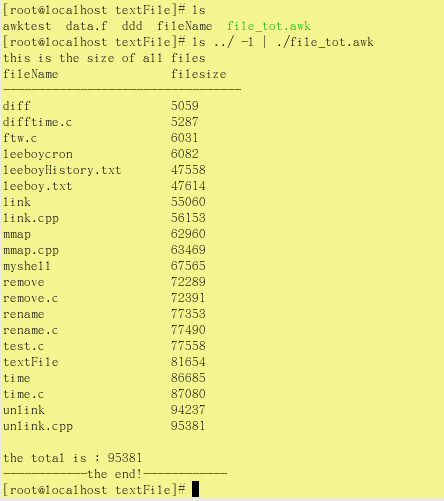
#!/bin/awk -f#命名:file_tot.awk#功能:计算当前文件夹中文件大小和#使用方法:ls -l|./file_tot.awk#print a header firstBEGIN{print"this is the size of all files"print"fileName\t\tfilesize"print"----------------------------------"}#let's add the size of file(tot+=$5) {printf "%-24s%s\n",$8,tot} #根据打印的头长度来判断左对齐空格长度#finished print an endEND{printf "\n"print "the total is : " totprint"------------the end!------------"}
#!/bin/awk -f 表示解析器的声明
该脚本和命令ls ../ -l | awk '(tot+=$5){printf "%-24s%s\n",$8,tot}' 执行效果一样
使用实例如下:
二、当文件中分隔符不是空格时,需要使用指定分隔符的awk脚本:(如/etc/passwd中的分隔符为“:”)
#!/bin/awk -f#命名:passwd.awk#功能:使用FS为awk指定分隔符#print firstBEGIN{FS=":"#指定分隔符}#根据分隔符获取指定字段{printf "%-24s%s\n",$1,$6}#print the endEND{print "end of!"}
使用方法:./passwd.awk /etc/passwd
三、给awk脚本传入参数
#!/bin/awk -f#check on how many fields in the file#to call eg:./fieldcheck.awk MAX=8 FS=":" /etc/passwdBEGIN{print "start check!"}#NF:文件中field域个数,FS:field分隔符,NR已读的记录数{if(NF!=MAX) print "line" NR "dose not have" MAX "fields"}END{print "check end!"}
使用方法:./fieldcheck.awk MAX=8 FS=":" /etc/passwd
四、awk中的数组使用
#!/bin/awk -f#数组测试#to use eg:./arraytest.awk /dev/nullBEGIN{ record="123#879#567#wef#f4h"; print "数组长度:" split(record,myarray,"#")}END{ #for(i in myarray) {print myarray[i]} #无序输出 for(i=1;i<=length(myarray);i++) print myarray[i]}
使用方法:./arraytest.awk /dev/null
/dev/null:代表空文件设备