Cookbook4 笔记 第三章
3.6 子元素的延迟创建与回收
使用HorizontalLayout, VerticalLayout或TileLayout的useVirtualLayout属性,程序只在可视区域创建项目渲染器,内容滚动时,程序将重用隐藏项的项目渲染器
?
<s:DataGroup width="150" height="120" itemRenderer="spark.skins.spark.DefaultItemRenderer"><s:layout><s:VerticalLayout useVirtualLayout="true"/></s:layout></s:DataGroup>
?
3.9 运行时改变元素的深度(类似图层效果,位于上层的元素将遮盖下层元素)
mx.core.IVisualElement.depth(value:Number):void
?修改索引为i的元素的深度
var element:IVisualElement = group.getElementAt(i) as IVisualElement;element.depth = group.numElements - 1;
?
3.10 使用3D模型旋转
var matrix:Matrix3D = button.getLayoutMatrix3D();// 在 Matrix3D 对象上后置一个增量旋转。matrix.appendRotation(90, Vector3D.Z_AXIS);// [只写] 用于相对于其同级组件计算组件的布局的转换矩阵。button.layoutMatrix3D = matrix;
?或使用rotationX属性设置旋转角度
<s:Rect id="rect" rotationZ="{rot}" width="110" height="50"><s:fill><s:SolidColor color="#000000"/></s:fill></s:Rect>3.11 旋转子元素但不影响容器布局及其他子元素
如左图显示,右图为3.10的方式
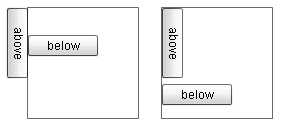
<!-- 效果见左图 --><s:BorderContainer x="41" y="11"><s:layout><s:VerticalLayout/></s:layout><s:Button label="above"><!-- 定义能够应用于对象转换且在一定程度上对其父布局不可视的一组调整。 --><s:postLayoutTransformOffsets><!-- 表示2D或3D转换的对象 --><mx:TransformOffsets rotationZ="90"/></s:postLayoutTransformOffsets></s:Button><s:Button label="below"/></s:BorderContainer><!-- 效果见右图 --><s:BorderContainer x="175" y="11"><s:layout><s:VerticalLayout/></s:layout><s:Button label="above" rotationZ="90"/><s:Button label="below"/></s:BorderContainer>
旋转动画效果
?
<fx:Declarations><s:Rotate3D id="rotator1" autoCenterTransform="true" target="{btn1}" angleXFrom="0" angleXTo="360" /></fx:Declarations><s:Button id="btn1" label="(0) button" click="{rotator1.play();}" />?
?在AS中旋转控件
?
mx.core.UIComponent.transformAround(transformCenter:Vector3D, //旋转中心点scale:Vector3D=null, //缩放(影响布局)rotation:Vector3D=null, //旋转(影响布局)translation:Vector3D=null, //平移(影响布局)postLayoutScale:Vector3D=null, //缩放(不影响布局)postLayoutRotation:Vector3D=null, //旋转(不影响布局)postLayoutTranslation:Vector3D=null, //平移(不影响布局)invalidateLayout:Boolean=true):void
?postLayoutXXX会产生上例左图的效果
?
3.12 自定义3D布局
好吧,Flex的布局太强大了,恨不得把整段示例代码都贴上来。都是前面章节介绍过的知识点。
还有,想做好看的布局,把初高中的代数书拿出来重新学一下三角函数吧。
?
3.13 编程的方式实现滚动
?
<fx:Declarations><fx:String id="txt">Lorem ipsum dolor sit amet consectetur adipisicing elit.</fx:String></fx:Declarations><s:HSlider id="slider" minimum="0" maximum="{group.contentHeight - group.height}" liveDragging="true" /><s:DataGroup id="group" width="100" height="100" clipAndEnableScrolling="true" itemRenderer="spark.skins.spark.DefaultItemRenderer"><s:layout><s:VerticalLayout id="vLayout" verticalScrollPosition="{slider.value}" /></s:layout><s:dataProvider><mx:ArrayCollection source="{txt.split(' ')}" /></s:dataProvider></s:DataGroup>?3.14?在基于序列的布局中限定元素的可见性(布局滚动到指定元素索引处)
?
private function scrollTo(index:int):void {// spark.layouts.VerticalLayout.fractionOfElementInView(index:int):Number// 如果指定的索引完全在视图中,则返回 1.0;// 如果不在视图中,则返回 0.0;// 如果部分处于视图中,则返回在 0.0 和 1.0 之间的一个值(表示处于视图中的部分的百分比)。 var amt:Number = (group.layout as VerticalLayout).fractionOfElementInView(index);if (amt < 1.0) {// spark.layouts.supportClasses.LayoutBase.getScrollPositionDeltaToElement(index:int):Point// 计算所需的 verticalScrollPosition 和 horizontalScrollPosition delta,以将处于指定索引处的元素滚动到视图中。 // delta代表差值var pt:Point = group.layout.getScrollPositionDeltaToElement(index);if (pt != null)group.verticalScrollPosition += pt.y;}}?我想了半天,delta到底是什么东西,字典解释是希腊字母,我突然想到以前代数里面有个三角形的希腊字母,表示两个量之间的差值,再根据代码上下文,断定就是它了,没错。
?
第三章终于完事了,真累。
话说刚拿到Flex4权威指南的时候用了2天就全看完了,包括自己手敲代码(之前Flex3权威指南看完一大半,4的内容确实比3少很多)。看英文又慢又累……
权威指南是入门级的,cookbook则更像是进阶级的