JSF组件开发(实现简单的输出)
这是我们的项目的文件位置
?
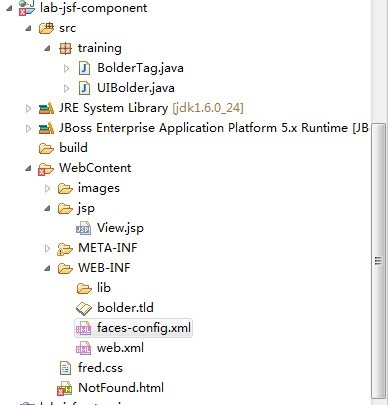
?
?1、开发我们的JSF组件
????? 编写UIOutput类型的组件Java类
import java.io.IOException;import javax.faces.component.UIOutput;import javax.faces.context.FacesContext;import javax.faces.context.ResponseWriter;public class UIBolder extends UIOutput { public void encodeBegin (FacesContext context) throws IOException { // FIXME: Open the HTML tag for bold text ResponseWriter writer = context.getResponseWriter(); writer.startElement("h2", this); } public void encodeEnd (FacesContext context) throws IOException { // FIXME: Close the HTML tag for bold text context.getResponseWriter().endElement("h2"); }}?faces-config.xml中注册我们组件类
<?xml version="1.0" encoding="UTF-8"?><faces-config version="1.2" xmlns="http://java.sun.com/xml/ns/javaee"xmlns:xi="http://www.w3.org/2001/XInclude" xmlns:xsi="http://www.w3.org/2001/XMLSchema-instance"xsi:schemaLocation="http://java.sun.com/xml/ns/javaee http://java.sun.com/xml/ns/javaee/web-facesconfig_1_2.xsd"><!-- Custom components: FIXME: Register the new custom component --><!-- View and data beans: --><!-- 注册组件 --><component><component-type>bold</component-type><component-class>training.UIBolder</component-class></component><!-- Navigation rules: --><navigation-rule><from-view-id>*</from-view-id><navigation-case><from-outcome>show</from-outcome><to-view-id>/jsp/View.jsp</to-view-id></navigation-case></navigation-rule><!-- Application configuration: --><application><locale-config><default-locale>en</default-locale></locale-config></application></faces-config>
?2、开发自定义标签
?? 编写标签Java类
import javax.faces.webapp.UIComponentELTag;public class BolderTag extends UIComponentELTag { @Override public String getComponentType () { //返回faces-config.xml中组件的名字 return "bold"; } @Override public String getRendererType () { return null; }}?在bolder.tld文件中定义标签
<?xml version="1.0" encoding="UTF-8"?><taglib version="2.1" xmlns="http://java.sun.com/xml/ns/javaee"xmlns:xsi="http://www.w3.org/2001/XMLSchema-instance"xsi:schemaLocation="http://java.sun.com/xml/ns/javaee http://java.sun.com/xml/ns/javaee/web-jsptaglibrary_2_1.xsd"><tlib-version>1.0</tlib-version><short-name>bold</short-name> <!-- 定义页面使用的标签 --> <uri>http://www.snailteam.org/</uri><tag><name>uibold</name><tag-class>training.BolderTag</tag-class><body-content>JSP</body-content></tag></taglib>?
3 、使用我们的自定义组件
<?xml version="1.0" encoding="UTF-8"?><!DOCTYPE html PUBLIC "-//W3C//DTD XHTML 1.0 Transitional//EN" "http://www.w3.org/TR/xhtml1/DTD/xhtml1-transitional.dtd"><%@ taglib uri="http://java.sun.com/jsf/html" prefix="h"%><%@ taglib uri="http://java.sun.com/jsf/core" prefix="f"%><%@ taglib uri="http://www.snailteam.com/" prefix="d"%><html><head><title>Lab JSF Component</title><link rel="stylesheet" href="fred.css" type="text/css" /></head><body><f:view><p>Fred says, show how to use custom component!</p><h:form id="main"><h:panelGrid id="grid" columns="2"><f:verbatim>New component:</f:verbatim><!-- FIXME: Use the new custom tag to display the following text in bold font --> <!-- 使用tld中的tag name --> <d:uibold>This my Bolder font</d:uibold> <f:verbatim>JSF bold component</f:verbatim></h:panelGrid></h:form></f:view></body></html>