WebService (一) CXF 入门 HelloWorld
?
1.CXF框架由来?
? ? ? ??ApacheCXF项目是由ObjectWeb Celtix和CodeHaus XFire合并成立。ObjectWeb Celtix是由IONA公司赞助,于2005年成立的开源Java ESB产品,XFire则是业界知名的SOAP堆栈。合并后的ApacheCXF融合该两个开源项目的功能精华,提供了实现SOA所需要的核心ESB功能框架,包括SOA服务创建,服务路由,及一系列企业级QoS功能。?
?
2.?ApacheCXF架框的目标
? ?1,支持不同的绑定,包括SOAP,REST 和 Corba。
?? 2,支持WS相关标准,包括WS-Addressing, WS-Security, WS-ReliableMessaging, 和 WS-Policy。
?? 3,支持多种传输协议。
?? 4,可插入的数据绑定。
?? 5,前端的清晰分离,像 JAX-WS 从核心代码中分离。
?? 6,高性能。
?? 7,可嵌入。
?
3.HelloWorld程序示例
此helloWorld是基于apache-cxf-2.5.3版本的。
?
新建一个工程,将cxf lib下面的包都加到classpath下。
?
HelloWorld接口定义如下:
?
package demo1.test;import javax.jws.WebService;@WebServicepublic interface HelloWorld {public String sayHello(String name);}?
?请注意在类上加上:@WebService标签
? 通过注解@WebService申明为webservice接口?
?
HelloWorldImpl实现类的代码如下:
?
package demo1.test;import javax.jws.WebService;@WebServicepublic class HelloWorldImpl implements HelloWorld {public String sayHello(String name) {System.out.println("SayHello method is called!");return "hello " + name;}}?
?
然后写一个发布服务的DemoServer程序(因为cxf lib包下面内嵌了jetty服务器的jar)。
DemoServer类的代码如下所示:
?
package demo1.test;import org.apache.cxf.endpoint.Server;import org.apache.cxf.jaxws.JaxWsServerFactoryBean;public class DemoServer {public static void main(String[] args) {JaxWsServerFactoryBean factory = new JaxWsServerFactoryBean();factory.setServiceClass(HelloWorldImpl.class);factory.setAddress("http://localhost:8080/helloWorld");Server server = factory.create();server.start();}}?
?使用JaxWsServerFactoryBean创建一个服务,然后进行发布。类运行DemoServer方法后,可以直接在浏览器中
输入http://localhost:8080/helloWorld?wsdl
你就可以看到此webservice的wsdl文件内容了。
?
要对此webservice进行测试,可以利用myEclipse 的插件webservice浏览器进行测试、自己写个客户端程序或使用soapUI工具。
? ?1.webservice浏览器进行测试
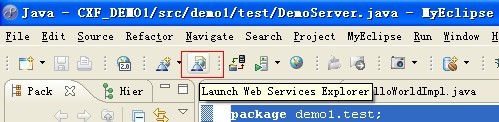
1)在myEclipse中启动插件web service浏览器,如下图所示:
? ?2)web service浏览器启动后,在浏览器的右上角选择WSDL Page,如下图所示:

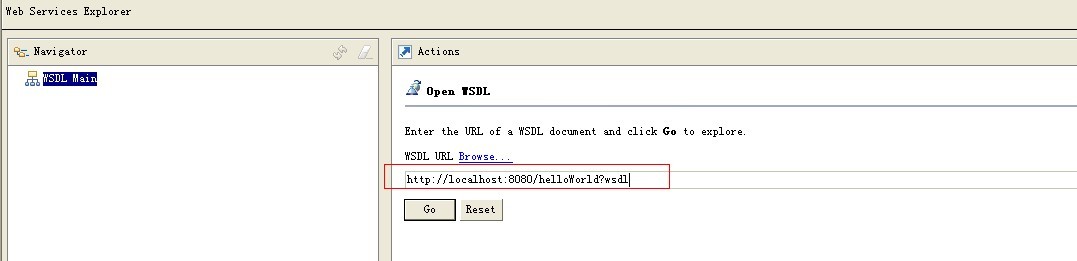
?3)在WSDL URL中输入服务的URL地址:http://localhost:8080/helloWorld?wsdl,如下图所示:
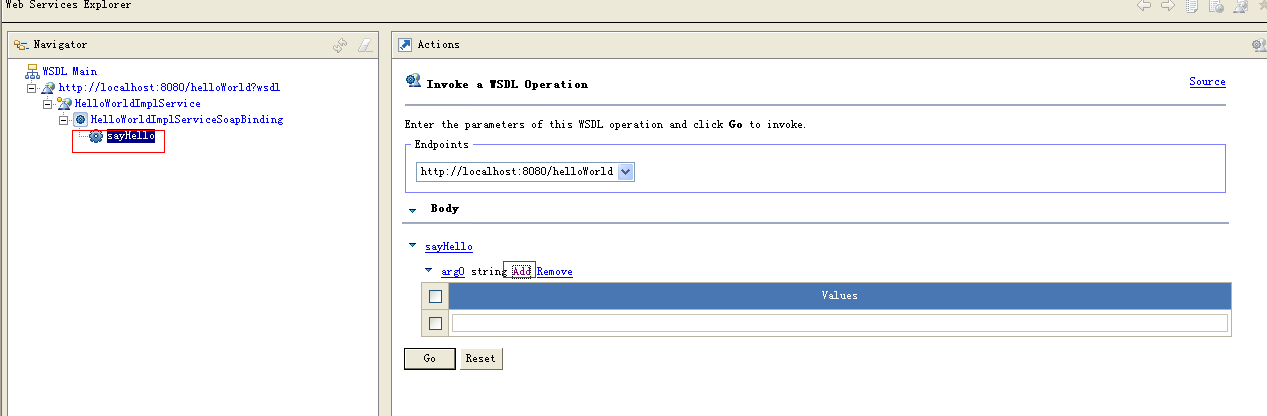
?4)然后点击"GO",按提示多操作几步后,是后点击sayHello方法,在传递名字后面点击“add”,会在下面出现一个输入参数的输入框,如下图所示:
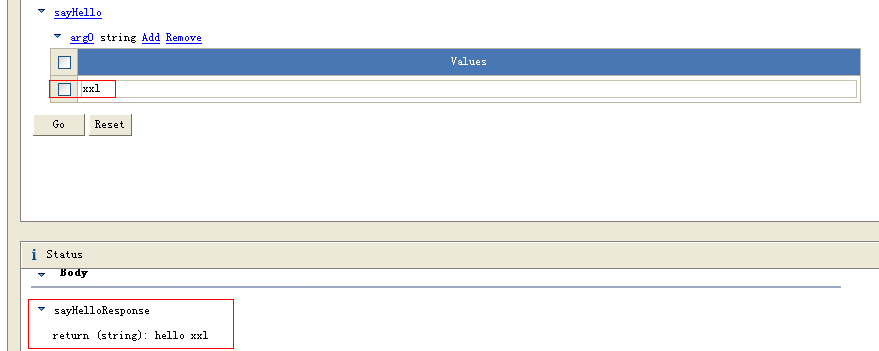
?5.在输入框中输入“xxl”,点击“GO”后,会返回“hello xxl”,同时服务器端打印出了语句“SayHello method is called!”,说明我们的服务是发布正常的。浏览器的返回结果如下图所示:
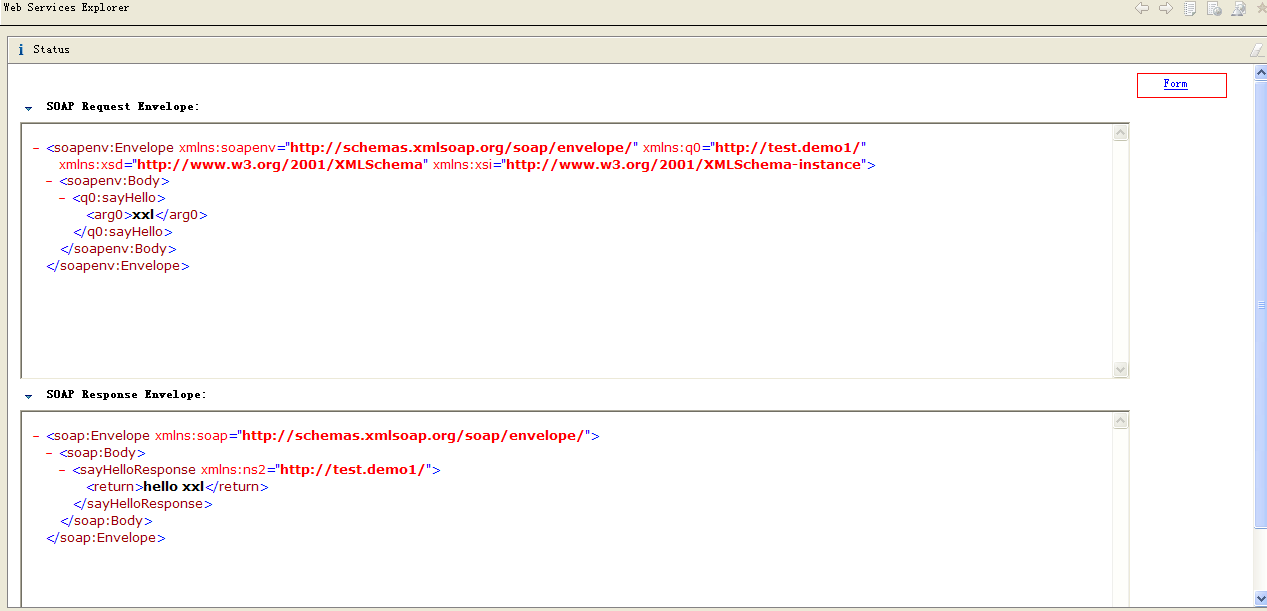
6.浏览器默认的返回结果显示是“Form”形式,也即上图所示。可以点出右上解的"source"链接,以源代码的形式查看请求及返回结果,即详细的xml,如下图所示:
?
2.自己利用cxf的api写个客户端程序进行测试
DemoClient的示例程序如下所示:
?
package demo1.test;import org.apache.cxf.jaxws.JaxWsProxyFactoryBean;public class DemoClient {public static void main(String[] args) {JaxWsProxyFactoryBean factory = new JaxWsProxyFactoryBean();factory.setServiceClass(HelloWorld.class);factory.setAddress("http://localhost:8080/helloWorld");HelloWorld helloWorld = (HelloWorld)factory.create();String result = helloWorld.sayHello("xxl");System.out.println(result);}}?执行客户端程序后,客户端会正常打印出“hello xxl”,服务器端会在控制台打印出“SayHello method is called!”,
说明测试程序及服务都是正常的。
?
?
总结:
1.JaxWsServerFactoryBean是创建服务器端服务的工厂,factory.setServiceClass(HelloWorldImpl.class);
在服务器端调用setServiceClass方法时,传入的Class必须是实现类的,不能是接口。
否则使用客户端程序调用时会抛出如下所示的异常:
Exception in thread "main" javax.xml.ws.soap.SOAPFaultException: Could not instantiate service class demo1.test.HelloWorld because it is an interface
?
setServiceClass方法的具体的API如下所示:
?
setServiceClass
?
public void setServiceClass(Class<?>?serviceClass)Specifies the class implementing the service.
?
Parameters:serviceClass?- the service's implementaiton class?
?
2.使用JaxWsProxyFactoryBean创建客户端程序,factory.setServiceClass(HelloWorld.class);
调用客户端的setServiceClass,传入的参数必须使用接口。(这是与服务端的区别。服务端是必须传具体的实现类)
如果客户端传递的是具体的类,则会抛出如下所示的异常:
Exception in thread "main" java.lang.IllegalArgumentException: demo1.test.HelloWorldImpl is not an interface
具体的API如下所示:
?
setServiceClasspublic void setServiceClass(Class<?>?serviceClass)
Specifies the class representing the SEI the proxy implements.
?
Parameters:serviceClass?- the SEI's class?
附件是基于myeclipse的工程文件。
?