在easyui中利用DataGrid的行明细区域实现CRUD操作
在easyui中,DataGrid可以通过detailview实现行的展开和收缩,利用这个特性可以实现基本的CRUD操作。
?
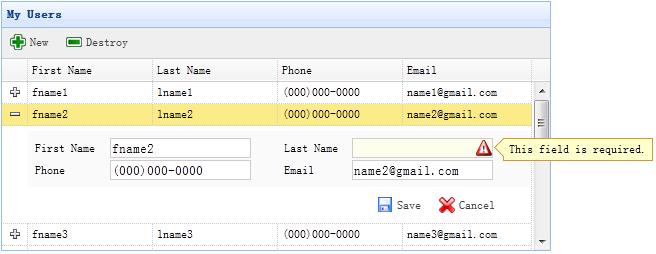
?
展开行时,动态加载表单并装载数据,保存或取消表单操作时再收缩行。
首先建立表格基本框架:
<table id="dg" title="My Users" style="width:550px;height:250px" url="get_users.php" toolbar="#toolbar" fitcolumns="true" singleselect="true"> <thead> <tr> <th field="firstname" width="50">First Name</th> <th field="lastname" width="50">Last Name</th> <th field="phone" width="50">Phone</th> <th field="email" width="50">Email</th> </tr> </thead> </table> <div id="toolbar"> <a href="#" iconcls="icon-add" plain="true" onclick="newItem()">New</a> <a href="#" iconcls="icon-remove" plain="true" onclick="destroyItem()">Destroy</a> </div>
上面这段代码把DataGrid和工具栏都建好了,不用再编写JS代码。
?
接着,应用detailview并加载表单数据:
$('#dg').datagrid({ view: detailview, detailFormatter:function(index,row){ return '<div name="code"> <form method="post"> <table style="width:100%;background:#fafafa;padding:5px;margin-top:5px;"> <tbody><tr> <td>First Name</td> <td><input name="firstname" required="true"></td> <td>Last Name</td> <td><input name="lastname" required="true"></td> </tr> <tr> <td>Phone</td> <td><input name="phone"></td> <td>Email</td> <td><input name="email" validtype="email"></td> </tr> </tbody></table> <div style="padding:5px 0;text-align:right;padding-right:30px"> <a href="#" iconcls="icon-save" plain="true" onclick="saveItem(<?php echo $_REQUEST['index'];?>)">Save</a> <a href="#" iconcls="icon-cancel" plain="true" onclick="cancelItem(<?php echo $_REQUEST['index'];?>)">Cancel</a> </div> </form> 保存表单的代码如下:
function saveItem(index){ var row = $('#dg').datagrid('getRows')[index]; var url = row.isNewRecord ? 'save_user.php' : 'update_user.php?id='+row.id; $('#dg').datagrid('getRowDetail',index).find('form').form('submit',{ url: url, onSubmit: function(){ return $(this).form('validate'); }, success: function(data){ data = eval('('+data+')'); data.isNewRecord = false; $('#dg').datagrid('collapseRow',index); $('#dg').datagrid('updateRow',{ index: index, row: data }); } }); } ?
详细的说明及演示可以参考:http://www.jeasyui.com/tutorial/app/crud3.php
 7 楼 SummitlyLee 2012-08-20 楼主你能解释一下: ddv.panel({
 9. border:false,
10. cache:true,
11. href:'show_form.php?index='+index,
12. onLoad:function(){
13. $('#dg').datagrid('fixDetailRowHeight',index);
14. $('#dg').datagrid('selectRow',index);
15. $('#dg').datagrid('getRowDetail',index).find('form').form('load',row);
16. }
17. });
href的 连接调用的是什么东西,那边是一个 表单吗? 还是 生成一个字符串发过来了....
我对这个php不熟,我现在用在jsp中,我想了解一下.