简单的开关组件
<?xml version="1.0" encoding="utf-8"?><!--* Author:tuding27@gmail.com* Release Date: 02-11-2011** 欢迎使用、转载、修改本代码,请保留以上作者信息--><s:BorderContainer xmlns:fx="http://ns.adobe.com/mxml/2009" xmlns:s="library://ns.adobe.com/flex/spark" xmlns:mx="library://ns.adobe.com/flex/mx"buttonMode="true" click="handleClick(event)" styleName="buildIn"rollOutEffect="{rollOut}" rollOverEffect="{rollIn}"><s:layout><s:BasicLayout /></s:layout><fx:Style>@namespace s "library://ns.adobe.com/flex/spark";@namespace mx "library://ns.adobe.com/flex/mx";.buildIn{color: #002222;switchColor:#5588ff;}</fx:Style><fx:Metadata>/** * 设置中间隔离按钮的主色 */[Style(name="switchColor", type="uint", format="Color", inherit="no")]</fx:Metadata><fx:Script><![CDATA[override protected function createChildren():void{// 确定容器视域this.scrollRect = new Rectangle( 0, 0, this.width, this.height );super.createChildren();changeStatus(status);}//~~~~~~~~~~~~~~~~~~~~~~~~~~~~~~~~~~~~~//statusLeft//~~~~~~~~~~~~~~~~~~~~~~~~~~~~~~~~~~~~~private var _statusLeft:String = "ON";[Bindable]/** * 状态"左"的值 * * @default false * @see mx.managers.FocusManager.defaultButton * @langversion 3.0 * @playerversion Flash 10 * @playerversion AIR 1.5 */public function get statusLeft():String{return _statusLeft;}public function set statusLeft(value:String):void{if ( value == _status )return;_statusLeft = value;}//~~~~~~~~~~~~~~~~~~~~~~~~~~~~~~~~~~~~~//statusRight//~~~~~~~~~~~~~~~~~~~~~~~~~~~~~~~~~~~~~private var _statusRight:String = "OFF";[Bindable]/** * 状态"右"的值 * * @default false * @see mx.managers.FocusManager.defaultButton * @langversion 3.0 * @playerversion Flash 10 * @playerversion AIR 1.5 */public function get statusRight():String{return _statusRight;}public function set statusRight(value:String):void{if ( value == _status )return;_statusRight = value;}//~~~~~~~~~~~~~~~~~~~~~~~~~~~~~~~~~~~~~//status//~~~~~~~~~~~~~~~~~~~~~~~~~~~~~~~~~~~~~private var _status:String = _statusLeft;[Bindable]/** * 当前组件所处状态 * * @default false * @see mx.managers.FocusManager.defaultButton * @langversion 3.0 * @playerversion Flash 10 * @playerversion AIR 1.5 */public function get status():String{return _status;}public function set status(value:String):void{if ( value == _status )return;_status = value;changeStatus(value);}/** * @private */protected function handleClick(event:MouseEvent):void{if ( status == _statusLeft )status = _statusRight;elsestatus = _statusLeft;}/** * @private */private function changeStatus( statusNow:String ):void{if ( statusNow == _statusLeft )this.currentState = "left";elsethis.currentState = "right";}[Bindable]private var borderColorTmp:uint;]]></fx:Script><fx:Declarations><s:AnimateColor id="rollIn" target="this" effectStart="borderColorTmp=getStyle('borderColor')" duration="300" colorPropertyName="borderColor" colorTo="{getStyle('rollOverColor')}" /><s:AnimateColor id="rollOut" target="this" duration="300" colorPropertyName="borderColor" colorTo="{borderColorTmp}" /></fx:Declarations><s:states><s:State name="left" /><s:State name="right" /></s:states><s:transitions><s:Transition><s:Move target="{hg}" duration="100" /></s:Transition></s:transitions><s:HGroup id="hg" gap="0" verticalAlign="middle" height="100%" x.left="{-(this.getStyle('borderWeight')*2+1)}" x.right="{-leftLabel.width+1}"><s:Label id="leftLabel" width="{this.width*0.7}" text="{statusLeft}" textAlign="center" /><s:Button width="{this.width*0.3}" height="{this.height-this.getStyle('borderWeight')*2}" cornerRadius="{getStyle('cornerRadius')}" chromeColor="{getStyle('switchColor')}" /><s:Label width="{this.width*0.7}" text="{statusRight}" textAlign="center" /></s:HGroup></s:BorderContainer>截图:
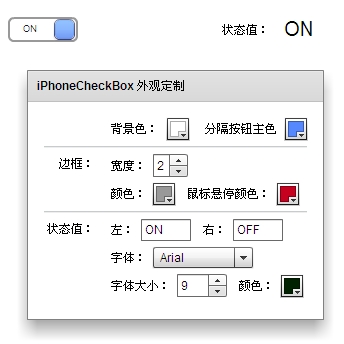
DEMO 源码:
<?xml version="1.0" encoding="utf-8"?><s:Application xmlns:fx="http://ns.adobe.com/mxml/2009" xmlns:s="library://ns.adobe.com/flex/spark" xmlns:mx="library://ns.adobe.com/flex/mx"xmlns:iphonelist="iphonelist.*"><s:layout><s:BasicLayout/></s:layout><iphonelist:iphoneCheckBox id="c" x="14" y="30" width="70" height="25" cornerRadius="5"backgroundColor="{bgColorSel.selectedColor}"borderWeight="{borderWeightStepper.value}" borderColor="{borderColorPicker.selectedColor}"switchColor="{switchColorPicker.selectedColor}"statusLeft="{statusLeft.text}" statusRight="{statusRight.text}"fontFamily="{fontSelector.selectedItem.fontFace}"fontSize="{fontSizeStepper.value}"color="{fontColorPicker.selectedColor}"rollOverColor="{rollOverborderColorPicker.selectedColor}" /><s:Label x="14" y="80" text="状态值:"/><s:Label x="129" y="77" text="{c.status}" fontSize="20"/><s:Panel height="250" x="10" y="106" title="iPhoneCheckBox 外观定制"><s:layout><s:VerticalLayout /></s:layout><mx:Form><mx:FormItem><mx:HBox verticalAlign="middle"><s:Label text="背景色:"/><mx:ColorPicker id="bgColorSel" showTextField="true" selectedColor="#ffffff" /><mx:Spacer/><s:Label text="分隔按钮主色" /><mx:ColorPicker id="switchColorPicker" showTextField="true" selectedColor="#5588ff" /></mx:HBox></mx:FormItem><mx:HRule width="100%" /><mx:FormItem label="边框:"><mx:VBox verticalAlign="middle"><s:HGroup verticalAlign="middle"><s:Label text="宽度:" /><s:NumericStepper id="borderWeightStepper" width="35" stepSize="1" maximum="5" value="2" /></s:HGroup><s:HGroup verticalAlign="middle"><s:Label text="颜色:" /><mx:ColorPicker id="borderColorPicker" showTextField="true" selectedColor="#999999" /><mx:Spacer/><s:Label text="鼠标悬停颜色:" /><mx:ColorPicker id="rollOverborderColorPicker" showTextField="true" selectedColor="#c6001f" /></s:HGroup></mx:VBox></mx:FormItem><mx:HRule width="100%" /><mx:FormItem label="状态值:"><mx:VBox verticalAlign="middle"><s:HGroup verticalAlign="middle"><s:Label text="左:"/><s:TextInput id="statusLeft" maxChars="4" width="50" text="ON" /><mx:Spacer /><s:Label text="右:"/><s:TextInput id="statusRight" maxChars="4" width="50" text="OFF" /></s:HGroup><s:HGroup verticalAlign="middle"><s:Label text="字体:" /><s:DropDownList id="fontSelector" width="100" labelField="fontName" selectedIndex="0"><s:ArrayCollection><fx:Object fontName="Arial" fontFace="Arial" /><fx:Object fontName="Segoe UI" fontFace="Segoe UI" /><fx:Object fontName="宋体" fontFace="宋体" /><fx:Object fontName="微软雅黑" fontFace="微软雅黑" /></s:ArrayCollection></s:DropDownList></s:HGroup><s:HGroup verticalAlign="middle"><s:Label text="字体大小:"/><s:NumericStepper id="fontSizeStepper" width="50" value="9" minimum="6" maximum="16" stepSize="0.5" /><mx:Spacer/><s:Label text="颜色:"/><mx:ColorPicker id="fontColorPicker" showTextField="true" selectedColor="#002200" /></s:HGroup></mx:VBox></mx:FormItem></mx:Form></s:Panel></s:Application>