jquery 自定义插件(操作table、编辑table、表头拖动、隔行换色等.....),可按需求配置,在加一个可拖动的DIV代码
open-open.com 看到N多老外写的插件
于是今天看了下jquery文档也自己来两个,献丑啦!
需求:
一:操作table
1、无侵入式可编辑
2、隔行换色
3、拉动表头,自定义宽度
4、可编辑
5、编辑后的数据颜色区分
5、css文件自己定义,无需和插件绑定,这样更加灵活
6、一切可配置
1:名字就叫bestTable
二:拖动div
万恶的IE6,在自定义的js文件中有时候加备注会让IE6报错,我非常蛋疼,可能是中文注释的原因所以键盘事件的代码取消了注释,一切正常,只要在一写备注ie6就运行不了,
jquery.bestTable.js
(function($){ $.fn.bestTable = function(options) { /** * isDrog 是否可以拖动表头宽度 * oddtrBackgroundColor odd背景颜色 * isEffect 是否开启鼠标特效 * effectBackgroundColor 鼠标移动后的背景色 * isEditor 是否开启可编辑状态 * isEditorNewColor 编辑状态背景色 * isEditorNewColor 是否开启编辑后状态 * editorNewColorBackgroundColor 编辑后背景色 */var defaults = {isDrog : true,oddtrBackgroundColor:"#EEE",isEffect:true,effectBackgroundColor:"#CCCCCC",isEditor:true,editorBackgroundColor:"#FFFFCC",isEditorNewColor:true,editorNewColorBackgroundColor : "0099FF"};var opts = $.extend(defaults, options); var backgroundColor='background-color';$(this).each(function(){//获取当前tablevar newTable= $(this);//是否允许拖动表头if(opts.isDrog)drog(newTable); //鼠标拖动th$(newTable).find("tbody tr:odd").css(backgroundColor,opts.oddtrBackgroundColor);//获取当前table中tbody中的tdvar newtd = $(newTable).find('tbody td');//编辑状态(鼠标变手形)和鼠标特效状态(改变背景色)都需要给当前td设置mouseovernewtd.mouseover(function(){//保存当前td的背景色var oldbackgroundColor=$(this).css(backgroundColor);if(opts.isEffect)//启动特效状态{$(this).css({'cursor':'pointer',backgroundColor:opts.effectBackgroundColor});//修改鼠标为手状、修改背景色$(this).mouseout(function(){$(this).css({backgroundColor:oldbackgroundColor}); //光标移开后恢复到最初背景色});}});//不允许编辑if(!opts.isEditor)return false;//单击tdnewtd.click(function(){var td = $(this);//判断当前td中是否已经包含了inpu文本框if(td.children("input").length>0){return false};//为当前td添加一个编辑框临时input var inputObject = $("<input type='text'/>").height("100%").width("100%").css({ "font-size":td.css("font-size"), backgroundColor:opts.editorBackgroundColor, "border-width":0 }); //取消当前input文本框单击事件 inputObject.click(function(){return false}); //获取td文本框放入一个变量 var tdText = td.html(); //将td中的文本框赋值给input中 inputObject.val(tdText); //将input放入td文本框当中 td.html(inputObject); //选中编辑区域 兼容所有浏览器 inputObject.trigger("focus").trigger("select"); inputObject.blur(function(){ //恢复td的文本 td.html(tdText); //删除input $(this).remove(); }); //键盘 inputObject.keydown(function(event){ var keyCode = event.which; switch(keyCode){ case 13: var inputText = $(this).val(); td.html(inputText); $(this).remove(); if(!opts.isEditorNewColor)return false; td.css(backgroundColor,opts.editorNewColorBackgroundColor); break; case 27: td.html(tdText); $(this).remove(); break; } }); });}); //很少的代码实现拖动表头function drog(table){var tr = $(table).find("thead tr");var th = $(table).find('thead tr th');$(tr).mousemove(function(event){$(this).css("cursor","e-resize");});$(th).mousedown(function(event){$(this).mousemove(function(e){var width = $(this).width();var px = e.clientX-event.clientX;$(this).width(width+px);});});$(th).mouseup(function(){$(th).unbind('mousemove');});} }; })(jQuery); 页面 引入 jquery.js 和 自定义的 jquery.bestTable.js
<!DOCTYPE HTML PUBLIC "-//W3C//DTD HTML 4.01 Transitional//EN"><html> <head> <title>a.html</title> <meta http-equiv="keywords" content="keyword1,keyword2,keyword3"> <meta http-equiv="description" content="this is my page"> <meta http-equiv="content-type" content="text/html; charset=UTF-8"> <script type="text/javascript" src="js/jquery.min.js"></script> <script type="text/javascript" src="js/jquery.bestTable.js"></script><script type="text/javascript">$(document).ready(function() { //最简单配置 默认配置 $('table#demo').bestTable(); //按需求配置 $('table#demo2').bestTable({ isDrog:false, //不允许拖动表头宽度 oddtrBackgroundColor:'red', //改变odd背景色 isEffect:false, //关闭鼠标滑动特效 isEditorNewColor:false //编辑完成后不改变背景色 }); }); </script><style>table { border: solid 1px #D5D5D5; border-collapse: collapse; height:auto; }tbody td {border:1px solid #D5D5D5;font-size:12px;}thead th {border:1px solid #D5D5D5;background-color:#EEE;font-size:12px;}</style> </head> <body> <!-- demo --> <table id="demo"> <thead> <tr> <th>userName</th> <th>email</th> <th>sex</th> </tr> </thead> <tbody> <tr> <td>胡**</td> <td>1016181216@163.com</td> <td>男</td> </tr> <tr> <td>胡**</td> <td>1016181216@163.com</td> <td>男</td> </tr> <tr> <td>胡**</td> <td>1016181216@163.com</td> <td>男</td> </tr> <tr> <td>胡**</td> <td>1016181216@163.com</td> <td>男</td> </tr> </tbody> </table> <br/> <!-- demo2 --> <table id="demo2"> <thead> <tr> <th>userName</th> <th>email</th> <th>sex</th> </tr> </thead> <tbody> <tr> <td>xiaomaha</td> <td>xiaomaha@163.com</td> <td>男</td> </tr> <tr> <td>xiaomaha2</td> <td>xiaomaha2@163.com</td> <td>男</td> </tr> <tr> <td>xiaomaha3</td> <td>xiaomaha3@163.com</td> <td>男</td> </tr> <tr> <td>xiaomaha4</td> <td>xiaomaha4@163.com</td> <td>男</td> </tr> </tbody> </table> <span id="a"></span><br/><span id="b"></span><br/><span id="c"></span><br/><span id="d"></span><br/> </body></html>显示结果
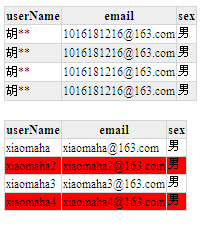
拖动表头宽度
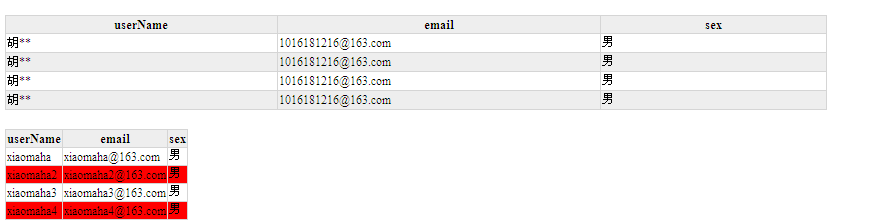
编辑状态改变背景色
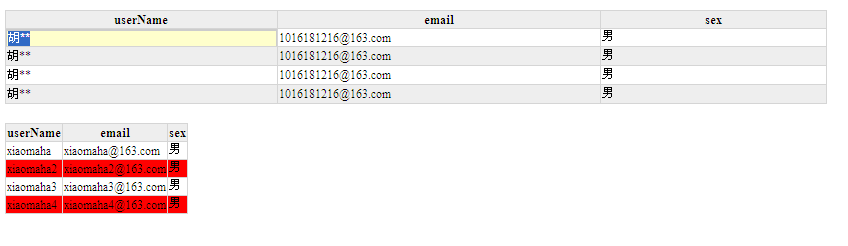
编辑后回车 被编辑过的td会改变颜色
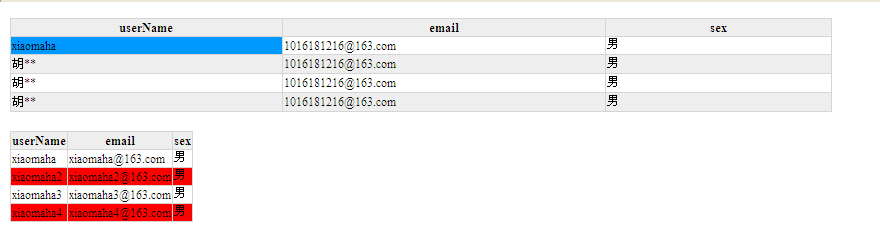
---------------------bestTableOver------------------
可拖动的div
(function($){ $.fn.bestDrag = function(options){var defaults = {}var opts = $.extend(defaults, options);this.each(function(){var tag = $(this);drog(tag);});//到处乱拖function drog(tag){$(tag).mousedown(function(e){ $(this).css("cursor","move"); var offset = $(this).offset(); var x = e.clientX-offset.left; var y = e.clientY-offset.top; $(document).bind("mousemove",function(event){ var _x = event.clientX-x; var _y = event.clientY-y; $(tag).animate({left:_x,top:_y},0); }); });$(document).mouseup(function() { $(tag).css("cursor","default"); $(this).unbind("mousemove"); }); }};})(jQuery);页面引入jquery和自定义的jquery.bestDrag.js
<!DOCTYPE HTML PUBLIC "-//W3C//DTD HTML 4.01 Transitional//EN"><html> <head> <title>test.html</title> <meta http-equiv="keywords" content="keyword1,keyword2,keyword3"> <meta http-equiv="description" content="this is my page"> <meta http-equiv="content-type" content="text/html; charset=UTF-8"> <script type="text/javascript" src="js/jquery.min.js"></script> <script type="text/javascript" src="js/jquery.bestDrag.js"></script> <style type="text/css"> div{ background:#660099; width:100px; height:100px; text-align:center; position:absolute; z-index:1; left:100px; top:100px; } </style> <!--<link rel="stylesheet" type="text/css" href="./styles.css">--><script type="text/javascript">$(document).ready(function(){$('div').bestDrag();</script> </head> <body> <div>可拖动的div</div></body></html>显示结果:很平滑、无延迟


点击下载