JQuery 日历控件Datepicker的简单使用
一、相关参考:
http://docs.jquery.com/UI/Datepicker???????? ?JQuery官网关于Datapicker的使用
http://jqueryui.com/demos/datepicker/??????? JQuery UI官网关于Datapicker的使用
?
二、准备工作:
下载
1、jQuery 1.6.1 Released?????????????????? http://blog.jquery.com/2011/05/12/jquery-1-6-1-released/
2、jquery-ui-1.8.13.custom.zip?????????? http://jqueryui.com/download
?
三、实现?
1、在eclipse中建立Dynamic Web Project,命名为myjquery。
2、在WebContent目录下建立Folder,命名为为js,拷入相关的js文件。
包括:
jquery-1.6.1.min.js?? (JQuery)
jquery-ui-1.8.13.custom.min.js —atapicke)
jquery.ui.datepicker-zh-CN.js? (中文化 jquery-ui-1.8.13.custom\development-bundle\ui\i18n 目录下)
3、将JQuery Ui 插件包 jquery-ui-1.8.13.custom 下的文件夹css拷入到项目的WebContent目录下。
代码(datepicker.jsp):
?
<%@ page language="java" contentType="text/html; charset=UTF-8" pageEncoding="UTF-8"%><!DOCTYPE html PUBLIC "-//W3C//DTD HTML 4.01 Transitional//EN" "http://www.w3.org/TR/html4/loose.dtd"><html><head><meta http-equiv="Content-Type" content="text/html; charset=UTF-8"><title>日历控件</title> <link href="css/ui-lightness/jquery-ui-1.8.13.custom.css" rel="stylesheet" type="text/css"/> <script src="js/jquery-1.6.1.min.js"></script> <script src="js/jquery-ui-1.8.13.custom.min.js"></script> <script type="text/javascript" src="js/jquery.ui.datepicker-zh-CN.js"></script> <script type="text/javascript"> $(function() { $( "#datepicker" ).datepicker({ dateFormat: 'yy年mm月dd日', autoSize: true }); $('#datepicker').datepicker('option', $.datepicker.regional['zh-CN']); }); </script> <style type="text/css"> .ui-datepicker { width: 17em; padding: .2em .2em 0; font-size: 15px;} /*覆盖了jquery-ui-1.8.13.custom.css中的.ui-datepicker,用于调整大小*/ </style> </head><body><h3>请选择日期:</h3><P>Date: <input id=datepicker type=text></P></body></html> ?
四、截图
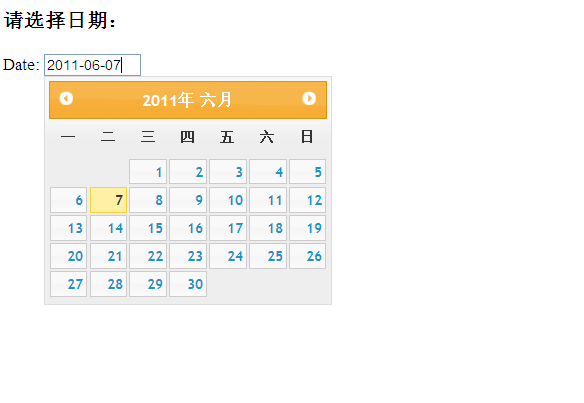
?
?
?