JQuery和Servlet实现上传进度条
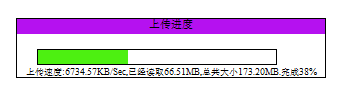
1,完整源码还包含:fileUploadStatus.java、myProgressListener.java、progressServlet.java、uploadServlet.java四个类
下载地址:.http://download.csdn.net/detail/software0116/4626823
Js代码
var startTime;$(document).ready(function () {$("#subButton").click(function () {var myDate = new Date();startTime = myDate.getTime();$(this).attr("disabled", true);$("#uploadForm").submit();$("#progress").show();window.setTimeout("getProgressBar()", 1000);});$("#close").click(function(){$("#progress").hide();});});function getProgressBar() {var timestamp = (new Date()).valueOf();var bytesReadToShow = 0;var contentLengthToShow = 0;var bytesReadGtMB = 0;var contentLengthGtMB = 0;$.getJSON("/uploadProgress/getBar", {"t":timestamp}, function (json) {var bytesRead = (json.pBytesRead / 1024).toString();if (bytesRead > 1024) {bytesReadToShow = (bytesRead / 1024).toString();bytesReadGtMB = 1;}else{bytesReadToShow = bytesRead.toString();}var contentLength = (json.pContentLength / 1024).toString();if (contentLength > 1024) {contentLengthToShow = (contentLength / 1024).toString();contentLengthGtMB = 1;}else{contentLengthToShow= contentLength.toString();}bytesReadToShow = bytesReadToShow.substring(0, bytesReadToShow.lastIndexOf(".") + 3);contentLengthToShow = contentLengthToShow.substring(0, contentLengthToShow.lastIndexOf(".") + 3);if (bytesRead == contentLength) {$("#close").show();$("#uploaded").css("width", "230px");if (contentLengthGtMB == 0) {$("div#info").html("\u4e0a\u4f20\u5b8c\u6210\uff01\u603b\u5171\u5927\u5c0f" + contentLengthToShow + "KB.\u5b8c\u6210100%");} else {$("div#info").html("\u4e0a\u4f20\u5b8c\u6210\uff01\u603b\u5171\u5927\u5c0f" + contentLengthToShow + "MB.\u5b8c\u6210100%");}window.clearTimeout(interval);$("#subButton").attr("disabled", false);} else {var pastTimeBySec = (new Date().getTime() - startTime) / 1000;var sp = (bytesRead / pastTimeBySec).toString();var speed = sp.substring(0, sp.lastIndexOf(".") + 3);var percent = Math.floor((bytesRead / contentLength) * 100) + "%";$("#uploaded").css("width", percent);if (bytesReadGtMB == 0 && contentLengthGtMB == 0) {$("div#info").html("\u4e0a\u4f20\u901f\u5ea6:" + speed + "KB/Sec,\u5df2\u7ecf\u8bfb\u53d6" + bytesReadToShow + "KB,\u603b\u5171\u5927\u5c0f" + contentLengthToShow + "KB.\u5b8c\u6210" + percent);} else {if (bytesReadGtMB == 0 && contentLengthGtMB == 1) {$("div#info").html("\u4e0a\u4f20\u901f\u5ea6:" + speed + "KB/Sec,\u5df2\u7ecf\u8bfb\u53d6" + bytesReadToShow + "KB,\u603b\u5171\u5927\u5c0f" + contentLengthToShow + "MB.\u5b8c\u6210" + percent);} else {if (bytesReadGtMB == 1 && contentLengthGtMB == 1) {$("div#info").html("\u4e0a\u4f20\u901f\u5ea6:" + speed + "KB/Sec,\u5df2\u7ecf\u8bfb\u53d6" + bytesReadToShow + "MB,\u603b\u5171\u5927\u5c0f" + contentLengthToShow + "MB.\u5b8c\u6210" + percent);}}}}});var interval = window.setTimeout("getProgressBar()", 500);}jsp代码
<%@ page language="java" import="java.util.*" pageEncoding="UTF-8"%><%String path = request.getContextPath();String basePath = request.getScheme() + "://"+ request.getServerName() + ":" + request.getServerPort()+ path + "/";%><!DOCTYPE HTML PUBLIC "-//W3C//DTD HTML 4.01 Transitional//EN"><html><head><base href="<%=basePath%>"><title>上传进度条</title><script type="text/javascript" src="<%=path%>/js/jquery-1.3.2.min.js"></script><script type="text/javascript" src="<%=path%>/js/progressBar.js"></script><style type="text/css">body {font-size: 11px;}#progress {left: 400px;top: 200px;position: absolute;width: 320px;height: 50px;border: 1px solid black;display: none;}#progressBar {border: 1px solid black;width: 240px;height: 15px;margin-left: 20px;margin-top: 15px;}#uploaded {height: 10px;width: 1px;background-color: #4DF011;}#title {height: 15px;background-color: #B511F0;pading: -10px;}#close {width: 10px;height: 10px;right: 1px;top: 0px;position: absolute;display: none;cursor: pointer;}</style></head><body><iframe id='target_upload' name='target_upload' src=''style='display: none'></iframe><form action="./upload" id="uploadForm" enctype="multipart/form-data"method="post" target="target_upload"><input type="file" name="upload"><input type="button" id="subButton" value="上传"></form><div id="progress"><div id="title" align="center"><span id="text">上传进度</span><div id="close">X</div></div><div id="progressBar"><div id="uploaded"></div></div><div style="font-size:9px;" align="center" id="info"></div></div></body></html>