JavaScript dom操作一些例子
dom节点操作
克隆节点
<!DOCTYPE html PUBLIC "-//W3C//DTD XHTML 1.0 Transitional//EN" "http://www.w3.org/TR/xhtml1/DTD/xhtml1-transitional.dtd"><html xmlns="http://www.w3.org/1999/xhtml"><head><meta http-equiv="Content-Type" content="text/html; charset=utf-8" /><title>cloneNode demo</title><script type="text/javascript">function clone(){var p = document.body.getElementsByTagName('p')[0];var newNode = p.cloneNode(false);document.getElementById('containter').appendChild(newNode);}function cloneWithChildNodes(){var p = document.body.getElementsByTagName('p')[0];var newNode = p.cloneNode(true);document.getElementById('containter').appendChild(newNode);}</script><style type="text/css">p {line-height:20px;background-color:#ff0;height:20px;width:400px;}</style></head><body><h1>cloneNode demo</h1> <div id="containter"><p>JavaScript cloneChild function demo</p> </div> <input type="button" value="clone node without child nodes" onclick="clone();" /> <input type="button" value="clone node with child nodes" onclick="cloneWithChildNodes();" /></body></html>创建节点,增加节点
<!DOCTYPE html PUBLIC "-//W3C//DTD XHTML 1.0 Transitional//EN" "http://www.w3.org/TR/xhtml1/DTD/xhtml1-transitional.dtd"><html xmlns="http://www.w3.org/1999/xhtml"><head><meta http-equiv="Content-Type" content="text/html; charset=utf-8" /><title>create & add node demo</title><style type="text/css">* {margin:0;padding:0;}html {background-color:#eee;height:100%;}body {padding:15px;font-size:11px;width:500px;background-color:#fff;height:100%;font-family:Tahoma;border-left:20px solid #ccc;}ul {list-style:none;border-top:1px solid #999;height:350px;overflow-x:auto;overflow-y:scroll;}span {font-weight:bold;font-size:12px;}li {border-bottom:1px dashed #666;line-height:20px;}form {margin-top:10px;border-top:1px solid #999;}label {display:block;line-height:20px;font-weight:bold;cursor:pointer;background-color:#999;color:#fff;margin:3px 0;padding-left:5px;width:100%;}#txtName , #txtContent {width:100%;font-size:11px;}#btnSubmit {display:block;margin-top:3px;border:1px solid #666;padding:2px 5px;width:100%;}</style><script type="text/javascript">function submitMsg(){var name = document.getElementById('txtName').value;//取得name值var content = document.getElementById('txtContent').value;//取得message值var span = document.createElement('span');//创建span节点var nameText = document.createTextNode(name);//创建文本节点,文本值为name值span.appendChild(nameText);//将文本节点添加到span节点中var p = document.createElement('p');//创建p节点var contentText = document.createTextNode(content);//创建文本节点,文本值为message值p.appendChild(contentText);//将文本节点添加到p节点中var li = document.createElement('li');//创建li节点li.appendChild(span);//将span节点添加到li节点中li.appendChild(p);//将p节点添加到li节点中document.getElementById('msgList').appendChild(li);//将li节点添加到msgList节点中}</script></head><body><h1>Guest Book</h1> <ul id="msgList"> <li> <span>Robin Chen</span> <p>Welcome,My friends.</p> </li> </ul> <form name="fmMsg" id="fmMsg" action="?" method="post"> <h2>Message</h2> <label for="txtName">name</label> <input name="txtName" type="text" id="txtName" value="guest" onfocus="this.select();" /> <label for="txtContent">Message</label> <textarea name="txtContent" rows="4" id="txtContent" onfocus="this.select();">something to say...</textarea> <input type="button" value="Click here to submit your message!" id="btnSubmit" onclick="submitMsg();" /> </form></body></html>在html文档中的某个节点前添加一个节点
<!DOCTYPE html PUBLIC "-//W3C//DTD XHTML 1.0 Transitional//EN" "http://www.w3.org/TR/xhtml1/DTD/xhtml1-transitional.dtd"><html xmlns="http://www.w3.org/1999/xhtml"><head><meta http-equiv="Content-Type" content="text/html; charset=utf-8" /><title>insertBefore demo</title><script type="text/javascript">function addNode(){var pos = parseInt(document.getElementById('txtPos').value) || 0;var li = document.createElement('li');var text = document.createTextNode('new node');li.appendChild(text);li.style.backgroundColor = '#ff0'; //新节点背景色为黄色var ul = document.getElementById('parent');var lis = ul.getElementsByTagName('li');if(pos >= lis.length){alert('error index');return;}ul.insertBefore(li,lis[pos]); //在lis[pos]节点前插入新节点li}</script></head><body><ul id="parent"> <li>child node</li> <li>child node</li> <li>child node</li> <li>child node</li> <li>child node</li> <li>child node</li> <li>child node</li> <li>child node</li> <li>child node</li> </ul> <label for="txtPos">node position:</label> <input type="text" id="txtPos" /> <input type="button" value="add" onclick="addNode();" /></body></html>删除子节点
<!DOCTYPE html PUBLIC "-//W3C//DTD XHTML 1.0 Transitional//EN" "http://www.w3.org/TR/xhtml1/DTD/xhtml1-transitional.dtd"><html xmlns="http://www.w3.org/1999/xhtml"><head><meta http-equiv="Content-Type" content="text/html; charset=utf-8" /><title>removeChild demo</title><style type="text/css">* {margin:0;padding:0;}body {font-size:12px;font-family:Tahoma;padding-left:20px;}ul {list-style:none;border:1px solid #666;background-color:#eee;width:400px;padding:10px;margin:10px 0;}li {width:100%;border-bottom:1px dashed #666;padding:5px 0;}.btn {float:right;}</style><script type="text/javascript">/* * 删除选中的节点 */function deleteSelectedItems(){var cbs = document.getElementsByName('cb');var list = document.getElementById('list');var lis = list.getElementsByTagName('li');var deletetItems = [];//需要删除的节点的集合for(var i = 0; i < cbs.length; i ++){/* * 如果li中的checkbox被选中,则将该li节点加入到deleteItems数组中 */if(cbs[i].checked){deletetItems.push(lis[i]);}}for(var i = 0; i < deletetItems.length; i ++){list.removeChild(deletetItems[i]);//删除节点}}/* * 在document的click事件中判断是否点击了li中的按钮,并删除li元素 */document.onclick = function(e){var evt = arguments[0] || event;var elm = evt.target || evt.srcElement;if(elm.type == 'button' && elm.className == 'btn'){var li = elm.parentNode;li.parentNode.removeChild(li);}}</script></head><body><h1>removeChild demo</h1><ul id="list"> <li> <input type="button" value="delete" /> <input type="checkbox" name="cb" /> <span>Wildfires May Bring Other Hardships</span> </li> <li> <input type="button" value="delete" /> <input type="checkbox" name="cb" /> <span>Sentence in Teen Sex Case Ruled Illegal</span> </li> <li> <input type="button" value="delete" /> <input type="checkbox" name="cb" /> <span>What's the Biggest Shocker of the Week?</span> </li> <li> <input type="button" value="delete" /> <input type="checkbox" name="cb" /> <span>Spears Custody Case Closed to Media</span> </li> <li> <input type="button" value="delete" /> <input type="checkbox" name="cb" /> <span>Many States Facing Water Shortages</span> </li> <li> <input type="button" value="delete" /> <input type="checkbox" name="cb" /> <span>Student's Death Tied to Staph 'Superbug'</span> </li> <li> <input type="button" value="delete" /> <input type="checkbox" name="cb" /> <span>Astronauts Prepare to Open Station Room</span> </li> <li> <input type="button" value="delete" /> <input type="checkbox" name="cb" /> <span>Lawmaker's Remarks Offend the Dutch</span> </li> <li> <input type="button" value="delete" /> <input type="checkbox" name="cb" /> <span>Rice Looks to History for Peace Effort</span> </li> <li> <input type="button" value="delete" /> <input type="checkbox" name="cb" /> <span>US to Order Diplomats to Serve in Iraq</span> </li> </ul> <input type="button" value="delete selected items" onclick="deleteSelectedItems();" /></body></html>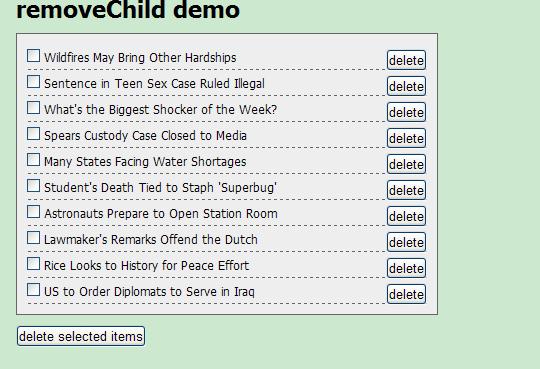
替代子节点
<!DOCTYPE html PUBLIC "-//W3C//DTD XHTML 1.0 Transitional//EN" "http://www.w3.org/TR/xhtml1/DTD/xhtml1-transitional.dtd"><html xmlns="http://www.w3.org/1999/xhtml"><head><meta http-equiv="Content-Type" content="text/html; charset=utf-8" /><title>replaceChild demo</title><script type="text/javascript">function replaceNode(){ document.write("replaceNode");var pos = parseInt(document.getElementById('txtPos').value) || 0;var new= document.createElement('li');var text = document.createTextNode('new node');new.appendChild(text);new.style.backgroundColor = '#ff0';var ul = document.getElementById('parent');var lis = ul.getElementsByTagName('li');if(pos >= lis.length){alert('error index');return;}ul.replaceChild(new,lis[pos]); //替换子节点 alert("替换成功"); }</script></head><body><ul id="parent"> <li>child node</li> <li>child node</li> <li>child node</li> <li>child node</li> <li>child node</li> <li>child node</li> <li>child node</li> <li>child node</li> <li>child node</li> </ul> <label for="txtPos">node position:</label> <input type="text" id="txtPos" /> <input type="button" value="replace" onclick="replaceNode();" /></body></html>源码见附件