tomcat的配置与监控
?
1.tomcat的配置:
a.修改tomcat的最大连接数,提升并发处理能力.
?
<Connector port="8080" protocol="HTTP/1.1" connectionTimeout="20000" redirectPort="8443" enableLookups="false" acceptCount="1000" maxThreads="300" minSpareThreads="25" maxSpareThreads="75" />
?上例子中,设置tomcat的最大连接数为1000(最大连接数同时受到操作系统能内核的限制).同时最多处理请求数为300.minSpareThreads的含义是,即使所维持的线程池线程最小数,初始化的时候创建线程数为25.maxSpareThreads为75的含义一旦创建的线程超过75,tomcat开始尝试清理不再需要的线程.enableLookups设为false停用域名解析功能,不将进行请求的客户机的域名转换为IP.
b.修改tomcat运行的JVM参数.
?
set JAVA_OPTS=-server -Xmx1024m -Xms512m -XX:MaxNewSize=256m -XX:MaxPermSize=256m
?在catalina.bat中添加JVM运行参数如上.使tomcat运行于server mode.增加tomcat的最大使用内存为1024m,初始使用内存为512m.调整对象堆的大小,XX:MaxNewSize调整Young Generation的堆大小为256m,用于存储新建对象.XX:MaxPermSize调整为256m,以应对web程序可能需要加载较多类库.
?
2.tomcat的管理
a.Web
tomca提供了http://[ip]:[port]/manager/status?对tomcat进行监控,http://[ip]:[port]?/manager/html进行程序部署的管理.具有manager-gui角色的用户可以登录进行管理.可以进行的操作包括:运行数据的查看,程序的部署,卸载,停止,启动,重启.可以查看Connector的运行数据,如,请求处理时间,当前连接数等.
?
<tomcat-users><!-- NOTE: By default, no user is included in the "manager-gui" role required to operate the "/manager/html" web application. If you wish to use this app, you must define such a user - the username and password are arbitrary.--><!-- NOTE: The sample user and role entries below are wrapped in a comment and thus are ignored when reading this file. Do not forget to remove <!.. ..> that surrounds them.--> <role rolename="tomcat"/> <role rolename="role1"/> <role rolename="manager-gui"/> <role rolename="manager-script"/> <role rolename="manager-jmx"/> <user username="tomcat" password="tomcat" roles="tomcat,manager-gui,manager-script,manager-jmx"/> <user username="both" password="tomcat" roles="tomcat,role1"/> <user username="role1" password="tomcat" roles="role1"/></tomcat-users>
?b.使用jmx对tomcat运行数据进行监控.
在启动的时候加入一下启动参数:
?
set JAVA_OPTS=-Dcom.sun.management.jmxremote
-Dcom.sun.management.jmxremote.port=8998?
-Dcom.sun.management.jmxremote.ssl=false?
-Dcom.sun.management.jmxremote.authenticate=true
?开启jmx服务需要配置jre\lib\management下的jmxremote.access,jmxremote.password文件.将jmxremote.password文件的权限设置仅仅当前用户可读,文档原文为:"The password file should be read-only and only accessible by the operating system user Tomcat is running as."
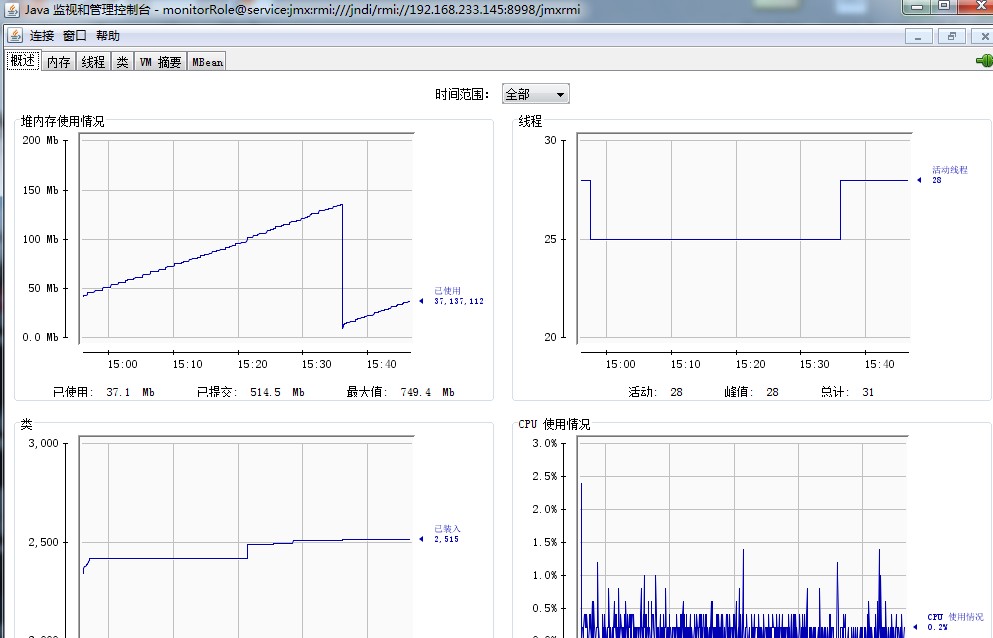
开启jmx服务之后,可以使用jconsole或者jvisualvm工具对tomcat运行时的jvm数据进行监控.如果开启了jmx的readwrite权限,也可以编写代码对tomcat进行管理,比如停止或者启动web应用.