Axis2 WebService(配置、发布、调用)
?
1、新建 Axis2Service1 java工程。
2、新建 \Axis2Service1\src\ws\TestWs.java
package ws;
public class TestWs {
?public String showName(String name) {return name; }
?public String getName() {return “Axis2Service Sample”; }??
}
二、arr部署方式
1、手动打包
新建\Axis2Service1\deploy文件夹 ,将\Axis2Service1\bin下的class文件复制过来。
新建\Axis2Service1\deploy\META-INF\services.xml文件
<service name=”AxisService”>
?<description>AxisService</description>
?<parameter name=”ServiceClass”>ws.TestWs</parameter>
?<operation name=”showName”>
??<messageReceiver
???class=”org.apache.axis2.rpc.receivers.RPCMessageReceiver” />
?</operation>
?<operation name=”getName”>
??<messageReceiver
???class=”org.apache.axis2.rpc.receivers.RPCInOnlyMessageReceiver” />
?</operation>
</service>
生成aar包 \Axis2Service1\deploy>jar cvf AxisService.aar . (注意带.号)
?
2、插件打包
IDE中选择New->other->Axis2 Service Archiver,点击Next;
Class File Location:选择Axis2Service1\bin目录,点击Next;
勾选Skip WSDL,点击Next;
Service Archiver 选择jar位置,如果没有jar包就直接点击Next;
勾选Generate the service xml automatically 自动生成XML file文件,点击Next
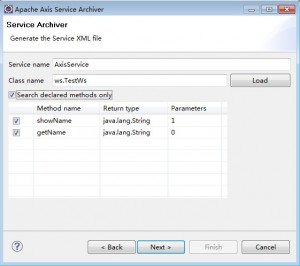
service name,输入:AxisService,然后在class name 中填写要发布的类(全路径),点击load。勾选 Search declared methods only。点击next
?
?
1、新建java web project工程。
2、文件复制
%TOMCAT-HOME%\webapps\axis2\WEB-INF\lib 复制到 \Axis2Service2\WebRoot\WEB-INF\lib 下,并加入工程引用。
%TOMCAT-HOME%\webapps\axis2\WEB-INF\conf 复制到 \Axis2Service2\WebRoot\WEB-INF\conf?
%TOMCAT-HOME%\webapps\axis2\WEB-INF\modules 复制到 \Axis2Service2\WebRoot\WEB-INF\modules
3、web.xml 代码如下
<?xml version=”1.0″ encoding=”UTF-8″?>
<web-app id=”wmf” version=”2.4″ xmlns=”http://java.sun.com/xml/ns/j2ee”
?xmlns:xsi=”http://www.w3.org/2001/XMLSchema-instance”
?xsi:schemaLocation=”http://java.sun.com/xml/ns/j2ee http://java.sun.com/xml/ns/j2ee/web-app_2_4.xsd“>
?<servlet>
??<servlet-name>AxisServlet</servlet-name>
??<servlet-class>org.apache.axis2.transport.http.AxisServlet</servlet-class>
??<load-on-startup>1</load-on-startup>
?</servlet>
?<servlet-mapping>
??<servlet-name>AxisServlet</servlet-name>
??<url-pattern>/services/*</url-pattern>
?</servlet-mapping>
</web-app>
?
2、新建 \Axis2Service2\src\ws\TestWs.java
package ws;
public class TestWs {
?public String showName(String name) {return name; }
?public String getName() {return “Axis2Service Sample”; }??
}
3、新建\Axis2Service2\WebRoot\WEB-INF\services目录。
4、新建一个AxisService服务
AxisService\META-INF\services.xml
<service name=”AxisService”>
?<description>AxisService</description>
?<parameter name=”ServiceClass”>ws.TestWs</parameter>
?<operation name=”showName”>
??<messageReceiver
???class=”org.apache.axis2.rpc.receivers.RPCMessageReceiver” />
?</operation>
?<operation name=”getName”>
??<messageReceiver
???class=”org.apache.axis2.rpc.receivers.RPCInOnlyMessageReceiver” />
?</operation>
</service>
启动tomcat后,访问http://localhost:8085/Axis2Service2/services/AxisService?wsdl看是否正常。
?
?AXIS2调用Web Services
?
一、客户端stub文件生成
1、脚本生成方式
去AXIS2的解压目录下bin(%AXIS2_HOME%\bin\)下执行下面语句
wsdl2java -uri http://localhost:8085/Axis2Service2/services/AxisService?wsdl -p ws -s -o stub
-p参数指定了生成的Java类的包名
-o参数指定了生成的一系列文件保存的根目录
在stub\src\ws自动生成AxisServiceStub.java
2、插件生成方式
IDE中选择New->other->Axis2 Code Generator,点击Next;
勾选Generate Java source code from a WSDL file,点击Next;
WSDL file location,输入:http://localhost:8085/Axis2Service2/services/AxisService?wsdl,点击Next;
如果路径不对会提示:Specified WSDL is invalid!, Please select a validated *.wsdl/*.xml file on previous page.
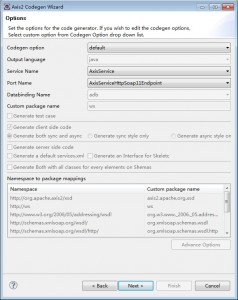
正确的话界面如下,点击next;
?
?
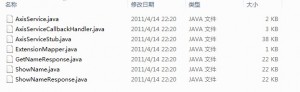
提示:All operations completed successfully! 生成成功。在D:\src\ws 自动生成了stub一系列文件,其中ws是包名。
?
?
上面代码展示了如何从webservice中 调用方法。
?
相关工程资源下载
?
Axis2Service1工程
Axis2Service2工程
Axis2Client工程