更贴心、更友好的用户提示,让alert见鬼去吧!更新1.2版本
玩过QQ开心农场的应该都见过,每次卖完东西都会闪出一个可以自动消失的提示,免去了alert提示用户点击确定的烦恼,用户的体验性更加的流畅。本脚本实现效果跟那个基本一样,如图: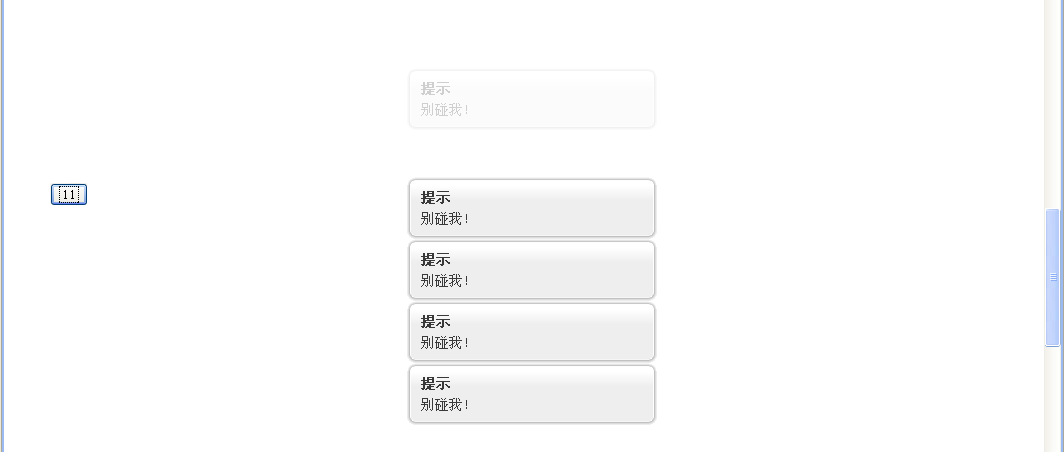
本脚本基于专为网站开发的Ext-core,主体部分来自于Ext的example,本人根据需求进行了适量修改。
脚本特点:
1.跨浏览器,已测试ie6、firefox、chrome
2.基于绝对定位,无论窗体如何滚动,提示框都会出现在页面区域正中间
3.可以同时存在多个,
4.使用简单,只需要ghostTip('标题','提示信息');即可
版本更新:
2010-4-11 修改了元素居中的算法
贴下JS代码,其它文件请从例子中下载
/** * 此方法用于显示一个自动消失的提示框,第二个参数可以设定为字符串模板, * * 例子: * ghostTip('提示','你点击了我'); * 1.2改动: * 1.去掉了自定义获取浏览器可视区域(viewport)宽高的函数,改用Ext核心函数 * * @author chemzqm@gmail.com * @version 1.2 */(function(){ var msgCt;var d=Ext.lib.Dom; /** * 将Element置于屏幕正中心,无视页面滚动条 * @param {Object} el */ function centerEl(el){var xy=[d.getViewportWidth(),d.getViewportHeight()]; var x = Ext.getBody().getScroll().left+(xy[0] - el.getWidth()) / 2; var y = Ext.getBody().getScroll().top+(xy[1] - el.getHeight()) / 2; el.setXY([x,y]); } function createBox(t, s){ return ['<div class="msg">', '<div class="x-box-tl"><div class="x-box-tr"><div class="x-box-tc"></div></div></div>', '<div class="x-box-ml"><div class="x-box-mr"><div class="x-box-mc"><h3>', t, '</h3>', s, '</div></div></div>', '<div class="x-box-bl"><div class="x-box-br"><div class="x-box-bc"></div></div></div>', '</div>'].join(''); } window.ghostTip = function(title, format){ if (!msgCt) { msgCt = Ext.DomHelper.append(document.body, { id: 'msg-div' }, true); } var s = String.format.apply(String, Array.prototype.slice.call(arguments, 1)); var m = Ext.DomHelper.append(msgCt, { html: createBox(title, s) }, true); centerEl(msgCt); m.slideIn('t').pause(2).ghost('t', { remove: true }); }})();1 楼 mxl86 2010-06-19 哥们,你这个IE8不能用啊~~~360浏览器(IE内核)也没反应~~~FF倒是没问题 2 楼 cnshell 2010-07-09 兼容性再好点就完美了