GWT通信机制初探
GWT RPC:GWT提供类似Swing的界面开发模式(基于UI组件重用,事件注册及监听等机制),遵循此开发模式的客户端Java代码将被编译为Javascript代码(并优化,压缩),以运行于客户端浏览器中。然而,客户端Java代码不仅仅包含即将呈现在HTML页面中的UI元素,还包含提供服务的接口和相对应的代理接口(实现异步调用服务),服务接口声明即将被
客户端通过RPC调用的方法。服务器端实现该方法来提供具体服务。服务架构参考下图: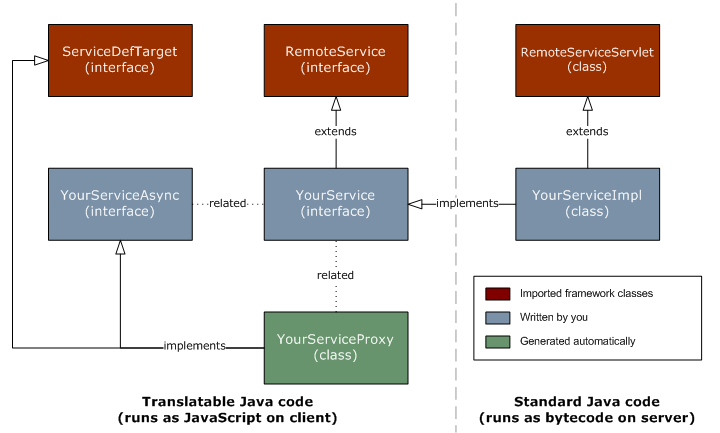
服务接口必须继承一个空接口RemoteService:
//提供getAddresses()服务的接口类import java.util.List;import com.google.gwt.user.client.rpc.RemoteService;import com.google.gwt.user.client.rpc.RemoteServiceRelativePath;@RemoteServiceRelativePath("address")public interface AddressService extends RemoteService{public List<Address> getAddresses();}/*--------------------*///代理接口,提供异步调用服务import java.util.List;import com.google.gwt.user.client.rpc.AsyncCallback;public interface AddressServiceAsync {public void getAddresses(AsyncCallback<List<Address>> callback);}服务接口的注释@RemoteServiceRelativePath("address")指定了代理接口调用的服务的相对路径(通常为servlet访问路径);
服务实现类
public class AddressServiceImpl extends RemoteServiceServlet implements AddressService{private static final long serialVersionUID = 7819604306802209305L; //实现从数据库查询地理信息的数据集@Overridepublic List<Address> getAddresses(){List<Address> addr_list = new ArrayList<Address>();DBConnectionPool pool = new DBConnectionPool("pool01", "com.mysql.jdbc.Driver", "jdbc:mysql://localhost:3306/db?autoReconnect=true&useUnicode=true&characterEncoding=UTF-8","admin", "admin123", 5);System.out.println("[INFO] Connection Pool created!");ResultSet rs = null;String sqlStmt = "SELECT addr_id,state,city,address,zip,description FROM address";try {Connection conn = pool.getConnection();System.out.println("[INFO] Connection to DB established!");PreparedStatement ps = conn.prepareStatement(sqlStmt);rs = ps.executeQuery();if(rs == null){System.out.println("[ERROR] Failed to query data from database!");return null;}System.out.println("[INFO] Execution of query for address list finished!");Address addr = null;int cnt = 0;while(rs.next()){addr = new Address();++cnt;System.out.println("[INFO] No. " + cnt + " of the result records.");addr.setId(rs.getLong("addr_id"));addr.setState(rs.getString("state") == null ? "N/A" : rs.getString("state"));addr.setCity(rs.getString("city"));addr.setAddress(rs.getString("address"));addr.setZip(rs.getString("zip"));addr.setDescription(rs.getString("description") == null ? "N/A" : rs.getString("description") );addr_list.add(addr);}} catch (SQLException e) {System.out.println("[ERROR] Failed to get field value from resultSet!");e.printStackTrace();}return addr_list;} @Overridepublic void onBeforeRequestDeserialized(String serializedRequest){System.out.println("[INFO] Received Serialized Request Diagram: " + serializedRequest); } @Overridepublic void onAfterResponseSerialized(String serializedResponse) {System.out.println("[INFO] Serialized Response Diagram to be sent: " + serializedResponse);}}实现类所继承的RemoteServiceServlet是GWT提供的核心Servlet处理类,该类接收客户请求,反序列化RPC请求数据包(GWT提供了序列化及反序列化类库),将反序列化之后的数据交由开发者做业务处理,处理结果将被序列化并组织为响应对象返回客户端。以下为该Servlet处理类的对请求的处理过程:
/** * Standard HttpServlet method: handle the POST. * * This doPost method swallows ALL exceptions, logs them in the * ServletContext, and returns a GENERIC_FAILURE_MSG response with status code * 500. * * @throws ServletException * @throws SerializationException */ @Override public final void processPost(HttpServletRequest request, HttpServletResponse response) throws IOException, ServletException, SerializationException { // Read the request fully. String requestPayload = readContent(request); // Let subclasses see the serialized request. onBeforeRequestDeserialized(requestPayload); // Invoke the core dispatching logic, which returns the serialized // result. String responsePayload = processCall(requestPayload); // Let subclasses see the serialized response. onAfterResponseSerialized(responsePayload); // Write the response. writeResponse(request, response, responsePayload); } //本方法处理反序列化后的请求数据 public String processCall(String payload) throws SerializationException { try { RPCRequest rpcRequest = RPC.decodeRequest(payload, this.getClass(), this); onAfterRequestDeserialized(rpcRequest); return RPC.invokeAndEncodeResponse(this, rpcRequest.getMethod(), rpcRequest.getParameters(), rpcRequest.getSerializationPolicy(), rpcRequest.getFlags()); } catch (IncompatibleRemoteServiceException ex) { log( "An IncompatibleRemoteServiceException was thrown while processing this call.", ex); return RPC.encodeResponseForFailure(null, ex); } }/*---------------------- RPC.java -------------------------*///RPC类中定义的方法invokeAndEncodeResponse,采用反射机制来调用具体的服务方法。 public static String invokeAndEncodeResponse(Object target, Method serviceMethod, Object[] args, SerializationPolicy serializationPolicy, int flags) throws SerializationException { if (serviceMethod == null) { throw new NullPointerException("serviceMethod"); } if (serializationPolicy == null) { throw new NullPointerException("serializationPolicy"); } String responsePayload; try { Object result = serviceMethod.invoke(target, args); responsePayload = encodeResponseForSuccess(serviceMethod, result, serializationPolicy, flags); } catch (IllegalAccessException e) { SecurityException securityException = new SecurityException( formatIllegalAccessErrorMessage(target, serviceMethod)); securityException.initCause(e); throw securityException; } catch (IllegalArgumentException e) { SecurityException securityException = new SecurityException( formatIllegalArgumentErrorMessage(target, serviceMethod, args)); securityException.initCause(e); throw securityException; } catch (InvocationTargetException e) { // Try to encode the caught exception // Throwable cause = e.getCause(); responsePayload = encodeResponseForFailure(serviceMethod, cause, serializationPolicy, flags); } return responsePayload; }onBeforeRequestDeserialized()和onAfterResponseSerialized()由实现类继承,以做定制化处理。
以下是从客户端获取的请求数据包及请求属性:
//final ArrayList<Address> addressList = new ArrayList<Address>();//final ListBox addresses = new ListBox();AddressServiceAsync as = (AddressServiceAsync) GWT.create(AddressService.class);as.getAddresses(new AsyncCallback<List<Address>>() {@Overridepublic void onSuccess(List<Address> result) {Window.alert("[INFO] Succeed to retrieve data from db!");Iterator<Address> it = result.iterator();Address address = null;while(it.hasNext()){address = new Address();address = it.next();System.out.println("[INFO] Address: " + address.getAddress());addresses.addItem(address.getAddress());addressList.add(address);}System.out.println("[INFO] Data in addresses ListBox:");addresses.setVisibleItemCount(result.size());addressGrid.setAddress(addressList.get(0));System.out.println("[INFO] [GMap.getAddresse()] Retrieved addresses already be populated into the ListBox!");}@Overridepublic void onFailure(Throwable caught) { String msg = "[ERROR] Failed to retrieve data from database!"; Window.alert(msg); System.out.println(msg); GWT.log(msg, caught); }});
服务接口及相应的异步接口由GWT编译至客户端Javascript中,由GWT Plugin根据服务器地址及端口,模块(Module),服务调用的页面来对服务器进行RPC调用。参考编译后的客户端JS代码(GWT Plugin负责连接服务器,调用服务端RPC服务):
if (!plugin) { // try searching for a v1 plugin for backwards compatibility var found = false; for (var i = 0; i < pluginFinders.length; ++i) { try { plugin = pluginFinders[i](); if (plugin != null && plugin.connect($hosted, $moduleName, window)) { return; } } catch (e) { } } loadIframe("http://gwt.google.com/missing-plugin"); } else { if (plugin.connect(url, topWin.__gwt_SessionID, $hosted, $moduleName, $hostedHtmlVersion)) { window.onUnload = function() { try { // wrap in try/catch since plugins are not required to supply this plugin.disconnect(); } catch (e) { } }; } else { if (errFn) { errFn(modName); } else { alert("Plugin failed to connect to hosted mode server at " + $hosted); loadIframe("http://code.google.com/p/google-web-toolkit/wiki/TroubleshootingOOPHM"); } } }