REST WebService的多资源路径
package com.easyway.jersey.rest;import java.util.HashSet;import java.util.Set;import javax.ws.rs.core.Application;import javax.ws.rs.ApplicationPath;/** *注册所有的服务 * 1.继承自 javax.ws.rs.core.Application * 2.使用 ApplicationPath注解类 * @author longgangbai * * * */@ApplicationPath("resources")public class CustomerApplication extends Application {/** * 注册各种资源 */ @Override public Set<Class<?>> getClasses() { final Set<Class<?>> classes = new HashSet<Class<?>>(); // register root resources/providers classes.add(MasterResourceService.class); classes.add(TextPlainService.class); classes.add(SimpleTextPlainService.class); classes.add(MultiplePathService.class); classes.add(MultipleService.class); return classes; }}?
?
package com.easyway.jersey.rest;import java.io.InputStream;import javax.servlet.ServletContext;import javax.ws.rs.GET;import javax.ws.rs.Produces;import javax.ws.rs.Path;import javax.ws.rs.core.Context;/** * 创建一个主的REST服务的 * @author longgangbai * */@Path("/start")public class MasterResourceService { /** * 获取Web容器相关的信息 */ @Context ServletContext sc; /** * 设置将获取的资源转换为流信息在页面index.html显示 * @return */ @GET @Produces("text/html") public InputStream doGet() { return sc.getResourceAsStream("/index.html"); } }?
?
?
package com.easyway.jersey.rest;import com.sun.jersey.api.representation.Form;import java.net.URL;import javax.activation.DataSource;import javax.activation.FileDataSource;import javax.ws.rs.GET;import javax.ws.rs.POST;import javax.ws.rs.Produces;import javax.ws.rs.Path;import javax.ws.rs.PathParam;import javax.ws.rs.core.Context;import javax.ws.rs.core.MultivaluedMap;import javax.ws.rs.core.Response;import javax.ws.rs.core.UriInfo;import javax.ws.rs.core.MediaType;/** * 这个类比较特殊采用多层次的匹配格式调用不同的方法 * * @author longgangbai * */@Path("/multiplePathService/{arg1}/{arg2}")public class MultiplePathService { //获取请求的各种参数@Context UriInfo uriInfo; int count =0; /** * * 在post方式下返回的结果 */ @POST public void doPost() { System.out.println("MultiplePathService POST"); } /** * 这个方法并不具有具体的方法实现,只提供判断服务的去向,调用的方法 * * @return */ @GET public Response doGet() { MultivaluedMap<String, String> params = uriInfo.getPathParameters(); String arg1 = params.getFirst("arg1"); String arg2 = params.getFirst("arg2"); //输出相关的查询参数 for (String key : uriInfo.getQueryParameters().keySet()) System.out.println("key: " + key + " value: " + uriInfo.getQueryParameters().getFirst(key)); //获取查询参数 int rep = Integer.parseInt(uriInfo.getQueryParameters().getFirst("rep")); String help = "<pre>Received args: arg1: "+arg1+" arg2: "+arg2+"\n" +"Please specify a \"rep\" queryParameter using one of the following values\n" +"For example, http://localhost:8080/AdvanceJersey/resources/multiplePathService/2/4?rep=0 \n" +"Valid Representations:\n" +"\t0 - StringRepresentation of this message\n" +"\t1 - StringRepresentation\n" +"\t2 - FormURLEncodedRepresentation\n" +"\t3 - DataSourceRepresentation\n</pre>"; Response r = null; System.out.println("rep: "+rep); switch (rep) { case 0: //请求帮助 r = Response.ok(help, MediaType.TEXT_PLAIN). header("resource3-header", MediaType.TEXT_PLAIN).build(); break; case 1: // r = Response.ok(getStringRep(arg1, arg2),MediaType.TEXT_PLAIN). header("resource3-header",MediaType.TEXT_PLAIN).build(); break; case 2: r = Response.ok(getFormURLEncodedRep(arg1, arg2), "application/x-www-form-urlencoded"). header("resource3-header", "application/x-www-form-urlencoded").build(); break; case 3: r = Response.ok(getImageRep(), "image/jpg"). header("resource3-header", "image/jpg").build(); break; default : r = Response.ok(help, MediaType.TEXT_PLAIN).build(); break; } return r; } /** * 此方法的请求的路径为: * http://localhost:8080/AdvanceJersey/resources/multiplePathService/2/4?rep=0 * @param arg1 * @param arg2 * @return */ @Produces(MediaType.TEXT_PLAIN) @GET public String getStringRep(@PathParam("arg1")String arg1, @PathParam("arg2")String arg2) { return "representation: StringRepresentation: arg1: " +arg1+" arg2: "+arg2+"\n\n"; } /** /** * 此方法的请求的路径为: * http://localhost:8080/AdvanceJersey/resources/multiplePathService/2/4?rep=2 * 上传下载使用这种表单类型 * * @param arg1 * @param arg2 * @return */ @Produces(MediaType.APPLICATION_FORM_URLENCODED) @GET public Form getFormURLEncodedRep( @PathParam("arg1")String arg1, @PathParam("arg2")String arg2) { Form urlProps = new Form(); urlProps.add("representation", "FormURLEncodedRepresentation"); urlProps.add("name", "Master Duke"); urlProps.add("sex", "male"); urlProps.add("arg1", arg1); urlProps.add("arg2", arg2); return urlProps; } /** * 此方法的请求的路径为: * http://localhost:8080/AdvanceJersey/resources/multiplePathService/2/4?rep=3 * * * @return */ @Produces("image/jpg") @GET public DataSource getImageRep() { URL jpgURL =this.getClass().getResource("java.jpg"); return new FileDataSource(jpgURL.getFile()); } }?
?
?
package com.easyway.jersey.rest;import javax.ws.rs.Consumes;import javax.ws.rs.GET;import javax.ws.rs.POST;import javax.ws.rs.Path;import javax.ws.rs.Produces;import javax.ws.rs.QueryParam;import javax.ws.rs.core.MediaType;import javax.ws.rs.core.Response;/** * 这个类比较特殊在拥有多个Path解析路径,采用模糊匹配的模式到相应的结果 * * @author longgangbai * */@Path("/multipleService")@Consumes(MediaType.TEXT_PLAIN)public class MultipleService { public MultipleService() { } /** * 访问路径: * http://localhost:8080/AdvanceJersey/resources/multipleService?format=text/html * html格式返回 * @return */ @GET @Produces(MediaType.TEXT_HTML) public String getAsHtml() { return "<html><head></head><body><p>Hello World</p></body></html>"; } /** * 访问路径: * http://localhost:8080/AdvanceJersey/resources/multipleService?format=text/xml * xml格式返回 * @return */ @GET @Produces(MediaType.TEXT_XML) public String getAsXml() { return "<response>Hello World</response>"; } /** * 访问路径: * http://localhost:8080/AdvanceJersey/resources/multipleService?format=text/plain * 文件形式返回 * @return */ @GET @Produces(MediaType.TEXT_PLAIN) public String getAsText() { return "Hello World"; } /** * 针对GET方式发送请求中 * http://localhost:8080/AdvanceJersey/resources/multipleService?format=mediaType * * 根据format对应的mediaType的值,调用相关的类型 * * 参数判断输出的格式的类型的,并返回相应的结果 */ @GET @Produces(MediaType.WILDCARD) public Response get(@QueryParam("format") String format) { //调用相应的相应类型 return Response.ok("Hello World", format).build(); } /** * Post请求的处理 * http://localhost:8080/AdvanceJersey/resources/multipleService * * 文本格式相应 * @param input * @return */ @POST @Produces(MediaType.TEXT_PLAIN) public String postText(String input) { return input; } }?
?
?
package com.easyway.jersey.rest;import javax.ws.rs.GET;import javax.ws.rs.Produces;import javax.ws.rs.Path;import javax.ws.rs.core.MediaType;/** * * @author longgangbai * * 访问路径如下: * http://localhost:8080/AdvanceJersey/resources/simpleTextPlainService * 备注:AdvanceJersey 为应用上下文 * resources为主资源服务CustomerApplication路径 * simpleTextPlainService:本服务的路径 * */@Path("/simpleTextPlainService")public class SimpleTextPlainService { @GET @Produces(MediaType.TEXT_PLAIN) public String describe() { // public static final String MEDIA_TYPE_WILDCARD = "*"; // public static final String WILDCARD = "*/*"; // public static final MediaType WILDCARD_TYPE = new MediaType(); // public static final String APPLICATION_XML = "application/xml"; // public static final MediaType APPLICATION_XML_TYPE = new MediaType("application", "xml"); // public static final String APPLICATION_ATOM_XML = "application/atom+xml"; // public static final MediaType APPLICATION_ATOM_XML_TYPE = new MediaType("application", "atom+xml"); // public static final String APPLICATION_XHTML_XML = "application/xhtml+xml"; // public static final MediaType APPLICATION_XHTML_XML_TYPE = new MediaType("application", "xhtml+xml"); // public static final String APPLICATION_SVG_XML = "application/svg+xml"; // public static final MediaType APPLICATION_SVG_XML_TYPE = new MediaType("application", "svg+xml"); // public static final String APPLICATION_JSON = "application/json"; // public static final MediaType APPLICATION_JSON_TYPE = new MediaType("application", "json"); // public static final String APPLICATION_FORM_URLENCODED = "application/x-www-form-urlencoded"; // public static final MediaType APPLICATION_FORM_URLENCODED_TYPE = new MediaType("application", "x-www-form-urlencoded"); // public static final String MULTIPART_FORM_DATA = "multipart/form-data"; // public static final MediaType MULTIPART_FORM_DATA_TYPE = new MediaType("multipart", "form-data"); // public static final String APPLICATION_OCTET_STREAM = "application/octet-stream"; // public static final MediaType APPLICATION_OCTET_STREAM_TYPE = new MediaType("application", "octet-stream"); // public static final String TEXT_PLAIN = "text/plain"; // public static final MediaType TEXT_PLAIN_TYPE = new MediaType("text", "plain"); // public static final String TEXT_XML = "text/xml"; // public static final MediaType TEXT_XML_TYPE = new MediaType("text", "xml"); // public static final String TEXT_HTML = "text/html"; // public static final MediaType TEXT_HTML_TYPE = new MediaType("text", "html"); return "Hello World from SimpleTextPlainService resource "; } }?
?
?
package com.easyway.jersey.rest;import javax.servlet.ServletConfig;import javax.servlet.http.HttpServletRequest;import javax.ws.rs.GET;import javax.ws.rs.core.MediaType;import javax.ws.rs.Produces;import javax.ws.rs.Path;import javax.ws.rs.core.Context;/** * 获取Servlet Context信息 * @author longgangbai * */@Path("/textPlainService")public class TextPlainService { /** * */ @Context HttpServletRequest servletRequest; @Context ServletConfig servletConfig; /** * 获取Servlet Context的一些信息 * @return */ @GET @Produces(MediaType.TEXT_PLAIN) public String describe() { return "Hello World from TextPlainService resource 1 in servlet: '" + servletConfig.getServletName() + "', path: '" + servletRequest.getServletPath() + "'"; } }?
web.xml配置如下:
<?xml version="1.0" encoding="UTF-8"?><web-app version="2.5" xmlns="http://java.sun.com/xml/ns/javaee" xmlns:xsi="http://www.w3.org/2001/XMLSchema-instance" xsi:schemaLocation="http://java.sun.com/xml/ns/javaee http://java.sun.com/xml/ns/javaee/web-app_2_5.xsd"> <servlet> <servlet-name>RESTAPP</servlet-name> <servlet-class>com.sun.jersey.spi.container.servlet.ServletContainer</servlet-class> <init-param> <param-name>javax.ws.rs.Application</param-name> <param-value>com.easyway.jersey.rest.CustomerApplication</param-value> </init-param> <load-on-startup>1</load-on-startup> </servlet> <servlet-mapping> <servlet-name>RESTAPP</servlet-name> <url-pattern>/resources/*</url-pattern> </servlet-mapping> <session-config> <session-timeout> 30 </session-timeout> </session-config></web-app>
?
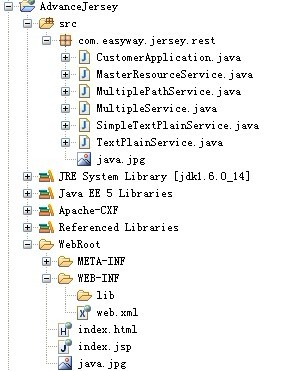
?
?
附件为源代码:
?
?