使用Dojo的FilteringSelect打造具有拼音检索功能的下拉菜单(上)
感谢王牌海盗的投稿!本文首发于:http://cosbor.web-144.com/?p=38
=======================================================================================
在我们国内开发应用系统的过程中往往会遇到这样的需求:下拉菜单中的条目过多时,用户在筛选时往往非常费劲,希望能提供条目拼音简码的方式进行筛选,加快选择速度。而Dojo的FilteringSelect是个非常优秀的具有动态筛选及autoComplete的下拉菜单组件,我们尝试用它来实现一个具有拼音检索功能的下拉菜单。我们以一个三国人物选择的下拉菜单为例看看FilteringSelect的使用,注意demo使用的是dojo的1.8版本。
<!DOCTYPE html PUBLIC "-//W3C//DTD HTML 4.01 Transitional//EN" "http://www.w3.org/TR/html4/loose.dtd"><html><head> <title>下拉菜单</title> <link rel="stylesheet" href="static/js/dojo/dojo/resources/dojo.css" /><link rel="stylesheet" href="static/js/dojo/dijit/themes/claro/claro.css" /><script type="text/javascript" src="static/js/dojo/dojo/dojo.js" data-dojo-config="async: true,parseOnLoad: true"></script> <script type="text/javascript"> require([ 'dijit/form/FilteringSelect', 'dojo/store/Memory', 'dojo/domReady!' ],function(FilteringSelect,Memory){ //下拉菜单的store,"py"字段存放每个条目的拼音简码 var selectStore = new Memory({ data:[ {name:'赵云',id:'1',py:'zy'}, {name:'张飞',id:'2',py:'zf'}, {name:'刘备',id:'3',py:'lb'}, {name:'关羽',id:'4',py:'gy'}, {name:'黄忠',id:'5',py:'hz'}, {name:'魏延',id:'6',py:'wy'}, {name:'周瑜',id:'7',py:'zy'}, {name:'孙坚',id:'8',py:'sj'}, {name:'曹操',id:'9',py:'cc'}, {name:'夏侯敦',id:'10',py:'xhd'}, ] }); //创建FilteringSelect var testSelect = new FilteringSelect({ id: "testSelect", name: "test", value: "", store: selectStore, searchAttr: 'py',//指定输入文本框进行用来进行检索的字段 labelAttr: 'name',//指定下拉菜单中显示的字段 required:false, autoComplete:false },"testSelect"); });</script></head> <body class="claro"><div style="text-align: center;width: 100%;padding-top: 100px;font-size:15px;"> 三国人物:<input id="testSelect"/></div></body></html>运行页面,在下拉菜单输入框中输入“zy”,发现下拉菜单已经可以根据输入的拼音简码进行过滤了,如下图: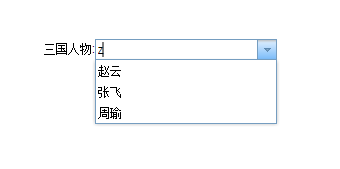
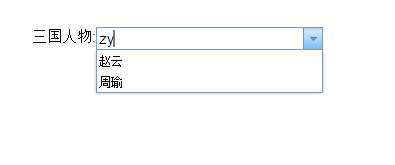
这时,问题来了,你会发现当鼠标选定下拉菜单中条目,如选“周瑜”时,最终在输入框中呈现的并不是我们想要的中文名称“周瑜”而是该条目对应的py字段的值“zy”。这是因为FilteringSelect会以searchAttr属性中设置的字段作为最终显示结果。但这并不是我们想要的结果,我们希望显示的是中文的name字段。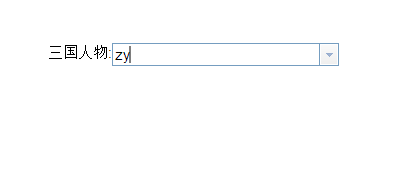
经过翻看FilteringSelect的源码,发现可以对FilteringSelect进行一下小的改造来满足我们的要求。可以使用Dojo提供的自定义组件机制,通过继承FilteringSelect来创建一个满足我们需求的FilteringSelect组件。代码如下:
?define([ "dojo/_base/declare", // declare, "dojo/dom-attr", // domAttr.get "dijit/form/FilteringSelect"], function(declare, domAttr ,FilteringSelect){ return declare("test.FilteringSelect", [FilteringSelect], { displayValueAttr:null, //新增一个自定义属性,用于指定FilteringSelect的textbox中最终显示内容的属性字段 // summary: // 覆盖dijit.form._AutoCompleterMixin的同名方法,使FilteringSelect支持displayValueAttr指定textbox最终显示内容,而不是默认显示searchAttr指定的字段内容 _announceOption: function(/*Node*/ node){ if(!node){ return; } // pull the text value from the item attached to the DOM node var newValue; if(node == this.dropDown.nextButton || node == this.dropDown.previousButton){ newValue = node.innerHTML; this.item = undefined; this.value = ''; }else{ var item = this.dropDown.items[node.getAttribute("item")]; var displayAttr = this.displayValueAttr!=null?this.displayValueAttr:this.searchAttr;//此处判断是否配置了自定义属性displayValueAttr newValue = (this.store._oldAPI ? // remove getValue() for 2.0 (old dojo.data API) this.store.getValue(item, displayAttr) : item[displayAttr]).toString();//将this.searchAttr替换为displayAttr this.set('item', item, false, newValue); } // get the text that the user manually entered (cut off autocompleted text) this.focusNode.value = this.focusNode.value.substring(0, this._lastInput.length); // set up ARIA activedescendant this.focusNode.setAttribute("aria-activedescendant", domAttr.get(node, "id")); // autocomplete the rest of the option to announce change this._autoCompleteText(newValue); }, });});将页面中引入FilteringSelect换成我们自定义的FilteringSelect,然后在创建FilteringSelect时的代码中加入自定义的displayValueAttr属性。
?0102030405060708091011121314151617181920212223242526272829303132333435363738<script type="text/javascript"> require([ 'test/FilteringSelect', 'dojo/store/Memory', 'dojo/domReady!' ],function(FilteringSelect,Memory){ //下拉菜单的store,"py"字段存放每个条目的拼音简码 var selectStore = new Memory({ data:[ {name:'赵云',id:'1',py:'zy'}, {name:'张飞',id:'2',py:'zf'}, {name:'刘备',id:'3',py:'lb'}, {name:'关羽',id:'4',py:'gy'}, {name:'黄忠',id:'5',py:'hz'}, {name:'魏延',id:'6',py:'wy'}, {name:'周瑜',id:'7',py:'zy'}, {name:'孙坚',id:'8',py:'sj'}, {name:'曹操',id:'9',py:'cc'}, {name:'夏侯敦',id:'10',py:'xhd'}, ] }); //创建FilteringSelect var testSelect = new FilteringSelect({ id: "testSelect", name: "test", value: "", store: selectStore, searchAttr: 'py',//指定输入文本框进行用来进行检索的字段 labelAttr: 'name',//指定下拉菜单中显示的字段 displayValueAttr:'name',//指定选中下拉菜单后显示在输入框中的字段 required:false, autoComplete:false },"testSelect"); });</script>再次访问本页面,可以看到在选择下拉菜单条目后,text输入框显示为name的中文了。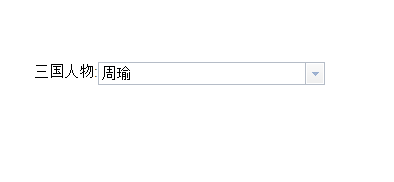
下篇预告:
准备写一下服务端自动实现新增实体bean时,将相应name字段转为拼音简码后存储。大致过程是编写一个java注解,在model实体类中标注需要进行汉字转拼音的属性字段,利用spring的AOP功能,编写一个统一切面,在dao层对保存实体的save方法进行拦截,将标注的name字段转为拼音简码后注入bean的拼音简码字段,这样使业务编码人员无需再关注对实体name字段进行拼音简码的转换工作。
- 2楼ccscu昨天 23:20
- [code=javascript]ndefine([n"dojo/_base/declare",n"dojo/dom-attr",n"dijit/form/FilteringSelect"n], function(declare, domAttr, FilteringSelect){nreturn declare("test.FilteringSelect", [FilteringSelect], {ntdisplayValueAttr: null,nt_announceOption: function(node){ntif (!node) {nttreturn;nt}ntvar newValue;ntif (node == this.dropDown.nextButton ||ntttnode == this.dropDown.previousButton) {nttnewValue = node.innerHTML;nttthis.item = undefined;nttthis.value = '';nt}else{nttvar item = this.dropDown.items[node.getAttribute("item")];nttvar displayAttr = this.displayValueAttr!=null?this.displayValueAttr:this.searchAttr;nttnewValue = (this.store._oldAPI ? nttttthis.store.getValue(item, displayAttr) : item[displayAttr]).toString();nttthis.set('item', item, false, newValue);nt}ntthis.focusNode.value = this.focusNode.value.substring(0, this._lastInput.length);ntthis.focusNode.setAttribute("aria-activedescendant", domAttr.get(node, "id"));ntthis._autoCompleteText(newValue);nt}n});n});n[/code]
- Re: black_kang昨天 23:22
- 回复ccscun这段代码是自定义的组件 FilteringSelect.js ,注意该文件存放的目录test应该同dojo,dijit,dojox这三个目录在同一级。同时注意dojo的版本是1.8
- Re: ccscu34分钟前
- 回复ccscun你好,打扰了,公司项目用dojo,完全的新人,一直关注你n这段代码不知道哪儿出了问题了,还是我哪儿打错了,麻烦百忙之中帮我看下,谢谢!
- 1楼ccscu昨天 23:14
- 楼主的代码是不是有问题啊,我在浏览器走了一下,提示错误nUncaught Error: declare test.FilteringSelect: mixin #0 is not a callable constructor.