application.conf介绍(一)
今天学习一下play framework的application.conf这个文件,默认的文件里提供了很多web常见问题的内置解决方案,只需要简单配置就可以使用。
我们逐行来,看看play给我们提供了什么轮子。
# This is the main configuration file for the application.
# ~~~~~application.name=playmusic
?? ? ? ?项目的名字,一个非常鼓舞的开始。
?
?
application.mode=dev
?? ? ? ?项目的开发模式,有两种,dev或prod,开发模式和产品模式,区别是开发模式下,请求到哪个控制器,才编译哪个文件,prod就是在启动服务的时候直接编译,而且不会对修改的代码进行再编译。
?
?
%prod.application.mode=prod
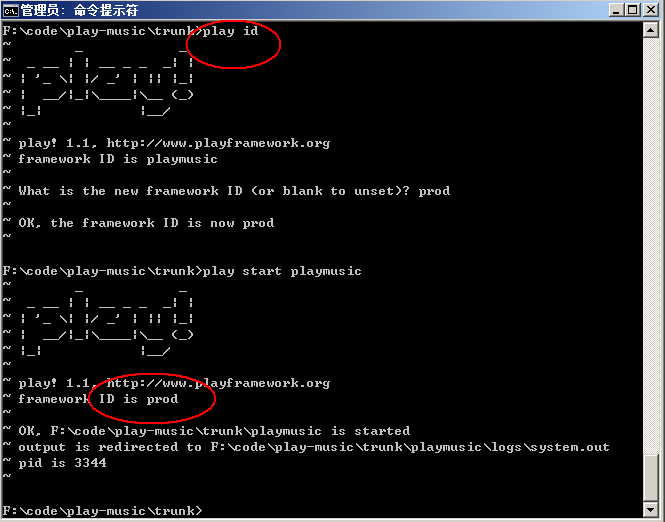
?? ?不同的部署(开发,测试,产品)环境需要不同的配置,Play可以让你分配不同的部署环境ID的方式解决这个问题,可以
将不同的play指定为不同的环境ID,语法就是%加环境ID名加'.'加部署变量。比如上面的那行代码,执行$ play id 命令,
输入prod,你当前的部署环境就是prod下的配置,以产品模式启动,见下图。
application.secret=Wx5K0OSgdcX7bePvMp25nwpEuW2AH4WW5oZJZ3UdvL0OoJR38A9k8nYuxTZiTqQg
项目的密钥,分布式部署时应保持密钥相同,可以通过$ play secret重新生成密钥。
?
?
module.crud=${play.path}/modules/crud?
?在项目中使用crud模块,指向crud模块的源代码。Play1.1已经提供了很多的模块供开发者使用,很多模块是由社区提供的,模块的内容这次就不介绍。
# i18n# ~~~~~# Define locales used by your application.# You can then place localized messages in conf/messages.{locale} files# application.langs=fr,en,ja?国际化部分,可以给出一个默认的国际化列表通过组合不同的messages.{locale}文件来使用,类似于struts。访问者第一次请求网站的时候,站点根据HTTP Accept-language header来匹配语言版本,play.i18n.Lang包下的代码也提供了其他的语言版本相关的思路。
?
# Date format# ~~~~~date.format=yyyy-MM-dd# date.format.fr=dd/MM/yyyy
?日期格式化输出,不同语言版本的格式化输出。
?
# Server configuration# ~~~~~# If you need to change the HTTP port, uncomment this (default is set to 9000)# http.port=9000## By default the server listen for HTTP on the wilcard address.# You can restrict this.# http.address=127.0.0.1
?开发环境的服务器ip,端口号设置。开发环境切换到生产环境是个大话题,这里就不说了。
?
?
# Session configuration# ~~~~~~~~~~~~~~~~~~~~~~# By default, session will be written to the transient PLAY_SESSION cookie.# The cookies are not secured by default, only set it to true# if you're serving your pages through https.# application.session.cookie=PLAY# application.session.maxAge=1h# application.session.secure=false
?Session的管理,cokkie头,生命周期,安全性(暂不清楚做了哪些处置)。
暂时先到这吧。
?