jquery ui dialog 怎么设置 才能居中 ?
用jquery ui ,做登录框 ,但是却不会居中。请问该怎么设置 啊?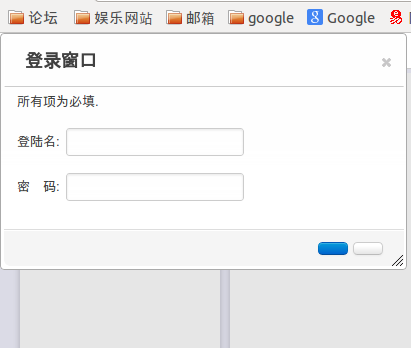
固定在了左上角。
代码如下:
用的是 jquery-ui-bootstrap
index.html
      <script src="{{ static_url('js/jquery-1.8.3.min.js') }}" ></script>
      <script src="{{ static_url('js/jquery-ui-1.8.16.custom.min.js') }}" ></script>
      <script src="{{ static_url('js/global.js') }}" ></script>

      <link href="{{ static_url('css/custom-theme/jquery-ui-1.8.16.custom.css') }}" rel="stylesheet" />
      <link href="{{ static_url('bootstrap/bootstrap.css') }}" rel="stylesheet">

<a id="login-dialog" href="javascript:;">{{_('Login in ')}}</a>
 <div id="auth-form" style="display:none;margin:auto;" title="用户登陆">
  <p class="validateTips" style="height:20px">所有项为必填.</p>
<form action="">
  <fieldset>
        <br />
<label for="name">登陆名:</label>
<input type="text" name="name" id="name" class="text ui-widget-content ui-corner-all" /><br /><br />
<label for="password">密 码:</label>
<input type="password" name="password" id="password" class="text ui-widget-content ui-corner-all" /><br /><br />
  </fieldset>
</form>
  </div>
js:
var login_dialog = $(function() {
        var email = $( "#email" ),
            password = $( "#password" ),
            allFields = $( [] ).add( email ).add( password );
        $("#auth-form").dialog({
            autoOpen: false,
            height: 'auto',
            width: 400,
            modal: true,
            stack:true,
            title:"登录窗口",
            buttons: {
                "登陆": function() {
                    $.ajax({
                          url: "/account/login/",
                          type: "POST",
                          cache: false,
                          async: false,
                          dataType: "json",
                          data:{email:$("#email").val(),password:$("#password").val()},
                          complete: function (XHR, TS) { XHR = null } ,
                          beforeSend: function () {
                              $('#login_form_error').html("提交中..");
                          },
                          success: function(date) {
                              if (date.msg) {
                                  $("#login_form_error").html(date.msg);
                              }
                              if(!date.msg){
                                  result = 1;
                                  document.location.reload();
                              };
                          },
                          error: function() {
                               //called when there is an error
                              }
                          });
                },
                "取消": function() {
                    $(".formError").fadeOut(150,function(){ $(this).remove(); });
                    $( this ).dialog( "close" );
                }
            },
            close: function() {
                $(".formError").fadeOut(150,function(){ $(this).remove(); });
                allFields.val( "" ).removeClass( "ui-state-error" );
            }
        });
        $( "#login-dialog").button().click(function() {$( "#auth-form" ).dialog("open");});
    });
还有,你看图片 中的 确定 和取消按钮,怎么没有显示出文字来?
[解决办法]
<script type="text/javascript" src="scripts/jquery.ui.core.js"></script>
 <script type="text/javascript" src="scripts/jquery.ui.widget.js"></script>
 <script type="text/javascript" src="scripts/jquery.ui.mouse.js"></script>
 <script type="text/javascript" src="scripts/jquery.ui.button.js"></script>
 <script type="text/javascript" src="scripts/jquery.ui.draggable.js"></script>
 <script type="text/javascript" src="scripts/jquery.ui.position.js"></script>
 <script type="text/javascript" src="scripts/jquery.ui.dialog.js"></script>