winform壁纸工具:为图片添加当月的日历并设为壁纸
这几天用winform做了一个设置壁纸的小工具, 为图片添加当月的日历并设为壁纸,可以手动设置壁纸,也可以定时设置壁纸,最主要的特点是在图片上生成当前月的日历信息。
工具和桌面设置壁纸后的效果如下:
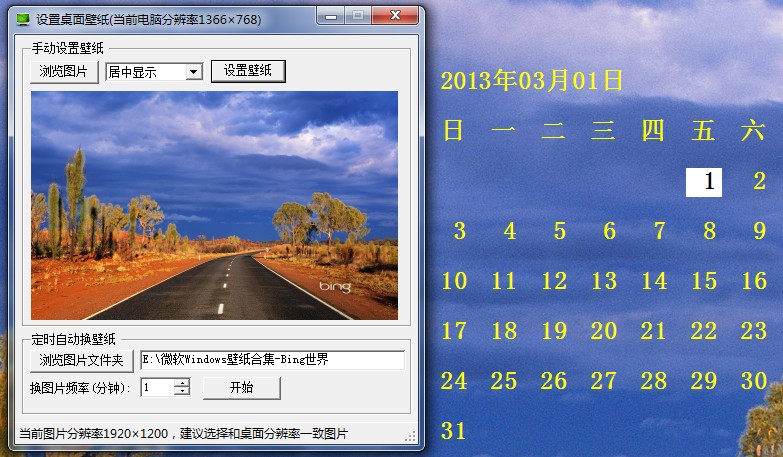
在图片上画日历的类代码Calendar.cs如下:
using System;using System.Collections.Generic;using System.ComponentModel;using System.Data;using System.Drawing;using System.Text;using System.Windows.Forms;using System.IO;using System.Drawing.Drawing2D;using Microsoft.Win32;using System.Collections;using System.Runtime.InteropServices;using System.Xml;using System.Drawing.Imaging;namespace SetWallpaper{ public partial class FrmMain : Form { [DllImport("user32.dll", CharSet = CharSet.Auto)] public static extern int SystemParametersInfo(int uAction, int uParam, string lpvParam, int fuWinIni); int screenWidth = Screen.PrimaryScreen.Bounds.Width; int screenHeight = Screen.PrimaryScreen.Bounds.Height; FileInfo[] picFiles; public FrmMain() { InitializeComponent(); } private void FrmMain_Load(object sender, EventArgs e) { List<DictionaryEntry> list = new List<DictionaryEntry>(){ new DictionaryEntry(1, "居中显示"), new DictionaryEntry(2, "平铺显示"), new DictionaryEntry(3, "拉伸显示") }; cbWallpaperStyle.DisplayMember = "Value"; cbWallpaperStyle.ValueMember = "Key"; cbWallpaperStyle.DataSource = list; txtPicDir.Text = XmlNodeInnerText(""); timer1.Tick += new EventHandler(timer_Tick); Text = string.Format("设置桌面壁纸(当前电脑分辨率{0}×{1})", screenWidth, screenHeight); } /// <summary> /// 浏览单个图片 /// </summary> private void btnBrowse_Click(object sender, EventArgs e) { using (OpenFileDialog openFileDialog = new OpenFileDialog()) { openFileDialog.Filter = "Images (*.BMP;*.JPG)|*.BMP;*.JPG;"; openFileDialog.AddExtension = true; openFileDialog.RestoreDirectory = true; if (openFileDialog.ShowDialog() == DialogResult.OK) { Bitmap img = (Bitmap)Bitmap.FromFile(openFileDialog.FileName); pictureBox1.Image = img; string msg = (img.Width != screenWidth || img.Height != screenHeight) ? ",建议选择和桌面分辨率一致图片" : ""; lblStatus.Text = string.Format("当前图片分辨率{0}×{1}{2}", img.Width, img.Height, msg); } } } /// <summary> /// 手动设置壁纸 /// </summary> private void btnSet_Click(object sender, EventArgs e) { if (pictureBox1.Image == null) { MessageBox.Show("请先选择一张图片。"); return; } Image img = pictureBox1.Image; SetWallpaper(img); } private void SetWallpaper(Image img) { Bitmap bmp = Calendar.GetCalendarPic(img); string filename = Application.StartupPath + "/wallpaper.bmp"; bmp.Save(filename, ImageFormat.Bmp); string tileWallpaper = "0"; string wallpaperStyle = "0"; string selVal = cbWallpaperStyle.SelectedValue.ToString(); if (selVal == "1") tileWallpaper = "1"; else if (selVal == "2") wallpaperStyle = "2"; //写到注册表,避免系统重启后失效 RegistryKey regKey = Registry.CurrentUser; regKey = regKey.CreateSubKey("Control Panel\\Desktop"); //显示方式,居中:0 0, 平铺: 1 0, 拉伸: 0 2 regKey.SetValue("TileWallpaper", tileWallpaper); regKey.SetValue("WallpaperStyle", wallpaperStyle); regKey.SetValue("Wallpaper", filename); regKey.Close(); SystemParametersInfo(20, 1, filename, 1); } /// <summary> /// 浏览文件夹 /// </summary> private void btnBrowseDir_Click(object sender, EventArgs e) { string defaultfilePath = XmlNodeInnerText(""); using (FolderBrowserDialog dialog = new FolderBrowserDialog()) { if (defaultfilePath != "") dialog.SelectedPath = defaultfilePath; if (dialog.ShowDialog() == DialogResult.OK) XmlNodeInnerText(dialog.SelectedPath); txtPicDir.Text = dialog.SelectedPath; } } /// <summary> /// 获取或设置配置文件中的选择目录 /// </summary> /// <param name="text"></param> /// <returns></returns> public string XmlNodeInnerText(string text) { string filename = Application.StartupPath + "/config.xml"; XmlDocument doc = new XmlDocument(); if (!File.Exists(filename)) { XmlDeclaration dec = doc.CreateXmlDeclaration("1.0", "UTF-8", null); doc.AppendChild(dec); XmlElement elem = doc.CreateElement("WallpaperPath"); elem.InnerText = text; doc.AppendChild(elem); doc.Save(filename); } else { doc.Load(filename); XmlNode node = doc.SelectSingleNode("//WallpaperPath"); if (node != null) { if (string.IsNullOrEmpty(text)) return node.InnerText; else { node.InnerText = text; doc.Save(filename); } } } return text; } /// <summary> /// 定时自动设置壁纸 /// </summary> private void btnAutoSet_Click(object sender, EventArgs e) { string path = txtPicDir.Text; if (!Directory.Exists(path)) { MessageBox.Show("选择的文件夹不存在"); return; } DirectoryInfo dirInfo = new DirectoryInfo(path); picFiles = dirInfo.GetFiles("*.jpg"); if (picFiles.Length == 0) { MessageBox.Show("选择的文件夹里面没有图片"); return; } if (btnAutoSet.Text == "开始") { timer1.Start(); btnAutoSet.Text = "停止"; lblStatus.Text = string.Format("定时自动换壁纸中..."); } else { timer1.Stop(); btnAutoSet.Text = "开始"; lblStatus.Text = ""; } } /// <summary> /// 定时随机设置壁纸 /// </summary> private void timer_Tick(object sender, EventArgs e) { timer1.Interval = 1000 * 60 * (int)numericUpDown1.Value; FileInfo[] files = picFiles; if (files.Length > 0) { Random random = new Random(); int r = random.Next(1, files.Length); Bitmap img = (Bitmap)Bitmap.FromFile(files[r].FullName); pictureBox1.Image = img; SetWallpaper(img); } } /// <summary> /// 双击托盘图标显示窗体 /// </summary> private void notifyIcon1_MouseDoubleClick(object sender, MouseEventArgs e) { ShowForm(); } /// <summary> /// 隐藏窗体,并显示托盘图标 /// </summary> private void HideForm() { this.Visible = false; this.WindowState = FormWindowState.Minimized; notifyIcon1.Visible = true; } /// <summary> /// 显示窗体 /// </summary> private void ShowForm() { this.Visible = true; this.WindowState = FormWindowState.Normal; notifyIcon1.Visible = false; } private void ToolStripMenuItemShow_Click(object sender, EventArgs e) { ShowForm(); } /// <summary> /// 退出 /// </summary> private void toolStripMenuItemExit_MouseDown(object sender, MouseEventArgs e) { Application.Exit(); } /// <summary> /// 最小化时隐藏窗体,并显示托盘图标 /// </summary> private void FrmMain_SizeChanged(object sender, EventArgs e) { if (this.WindowState == FormWindowState.Minimized) { HideForm(); } } }}完整的项目代码下载:
http://download.csdn.net/detail/gdjlc/5096674