java一款支持批量上传的代码示例
效果图如下:
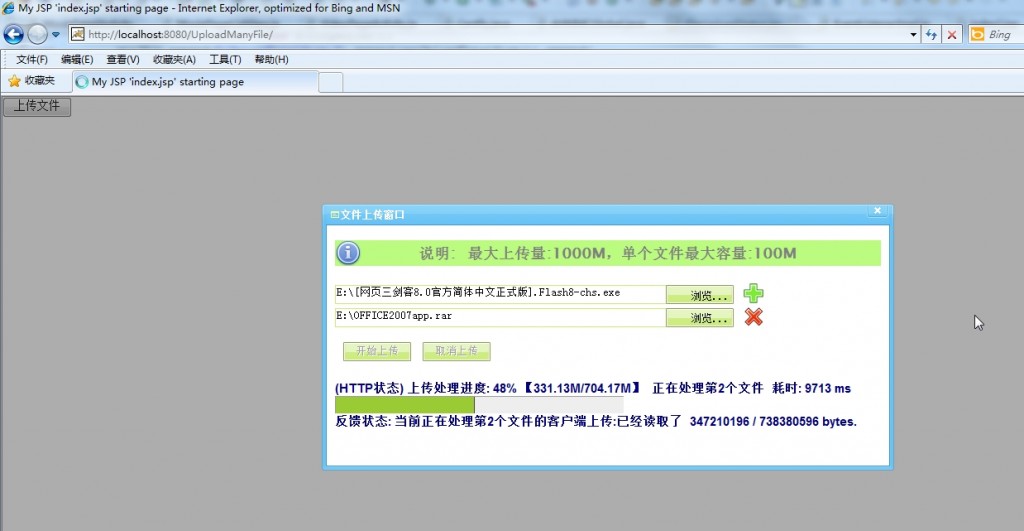
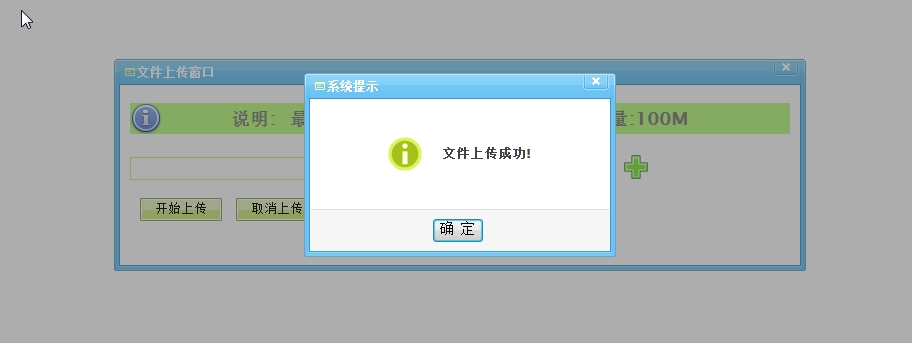
该工程包含五个源文件:BackGroundService.java、BeanControler.java、EventListenerImpl.java、FileUploadListener.java和FileUploadStatus.java;以及2个jsp页面。源码已提供免费下载,下载后直接部署到tomcat中运行即可。
BackGroundService.java:
<%@ page language="java" import="java.util.*" pageEncoding="gbk"%><%String path = request.getContextPath();String basePath = request.getScheme()+"://"+request.getServerName()+":"+request.getServerPort()+path+"/";%><!DOCTYPE HTML PUBLIC "-//W3C//DTD HTML 4.01 Transitional//EN"><html> <head> <base href="<%=basePath%>"> <title>My JSP 'index.jsp' starting page</title><meta http-equiv="pragma" content="no-cache"><meta http-equiv="cache-control" content="no-cache"><meta http-equiv="expires" content="0"> <meta http-equiv="keywords" content="keyword1,keyword2,keyword3"><meta http-equiv="description" content="This is my page"><!--<link rel="stylesheet" type="text/css" href="styles.css">--><script type="text/javascript" src="zDrag.js"></script><script type="text/javascript" src="zDialog.js"></script> <script type="text/javascript" src="./javascript/prototype.js" charset="utf-8"></script> <script type="text/javascript" src="./javascript/AjaxWrapper.js" charset="utf-8"></script> <link href="./css/fileUpload.css" type="text/css" rel="stylesheet"/> <style type="text/css"> div#readme{ width:100%;padding:3px 0;background: #BAFB80; background-image: url("images/info_32.png"); background-repeat: no-repeat; text-align: center; font:85%/1.45 "Lucida Sans Unicode","Lucida Grande",Arial,sans-serif; font-size:medium; font-weight: bold; line-height: 25px; height: 25px; color:gray; } </style><style></style><script type="text/javascript"> var flag=1; function getFileSize(fileSize){var num = new Number();var unit = '';if (fileSize > 1*1024*1024*1024){num = fileSize/1024/1024/1024;unit = "G"}else if (fileSize > 1*1024*1024){num = fileSize/1024/1024;unit = "M"}else if (fileSize > 1*1024){num = fileSize/1024;unit = "K"}else{return fileSize;}return num.toFixed(2) + unit;} function addRow() { if(flag>4) { Dialog.alert('<font size=2><b>一次最多上传5个文件!</b></font>'); return; } var form=document.getElementById('tool'); var text1 = document.createElement("input"); text1.size = "60"; text1.type = "text"; text1.name = "txt"+flag+1; text1.id = "txt"+flag+1; text1.className='input_text'; var btn1= document.createElement("input"); btn1.name='uploadfile'+flag+1; btn1.id='uploadfile'+flag+1; btn1.size=40; btn1.value='浏览...'; btn1.className="uploadfile2"; btn1.hidefocus=''; var inputNode1 = document.createElement("input"); inputNode1.size = "30"; inputNode1.type = "file"; inputNode1.name = "file"+flag+1; inputNode1.id = "file"+flag+1; inputNode1.className='input_file'; if(inputNode1.addEventListener){inputNode1.addEventListener("change",changeValue(text1,inputNode1),false);}else if(inputNode1.attachEvent){inputNode1.attachEvent("onchange", changeValue(text1,inputNode1)) ;} var inputNode3 = document.createElement("a"); inputNode3.href = "javascript:void(0);"; var img=document.createElement("img"); img.src='images/delete.png'; img.width=28; img.height=28; img.border='0'; img.className='imgstyle'; img.alt='删除一行'; inputNode3.appendChild(img); if(inputNode3.addEventListener){inputNode3.addEventListener("click",deleterow(form,text1,btn1,inputNode1,inputNode3),false);}else if(inputNode3.attachEvent){inputNode3.attachEvent("onclick", deleterow(form,text1,btn1,inputNode1,inputNode3)) ;} form.appendChild(text1); form.appendChild(btn1); form.appendChild(inputNode1); form.appendChild(inputNode3); flag++; parent.addHeight(); } var changeValue=function changeValue(v1,v2) { return function() { v1.value=v2.value; } } function init() { var btn1=document.getElementById('uploadfile2'); btn1.size=40; btn1.value='浏览...'; btn1.className="uploadfile2"; } var deleterow = function(form,text1,btn1,inputNode1,inputNode3){ return function(){ form.removeChild(text1); form.removeChild(btn1); form.removeChild(inputNode1); form.removeChild(inputNode3); flag--; parent.decreaseHeight();} } function closeWindow() { parent.closeWindow(); }</script> </head> <body onload="init();"> <div id="controlPanel"><div id="readme">说明: 最大上传量:1000M,单个文件最大容量:100M</div><div id="uploadFileUrl"></div><form id="fileUploadForm" name="fileUploadForm" action="./BackGroundService.action" enctype="multipart/form-data" method="post"><input class="input_text" type="text" id="txt1" name="txt1" size="60"/><input type="button" name="uploadfile2" id="uploadfile2" style="padding-left: 26px;"/><input class="input_file" size="30" type="file" name="file1" id="file1" hidefocus onchange="txt1.value=this.value"/><a href="javascript:void(0);" onclick="addRow();"><img src="images/add.png" width="28" height="28" border="0" alt="添加一行" class="imgstyle"/></a><br><div id="tool"></div><br><input type="submit" name="uploadButton" id="uploadButton" value="开始上传" class="up_btn"/><input type="button" name="cancelUploadButton" onclick="closeWindow();" id="cancelUploadButton" value="取消上传" class="up_btn"/><br></form><div id="progressBar"><div id="theMeter"> <div id="progressBarText"></div> <div id="totalProgressBarBox"> <div id="totalProgressBarBoxContent"></div> </div> </div> <div id="progressStatusText"></div> </div> </div><script>Element.hide('progressBar');Event.observe('fileUploadForm','submit',startProgress,false);Event.observe('cancelUploadButton','click',cancelProgress,false);//刷新上传状态function refreshUploadStatus(){var ajaxW = new AjaxWrapper(false);ajaxW.putRequest('./BackGroundService.action','uploadStatus=',function(responseText){eval("uploadInfo = " + responseText);var progressPercent = Math.ceil((uploadInfo.ReadTotalSize) / uploadInfo.UploadTotalSize * 100);if(uploadInfo.UploadFlag=='http'){ flag='(HTTP状态)'; }else{ flag='(FTP状态)';}$('progressBarText').innerHTML=flag;$('progressBarText').innerHTML += ' 上传处理进度: '+progressPercent+'% 【'+getFileSize(uploadInfo.ReadTotalSize)+'/'+getFileSize(uploadInfo.UploadTotalSize) +'】 正在处理第'+uploadInfo.CurrentUploadFileNum+'个文件'+' 耗时: '+(uploadInfo.ProcessRunningTime-uploadInfo.ProcessStartTime)+' ms';$('progressStatusText').innerHTML=' 反馈状态: '+uploadInfo.Status;$('totalProgressBarBoxContent').style.width = parseInt(progressPercent * 3.5) + 'px';});}//上传处理function startProgress(){ parent.addProgressHeight();Element.show('progressBar'); $('progressBarText').innerHTML = ' 上传处理进度: 0%'; $('progressStatusText').innerHTML=' 反馈状态:'; $('uploadButton').disabled = true; $('cancelUploadButton').disabled = true; var periodicalExe=new PeriodicalExecuter(refreshUploadStatus,0.5); return true;}//取消上传处理function cancelProgress(){$('cancelUploadButton').disabled = true;var ajaxW = new AjaxWrapper(false);ajaxW.putRequest('./BackGroundService.action','cancelUpload=true',//因为form的提交,这可能不会执行function(responseText){eval("uploadInfo = " + responseText);$('progressStatusText').innerHTML=' 反馈状态: '+uploadInfo.status;if (msgInfo.cancel=='true'){alert('删除成功!');window.location.reload();};});}</script><%String msg=(String)request.getAttribute("msg");if(msg!=null&&msg.length()>0){ %> <script type="text/javascript"> Dialog.alert('<%=msg%>'); parent.resizeHeight(); </script> <%} %> </body></html>源码下载地址:http://download.csdn.net/detail/xuweilinjijis/5160835