jqgrid点查询,表格被挤下去,界面不能操作
jqgrid点查询,表格被挤下去,界面不能操作(红色的是我涂掉的,,隐私。。)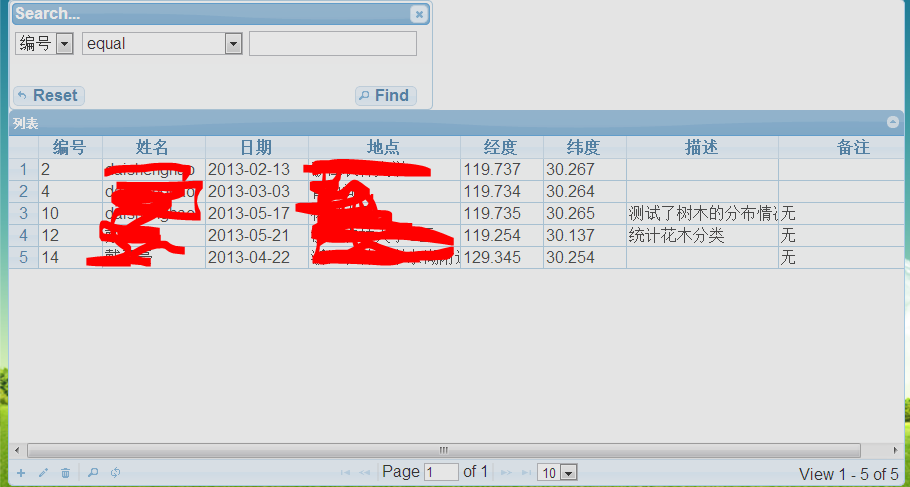
这是我这个界面的代码
<script type="text/javascript" src="js/jquery-1.4.2.min.js"></script>

<link rel="stylesheet" href="css/jquery-ui-1.7.2.custom.css" type="text/css"></link>
<link rel="stylesheet" href="css/ui.jqgrid.css" type="text/css"></link>

 <script type="text/javascript" src="js/grid.locale-en.js"></script>

<script type="text/javascript" src="js/jquery.jqGrid.min.js"></script>


<script type="text/javascript">


$(document).ready(function() {


$("#list4").jqGrid({
  url: "servlet/jsondb",
  datatype : "json",
  editurl:"servlet/testServlet",
  mtype: 'POST',
  height : 300,

  colNames : [ '编号','姓名','日期', '地点', '经度', '纬度', '描述', '备注'],
  autowidth : false,//自动设置宽度
  rownumbers:true,
  closeAfterSearch:true,
  colModel : [{name: "id",index : "id", sorttype : "int",width : 60,  editable :false, search : true},
  {name: "xm",index : "xm",sorttype : "text", width : 100,  editable :true,  search : true},
   {name: "rq",index : "rq", sorttype : "text", width : 100, editable :true, search : true},
     {name: "dd",index : "dd",sorttype : "text",width : 150,editable :true,search : true} ,
   {name : "jd",index : "jd",sorttype : "float",width : 80,editable :true,search : true},
 {name : "wd",index : "wd",sorttype : "float",width : 80, editable :true,search : true},
 {name : "ms",index : "ms",sorttype : "text",width : 150,editable :true,search : true},
 { name : "bz", index : "bz", sorttype : "text", width : 150,editable :true,search : true}
 ],
  sortname : 'ID',
  sortorder : "asc",
  viewrecords: true,
  rowNum : 10,
  rowList : [ 10, 20, 30],
   pager: '#pager',
  caption : "列表",
  jsonReader: {
     repeatitems : false
  },
    gridview: true
   });

   jQuery("#list4").jqGrid('navGrid','#pager',{add: true, edit: true, del: true,search:true,refresh:true });


 }  );

</script>

</head>

<body style="background-image:url(./resource/background/background.png)">
<jsp:include page="head.jsp"></jsp:include>
<table id="list4" class="scroll" cellpadding="0" cellspacing="0"></table>
<div style="background-color: blue;" id="pager"  class="scroll" ></div>
</body>
</html>
大家帮我看看可能是什么原因。。。
QQ406209073 这个有点急。。跪求指导。。 界面 jqGrid 样式
[解决办法]
jqGrid 4.1.1测试没有问题,感觉样式干扰了,遮盖层的z-index被设置高于查询框了,并且查询框的定位不是absolute之类的,
检查下导入的其他样式是否覆盖了ui.jqgrid.css中定义的样式
[解决办法]
找到问题了。。是doctype申明的问题,ie7+要增加xhtml申明才支持position:fixed定位,楼主应该没有添加xhtml头申明,ie下就就会出现问题,背景是fixed定位的,增加下面的申明试试
<!DOCTYPE html PUBLIC "-//W3C//DTD XHTML 1.0 Transitional//EN" "http://www.w3.org/TR/xhtml1/DTD/xhtml1-transitional.dtd">