我就想用js实现新增行删除行的功能 已经写了1天了 实在不会了 求大神帮帮我!
我就想用js实现新增行 删除行两个按钮的功能 代码我都拿出来了 哪位大神帮我改改 随便改只要是js 感激不尽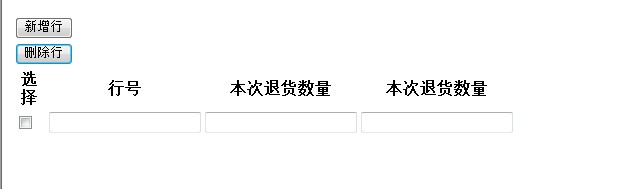
<html>
<head>
<script type="text/javascript">


function f1(){//新增行
var i=0
var objrow = Mytable.insertRow(1);

for(i=0;i<4;i++){
var objcell = objrow.insertCell(i);
objcell.innerHTML = document.getElementById("td"+i).innerHTML;

}
}

function f2(){                //删除行    我只能实现一行一行的删除不能实现勾选哪行删除哪行

Mytable.deleteRow(1);

}
</script>
</head>


<body>
<table id="addButton1" name="x-btn">
<tr>
<td class="x-btn-center">

<button type="button" hidefocus="true" class="x-btn-text add" onclick="f1()">新增行</button>

</td>
</tr>

<tr>

<td class="x-btn-center">
<button type="button" hidefocus="true" class="x-btn-text delete" onclick="f2()" >删除行</button>
</td>

</tr>
</table>


<table  id="Mytable" >
<thead>
<tr>
<th width="30px" align="center">
<div>选择</div></th>
<th align="center">
<div>行号</div></th>

<th align="center">
<div>本次退货数量</div></th>

<th align="center">
<div>本次退货数量</div></th>

</tr>
</thead>

<tbody id="tab1" style="display:">

<tr class="odd">
<td  id="td0">
<input type="checkbox" name="checkbox1" value="1" id="checkid">
</td>
<td  id="td1">
<input  type="TEXT" />
</td>
<td  id="td2">
<input  type="TEXT" />
</td>
<td  id="td3">
<input  type="TEXT" />
</td>
</tr>
</tbody>

</table>
</body>
</html>
[解决办法]
<!DOCTYPE html PUBLIC "-//W3C//DTD XHTML 1.0 Transitional//EN" "http://www.w3.org/TR/xhtml1/DTD/xhtml1-transitional.dtd">
<html xmlns="http://www.w3.org/1999/xhtml">
<head>
<script type="text/javascript">
function f1(){ //新增行
var i=0
Mytable=document.getElementById('Mytable');
var objrow = Mytable.insertRow(1);
for(i=0;i<4;i++){
var objcell = objrow.insertCell(i);
objcell.innerHTML = document.getElementById("td"+i).innerHTML;
}
}
function f2(){ //删除行 我只能实现一行一行的删除不能实现勾选哪行删除哪行
var inputs=document.getElementsByTagName('input');
Mytable=document.getElementById('Mytable');
var a=[];
for(var i=0;i<inputs.length;i++){
if(inputs[i].type=='checkbox'){
a.push(inputs[i]);
}
}
for(var i=a.length-1;i>=0;i--){
if(a[i].checked){
Mytable.deleteRow(i+1);
}
}
}
</script>
</head>
<body>
<table id="addButton1" name="x-btn">
<tr>
<td class="x-btn-center">
<button type="button" hidefocus="true" class="x-btn-text add" onclick="f1()">新增行</button>
</td>
</tr>
<tr>
<td class="x-btn-center">
<button type="button" hidefocus="true" class="x-btn-text delete" onclick="f2()" >删除行</button>
</td>
</tr>
</table>
<table id="Mytable" >
<thead>
<tr>
<th width="30px" align="center">
<div>选择</div></th>
<th align="center">
<div>行号</div></th>
<th align="center">
<div>本次退货数量</div></th>
<th align="center">
<div>本次退货数量</div></th>
</tr>
</thead>
<tbody id="tab1" style="display:">
<tr class="odd">
<td id="td0">
<input type="checkbox" name="checkbox1" value="1" id="checkid">
</td>
<td id="td1">
<input type="TEXT" />
</td>
<td id="td2">
<input type="TEXT" />
</td>
<td id="td3">
<input type="TEXT" />
</td>
</tr>
</tbody>
</table>
</body>
</html>
这样试试