滚动视图的被自动复位的问题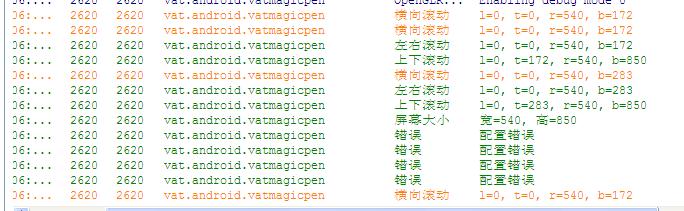
    <HorizontalScrollView
    android:id="@+id/h_scrollview_1"
    android:layout_width="match_parent"
    android:layout_height="100sp"
    android:background="#778899"
        >
<LinearLayout
    android:id="@+id/linearlayout_1"
    android:layout_width="match_parent"
    android:layout_height="match_parent"
    android:background="#778899"
    android:orientation="horizontal"
    >

</LinearLayout>
</HorizontalScrollView>

    <ScrollView
    android:id="@+id/v_scrollview_1"
    android:layout_width="match_parent"
    android:layout_height="match_parent"
    android:background="#998877"
    android:layout_below="@+id/h_scrollview_1"
        >

<RelativeLayout
    android:id="@+id/relativelayout_1"
    android:layout_width="match_parent"
    android:layout_height="match_parent"
    android:background="#007f7f"
    >

</RelativeLayout>
</ScrollView>
如图中的淡黄色字体,我在xml中使用了一个横向的滚动条,和一个纵向的滚动条,希望横向滚动条占三分之一,纵向滚动条占三分之二,在xml文件中,不知道怎么指定参数,只是写入了100sp,想在程序中再根据屏幕的像素大小来更新。
在Logcat的提示中,横向滚动条默认显示172高度,我用layout设置为283后,最后一行又自动恢复为172,不知道是什么原因?
难道用layout设置不可靠吗?
[解决办法]
你这种需求,最合适的是用android:layout_weight指定各个空间的所占的比例,这样可以自适应各种分辨率。
[解决办法]
HorizontalScrollView的android:layout_weight=2,ScrollView的android:layout_weight=1,他俩的android:layout_height="match_parent"。
不过你这里面还有其他的LinearLayout和RelativeLayout,可能会对结果有影响。
试试吧。