多步骤进度,多个提交的实现
我们原先是一个很长的form表单,里面有很多选项。客户反馈这样不够友好,容易看花眼。因此进行改进。实现多步骤进度,多个提交的实现(其实只有一个form提交)。实现的思路将表单的选项装入多个div中,一个显示,其他隐藏。
实现效果如下:
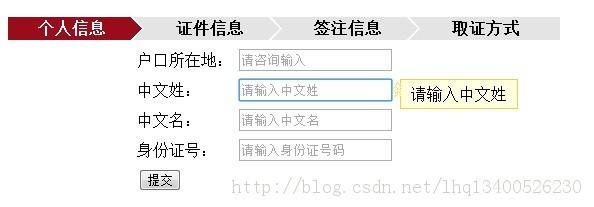

1、JavaScript代码
<body> <table width="600px"> <tr> <td> <div class="flow_steps"> <ul style="list-style-type:none"> <li id="grxx" class="current">个人信息</li> <li id="zjxx" >证件信息</li> <li id="qzxx">签注信息</li> <li id="qzfs" class="last">取证方式</li> </ul> </div> </td> </tr> <tr><td> <form action=""> <div id="one"> <table align="center"> <tr><td>户口所在地:</td><td><input class="pwdTrigger" type="text"placeholder="请输入户口所在地" /></td></tr><tr><td>中文姓:</td><td><input class="pwdTrigger" type="text" placeholder="请输入中文姓" /></td></tr><tr><td>中文名:</td><td><input class="pwdTrigger" type="text" placeholder="请输入中文名" /></td></tr><tr><td>身份证号:</td><td><input class="pwdTrigger" type="text" placeholder="请输入身份证号码" /></td></tr><tr> <td colspan="2"><button type="button" onclick="one()">提交</button></td> </tr> </table></div><div id="two" style="display: none"> <table align="center"> <tr> <td>通行证号</td> <td><input class="pwdTrigger" type="text" placeholder="请输入证件号码" /></td> </tr> <tr> <td>有效日期至</td> <td><input class="pwdTrigger" type="text" placeholder="请输入证件号码" /></td> </tr> <tr> <td>联系电话</td> <td><input class="pwdTrigger" type="text" placeholder="请输联系电话,建议是手机号码" /></td> </tr> <tr > <td > <button type="button" onclick="two()">提交</button> </td> <td> <button type="button" onclick="reone()">上一步</button> </td> </tr> </table></div> <div id="three" style="display: none"> <table align="center"> <tr> <td>签注类别</td> <td><input class="pwdTrigger" type="text" placeholder="请输入签注类别" /></td> </tr> <tr> <td>前往地</td> <td><input class="pwdTrigger" type="text" placeholder="请输入前往地" /></td> </tr> <tr> <td>签证种类</td> <td><input class="pwdTrigger" type="text" placeholder="请输入签注种类" /></td> </tr> <tr > <td > <button type="button" onclick="three()">提交</button> </td> <td> <button type="button" onclick="retwo()">上一步</button> </td> </tr> </table></div><div id="four" style="display: none"> <table align="center"> <tr> <td>取证方式</td> <td><input class="pwdTrigger" type="text" placeholder="请输入取证方式" /></td> </tr> <tr > <td > <button type="button" onclick="">提交</button> </td> <td> <button type="button" onclick="rethree()">上一步</button> </td> </tr> </table></div></form></td> </tr></table></body></html>
4、欢迎大家到我资源里面下载,是【免费】的哦
源代码下载地址
http://download.csdn.net/detail/lhq13400526230/6455549