(100分)webform中如何修改treeview 选中节点后的颜色
本帖最后由 a13951845000 于 2013-10-28 10:05:18 编辑 开发环境:vs2010,webform中如何修改treeview选中节点后的颜色。谢谢!
[解决办法]
public Form1()
{
InitializeComponent();
treeView1.HideSelection = true;
}
TreeNode preNode = null;
private void treeView1_BeforeSelect(object sender, TreeViewCancelEventArgs e)
{
if (preNode != null)
preNode.ForeColor = Color.Black;
e.Node.ForeColor = Color.Blue;
preNode = e.Node;
}
[解决办法]
楼上的不能实现,论坛有类似提问
[解决办法]
展开treeview的属性SelectedNodeStyle,找到ForeColor,选择你想要的颜色
[解决办法]
<%@ Page Language="C#" AutoEventWireup="true" CodeBehind="TreeView.aspx.cs" Inherits="Galsun.Test.Web.TreeView" %>
<!DOCTYPE html PUBLIC "-//W3C//DTD XHTML 1.0 Transitional//EN" "http://www.w3.org/TR/xhtml1/DTD/xhtml1-transitional.dtd">
<html xmlns="http://www.w3.org/1999/xhtml">
<head runat="server">
<title></title>
</head>
<script>
var preNode;
function selval(obj, url, target) {
//alert(obj.innerHTML);
/*
var cb = obj.parentNode.parentNode.getElementsByTagName("input");
if (cb.length > 0)
cb[0].checked = true;
document.getElementById("<%= txt_path.ClientID %>").value = obj.innerHTML;
*/
if (preNode) preNode.style.color = "";
obj.style.backgroundColor = "#eeeeee";
preNode = obj;
//document.getElementById("<%= txt_path.ClientID %>").value = obj;
window.open(url, target);
}
</script>
<body>
<form id="form1" runat="server" >
<div>
<asp:TextBox ID="txt_path" runat="server" Width="422px"></asp:TextBox>
<asp:TreeView ID="TreeView2" runat="server" ImageSet="XPFileExplorer"
NodeIndent="15">
<HoverNodeStyle Font-Underline="True" ForeColor="#6666AA" />
<NodeStyle Font-Names="Tahoma" Font-Size="8pt" ForeColor="Black"
HorizontalPadding="2px" NodeSpacing="0px" VerticalPadding="2px" />
<ParentNodeStyle Font-Bold="False" />
 <SelectedNodeStyle BackColor="#B5B5B5" Font-Underline="False"
                HorizontalPadding="0px" VerticalPadding="0px" />
</asp:TreeView>
<iframe name="Right" src="http://www.hao123.com" width="600" height="300"></iframe>
</div>
</form>
</body>
</html>
using System;
using System.Collections.Generic;
using System.Web;
using System.Web.UI;
using System.Web.UI.WebControls;
using System.Data;
namespace Galsun.Test.Web
{
public partial class TreeView : System.Web.UI.Page
{
DataTable dt = new DataTable();
protected void Page_Load(object sender, EventArgs e)
{
if (!IsPostBack)
{
dt.Columns.Add("a1");
dt.Columns.Add("a2");
dt.Columns.Add("a3");
dt.Columns.Add("num", Type.GetType("System.Int32"));
dt.Columns.Add("url");
dt.Rows.Add(new object[] { "1", "0", "我的文件夹", 2, "http://www.sina.com.cn" });
dt.Rows.Add(new object[] { "2", "0", "工作文件夹", 1, "http://www.baidu.com" });
dt.Rows.Add(new object[] { "3", "1", "图片", 1, "http://www.qq.com" });
dt.Rows.Add(new object[] { "4", "1", "文档", 2, "http://www.hao123.com" });
dt.Rows.Add(new object[] { "5", "3", "风景", 2, "http://www.163.com" });
dt.Rows.Add(new object[] { "6", "3", "人物", 1, "http://bbs.csdn.net" });
dt.Rows.Add(new object[] { "7", "2", "报告", 1, "http://www.taobao.com" });
dt.Rows.Add(new object[] { "8", "3", "写真", 3, "http://www.liuzhou.gov.cn" });
bindData("0", TreeView2.Nodes, "根目录");
}
}
private void bindData(string parentid, TreeNodeCollection tnc,string path)
{
DataRow[] ary_row = dt.Select("a2=" + parentid, "num");
foreach (DataRow item in ary_row)
{
TreeNode node = new TreeNode();
string txtpath = path + "//" + item["a3"].ToString();
node.Text = string.Format("<font onclick=\"selval(this,'{1}','{2}')\" style=\"cursor:pointer;\">{0}</font>", item["a3"].ToString(), item["url"].ToString(),"Right");
node.Value = item["a1"].ToString();
node.Expanded = true;//是否展开
//node.ShowCheckBox = true;//是否显示选择框
node.SelectAction = TreeNodeSelectAction.None;
//node.NavigateUrl = "javascript:selval(this,'" + txtpath + "','Right');";//连接路径
//node.SelectAction = TreeNodeSelectAction.Expand;//选择事件
tnc.Add(node);
bindData(item["a1"].ToString(), tnc[tnc.Count - 1].ChildNodes, txtpath);
}
}
}
}
[解决办法]
obj.style.backgroundColor = "#eeeeee";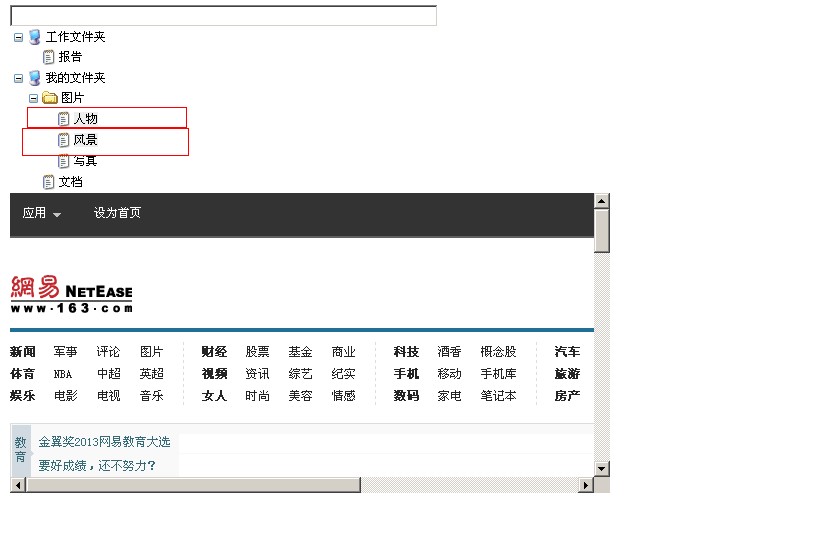
[解决办法]
你点击之后,节点不是变成灰色了吗?
[解决办法]
1.注册 树控件的客户端点击事件,写js来控制(我没试过,理论上可以实现)
2.注册 服务端事件,在服务器处理,但是这样做页面会刷新,树的状态能不能保存我不知道,没试过
3.使用 js控件(我一直都是用这个),比较有名的树控件 zTree,数据加载可以用异步加载,也可以第一次就全部加载,在客户端点击事件中 改变颜色。
个人吐槽下:webform的服务器控件真的很坑爹,让人从一开始就在思路上出现误区(当然这是针对新手而言,看过高手写的asp.net程序,的确发挥了asp.net高效率的优势,比我以前在嵌入式上面用CGI方便不知多少倍),所以我感觉我们这样的asp.net新手还是不要一开始就去用服务器控件,先熟悉了bs的一些特点后再去用也不迟。
[解决办法]
你在liuchaolin给你的页面代码(前台)中找到这句话:
 <SelectedNodeStyle BackColor="#B5B5B5" Font-Underline="False"
                HorizontalPadding="0px" VerticalPadding="0px" />
把BackColor="#B5B5B5" 改成 BackColor="#FF0033"
[解决办法]
不好意思,我搞错了。
你把linchaolin的页面代码中的js代码替换成以下的就可以了
<script>
    var preNode;
    function selval(obj, url, target) {
        //alert(obj.innerHTML);
        /*
        var cb = obj.parentNode.parentNode.getElementsByTagName("input");

        if (cb.length > 0)
        cb[0].checked = true;

        document.getElementById("<%= txt_path.ClientID %>").value = obj.innerHTML;
        */
        if (preNode) {
            preNode.style.color = ""; //初始字体颜色
            preNode.style.backgroundColor = ""; //初始字体背景
            preNode.style.fontSize = 10 + "px"; //字体大小
        }
        obj.style.color = "#fff"; //白色字体颜色
        obj.style.backgroundColor = "#FF0033"; //红色背景
        obj.style.fontSize = 20 + "px";
        preNode = obj;
        //document.getElementById("<%= txt_path.ClientID %>").value = obj;
        window.open(url, target);
    }
</script>
[解决办法]
//加一个SelectedNodeStyle-BackColor="Red"属性就ok了
 <asp:TreeView ID="TreeView1" runat="server" SelectedNodeStyle-BackColor="Red" >
            <Nodes>
                <asp:TreeNode Text="宋德福" Value="2">
                    <asp:TreeNode Text="新建节点1" Value="1"></asp:TreeNode>
                </asp:TreeNode>
                <asp:TreeNode Text="撒地方" Value="3">
                    <asp:TreeNode Text="新建节点2" Value="4"></asp:TreeNode>
                </asp:TreeNode>
            </Nodes>
            <SelectedNodeStyle BackColor="Red" />
        </asp:TreeView>
[解决办法]
这种方法不行吗? 还需要指导啥?